
Common Catalog Scaling Issues and Fixes
Scaling a Shopify catalog from hundreds to thousands of products can cause major problems if your data isn’t consistent. Issues like broken filters, missing products in search, and slow page performance often stem from poor data practices - not Shopify itself. Here’s what you need to know:
- Broken Filters: Inconsistent attributes (e.g., "Color" vs.
custom.color) prevent filters from working. - High Cardinality: Too many unique attribute values (e.g., hundreds of brands) overwhelm filters and users.
- Inconsistent Naming: Variations like "Red" vs. "red" create duplicate filter options.
- Manual Collection Problems: Managing collections manually becomes unworkable as catalogs grow.
- Metafield Chaos: Redundant or unstructured metafields cause filtering errors and API issues.
Key Fixes:
- Standardize Data: Consolidate attributes (e.g., unify
material_typeandproduct_material). - Simplify Filters: Group high-cardinality attributes into ranges (e.g., price ranges like "$0-$50").
- Enforce Naming Rules: Use consistent formatting for attributes (e.g., "Red" instead of "red").
- Automate Collections: Use rules based on standardized attributes to assign products.
- Clean Metafields: Remove redundant fields and create a structured schema.
Pro Tip: Use tools like FacetGuard to automate audits, fix errors, and monitor catalog health.
Scaling your Shopify catalog without fixing these issues can hurt SEO, frustrate customers, and reduce sales. Regular audits, automated tools, and clear data governance can keep your catalog running smoothly as it grows.
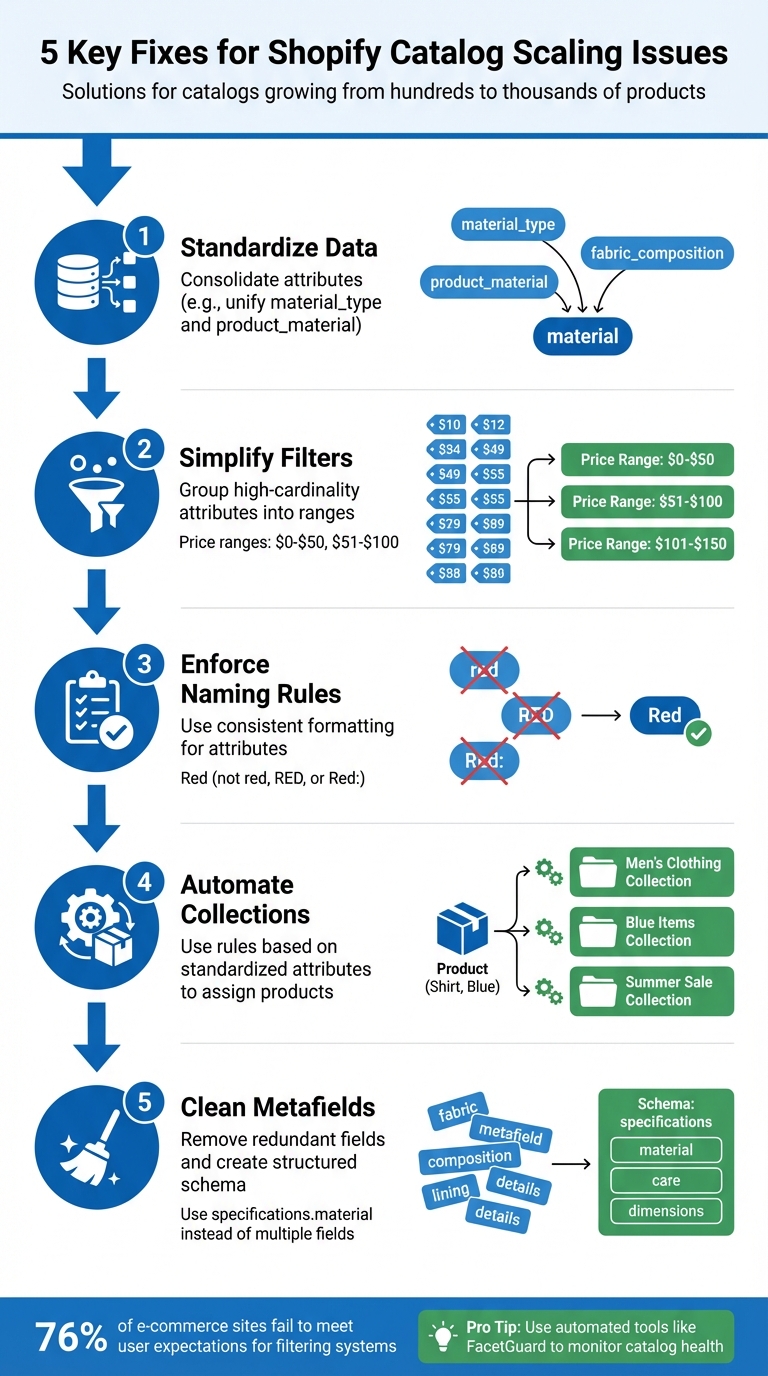
5 Key Fixes for Shopify Catalog Scaling Issues
Common Catalog Scaling Issues
As your Shopify catalog grows to include thousands of products, data quality problems can emerge, directly affecting how well your storefront functions. These challenges stem from gaps in data consistency rather than platform limitations. Let’s break down some common issues and provide examples to clarify the underlying problems.
Filter Blockers in Collections and Search
Filters can stop working in collections with more than 5,000 products if key metadata is missing or if attributes are inconsistently defined. For instance, if one product uses a "Color" variant option while another uses a custom.color metafield, Shopify won't combine them into a single filter - even though both represent the same attribute. This inconsistency can prevent filters from appearing altogether, frustrating shoppers. Adding to the complexity, attributes with too many unique values create additional filtering challenges.
High Cardinality Attributes Overloading Filters
Filters can become cluttered and impractical when attributes like "Brand" contain hundreds of unique values. Shopify limits filters to 100 options, so excessive entries can overwhelm users and even cause certain filters to disappear. For catalogs with over 100,000 SKUs, database queries involving multiple high-cardinality attributes can significantly slow down page performance. In fact, research shows that 76% of e-commerce sites fail to meet user expectations when it comes to filtering systems. Naming inconsistencies only make matters worse.
Inconsistent Option Naming Across Products
Even small inconsistencies in naming attributes - like using "Red" for one product and "red" for another - can create duplicate filter options or even disrupt theme logic. Variations such as "10 inch" versus "10in" or "Color" versus "Color:" may seem minor but can result in broken filters or missing product information.
"Consistency is not cosmetic. It's structural. Without consistent naming, your Shopify product data structure becomes unpredictable." – Performantcode.io
At scale, these inconsistencies often arise from manual data entry, leading to operational inefficiencies and layout errors.
Manual Collection Management Limitations
Managing collections manually becomes nearly impossible as your product catalog grows. Oversight becomes more complicated, and the risk of miscategorization increases. Even automated collections face challenges when products lack standardized attributes to trigger grouping rules. For example, a product that belongs in "New Arrivals", "Summer Collection", and "Blue Items" may require manual adjustments across multiple collections. This issue is further complicated in API-driven stores.
Metafield and Schema Constraints in API-Powered Stores
Headless Shopify setups often introduce unique API-related challenges. For example, a simple syntax error - like using filter instead of filters in a Storefront API query - can result in unfiltered results, even if the query looks correct in GraphiQL. Additionally, metafield sprawl - where redundant fields like specs_material, material_type, and product_material are used for the same attribute - can lead to inconsistent filter behavior across your storefront. These issues highlight the need for careful planning and governance when scaling your catalog.
The next section will explore targeted solutions to address these challenges effectively.
sbb-itb-e8e54fb
Fixes for Common Catalog Scaling Issues
Once you’ve pinpointed the challenges in your catalog, the next step is tackling them head-on with practical solutions that can scale effectively. Here’s how to address some of the most common issues.
Resolving Filter Blockers
Start by checking for frontend and backend mismatches - cases where filters appear in your theme but aren’t tied to the correct database fields. A common culprit is inconsistent data sources for the same attribute.
To fix this, standardize your data sources. Automated Python scripts or a Product Information Management (PIM) system can help unify attributes before they’re uploaded to your catalog. For example, if some products store material details under specs_material while others use material_type, consolidate them under a single metafield, such as specifications.material. Populate this new field alongside the older ones, update any dependencies in your theme, and only then phase out the outdated fields.
Tools like FacetGuard can simplify this process by identifying collections where filters fail and providing a prioritized list of attributes and products to address. This eliminates the need to manually sift through thousands of SKUs.
Another challenge to tackle is high cardinality, which can overwhelm filtering systems.
Addressing High Cardinality Attributes
Attributes like "Brand" with hundreds of unique values can overload your filtering system. Shopify limits filters to 100 options, so exceeding this can cause some filters to disappear entirely. To resolve this, use attribute bucketing - grouping values into logical ranges.
For instance, instead of listing every individual waist size (e.g., 28, 29, 30), group them into ranges like "28-32", "33-36", and "37-40". Similarly, price points can be grouped (e.g., "$0-$50", "$51-$100") to simplify the user experience and avoid endless scrolling.
For catalogs with over 100,000 SKUs, offload intensive filtering tasks to dedicated search engines like Elasticsearch or Solr, rather than relying solely on SQL databases. Implement AJAX for filtering, so results update without reloading the entire page. Additionally, use debouncing to manage server load during rapid filter selections, which can cut server strain by up to 40% during peak traffic.
"A filter menu is only as useful as the data behind it. If your catalog has inconsistent attribute values... even the most elegant filter UI will underperform." – Lasso
With filters optimized, it’s time to address inconsistent naming conventions that create duplicate options.
Ensuring Consistent Naming Conventions
Inconsistent naming - like "Red" versus "red" or "10 inch" versus "10in" - leads to duplicate filters and disrupts your theme’s logic. Conduct an attribute audit to identify and correct these variations. For example, inconsistencies like "M", "Med", and "Medium" can result in multiple filters for the same option.
Once identified, apply bulk updates to standardize naming. Create an internal attribute dictionary that outlines required attributes, accepted values, and formatting rules (e.g., units, decimals, and casing) for each product category. Decide on a consistent format - such as using "inches" instead of "in" - and ensure it’s applied universally.
Treat metafields as a structured schema rather than flexible notes. Use a clear hierarchy like specifications.material to make data easier for developers to query. Avoid mixing naming styles (e.g., spec_sheet vs. specSheet) or singular and plural forms (e.g., feature vs. features).
Optimizing Collection Management
As your catalog grows, manually managing collections becomes impractical. Instead, automate collection assignments using standardized attributes. For example, a product tagged with season:summer, color:blue, and status:new can automatically populate collections like "New Arrivals", "Summer Collection", and "Blue Items."
Use hierarchical tagging with a consistent structure (e.g., clothing > dresses > summer-dresses) and stick to lowercase letters with hyphens for multi-word tags. This ensures your automated rules function as intended.
For headless or API-powered stores, double-check that your metafields and schemas are correctly configured. Even small errors - like using filter instead of filters in a Storefront API query - can result in unfiltered results, even if the query looks correct.
Overcoming Metafield and Schema Limits
In API-driven setups, redundant fields like specs_material, material_type, and product_material storing the same attribute can cause inconsistent filtering behavior. To avoid this, establish a single source of truth for each attribute. Shopify’s uniqueValues feature can help prevent duplicates, such as overlapping ERP or PIM IDs. Ensure each piece of data is stored in only one place - duplicating information across product metafields, variant metafields, and tags increases the risk of errors.
For shared data across many products (like a "Material Guide"), use Metaobjects instead of individual metafields. This approach improves scalability and keeps things easier to maintain.
"Flexibility without discipline creates long-term problems... metafields start as a flexible solution and gradually become a liability when they grow without structure." – Performantcode.io
When cleaning up messy metafield structures, populate new standardized fields alongside the old ones. After updating your themes, deprecate the outdated data.
Future-Proofing Catalog Scalability
Quick fixes won't cut it when catalog issues keep popping up as your business grows. Errors in product data can cause serious damage - up to a 23% drop in clicks and 14% fewer conversions. Even worse, inaccurate product information can cost companies between 15% and 25% of their total revenue. The solution? Ongoing monitoring to catch problems before they affect your customers.
Continuous Monitoring with Audit Tools
Regular audits are crucial for spotting issues like metafield sprawl before they spiral out of control. For example, if your team creates attributes such as material_type and primary_material without a clear system in place, it can lead to inconsistencies that disrupt filtering. To stay ahead, review weekly no-results searches and ensure critical fields maintain at least 95% attribute completeness on a monthly basis.
Tools like FacetGuard take this a step further by automating scans for common problems like filter blockers, high-cardinality attributes, and naming inconsistencies. Instead of spending time on manual reviews, your team gets a prioritized list of fixes. This lets you shift focus from constantly fixing data errors to improving merchandising and enhancing the customer experience. With early detection in place, automated alerts and bulk fixes simplify ongoing catalog maintenance.
Using Alerts and Bulk Fix Features
Proactive alerts are game-changers. They can flag new products with missing attributes or warn you about filter combinations that lead to zero results. This is critical because 86% of consumers say they’re unlikely to shop again after encountering inaccurate product information.
At scale, bulk fix capabilities are non-negotiable. Imagine trying to standardize variants like "XL" and "Extra Large" across thousands of products - manual edits just won’t cut it. Automated validation rules can also stop common mistakes, like publishing negative prices or missing dimensions, before they go live. FacetGuard is already working on features like monitoring alerts and bulk fixes to help you maintain a clean, scalable catalog.
| Audit Frequency | Focus Area | Key Metric |
|---|---|---|
| Weekly | Search Performance | No-results search count, Search CTR |
| Monthly | Data Quality | Attribute coverage rate, Value normalization |
| Quarterly | Filter Usage | Filter interaction rate, Revenue per filtered session |
Conclusion
Scaling issues can quietly undermine SEO, waste your crawl budget, and frustrate your customers. As iWeb Power aptly stated:
Faceted navigation is a powerful UX tool... But under the hood, it can silently sabotage your Shopify store's SEO if left unchecked.
To address these challenges, structured data governance plays a critical role. Many scaling problems can be avoided with disciplined catalog management. Data governance becomes even more critical as your business grows. Performantcode.io highlighted this point:
At scale, clean data models don't just support growth - they make sustained growth possible without constant technical friction or costly refactors.
This involves setting clear naming conventions, conducting regular audits, and treating your catalog data as a strategic resource rather than an afterthought.
By adopting these strategies, businesses can transition from reactive problem-solving to proactive catalog management. Manual fixes simply can't keep up with the demands of growth. Automated tools like FacetGuard are designed to handle these complexities, identifying issues like filter blockers, cardinality problems, and naming inconsistencies before they impact your store. Instead of spending hours troubleshooting why filters vanish or searches fail, these tools provide actionable fix lists, allowing your team to focus on improving merchandising and enhancing the customer experience.
With structured data governance, effective SEO controls, and ongoing monitoring, your catalog can evolve into a powerful engine for growth.
FAQs
Why do Shopify filters disappear on large collections?
Shopify filters sometimes vanish when dealing with extensive collections, and it all comes down to how the platform manages large catalogs. For collections with over 1,000 products, filters may be hidden or disabled to ensure the storefront runs smoothly. This is Shopify's way of balancing performance with functionality.
Another common culprit? Inconsistent product data. Missing metafields or improperly indexed attributes can mess with how filters work, causing them to malfunction or disappear altogether.
So, how can you fix this? Here are a few strategies:
- Divide large collections into smaller groups: This makes it easier for Shopify to handle the data without compromising performance.
- Optimize your product data: Ensure all metafields and attributes are complete and correctly indexed.
- Use third-party apps: Many apps are designed to improve filtering capabilities for stores with extensive catalogs.
These steps can help you regain control over your filters and keep your store running smoothly, even with a large inventory.
How do I reduce high-cardinality filter values without losing detail?
To handle high-cardinality filters without losing important details, try grouping similar values into broader categories. This approach reduces the total number of unique options, making filters easier to manage. Additionally, you can exclude rare or less relevant values by setting thresholds, prioritizing the most commonly used ones. Tools such as FacetGuard can help by auditing catalog attributes, pinpointing and resolving issues to create filters that are both accurate and efficient. This ensures better usability and performance for your filtering system.
What’s the best way to clean up metafields without breaking my theme or API?
To tidy up metafields without causing issues with your theme or API, start by migrating your existing metafields to a proper definition. This step helps standardize data types and apply validation rules. Next, use the bulk editor to spot and correct any invalid values. This approach ensures your data stays consistent and avoids potential errors. Familiarizing yourself with your metafield types and validation rules is crucial to make the cleanup process smoother and more efficient.