
How Attribute Consolidation Improves Filters
Attribute consolidation fixes messy product filters by combining similar or duplicate values, like merging "Blue", "blue", and "Navy Blue" into a single "Blue" option. This ensures filters are consistent, helping shoppers find products faster and avoiding issues like "no results found" pages.
Why does this matter? Shoppers using filters are 2.3x more likely to buy, but 73% abandon searches if filters don’t work well. Consolidation also prevents overloading Shopify’s limits (25 filters per store, 100 values per filter) and improves search accuracy by reducing cluttered, overlapping options.
Key Takeaways:
- Problems Without Consolidation: Inconsistent tags like "XL", "X-Large", and "Extra Large" confuse shoppers and slow down navigation.
- Search Issues: Fragmented filters strain databases, slow down searches, and create SEO problems like duplicate URLs.
- Proven Results: Brands that consolidated attributes saw higher sales, reduced maintenance time, and fewer abandoned searches.
- How to Consolidate: Use tools like Shopify Magic or manual processes to standardize attributes and fix disorganized filters.
Fixing your filters isn’t just about improving navigation - it directly impacts sales, SEO, and customer satisfaction.
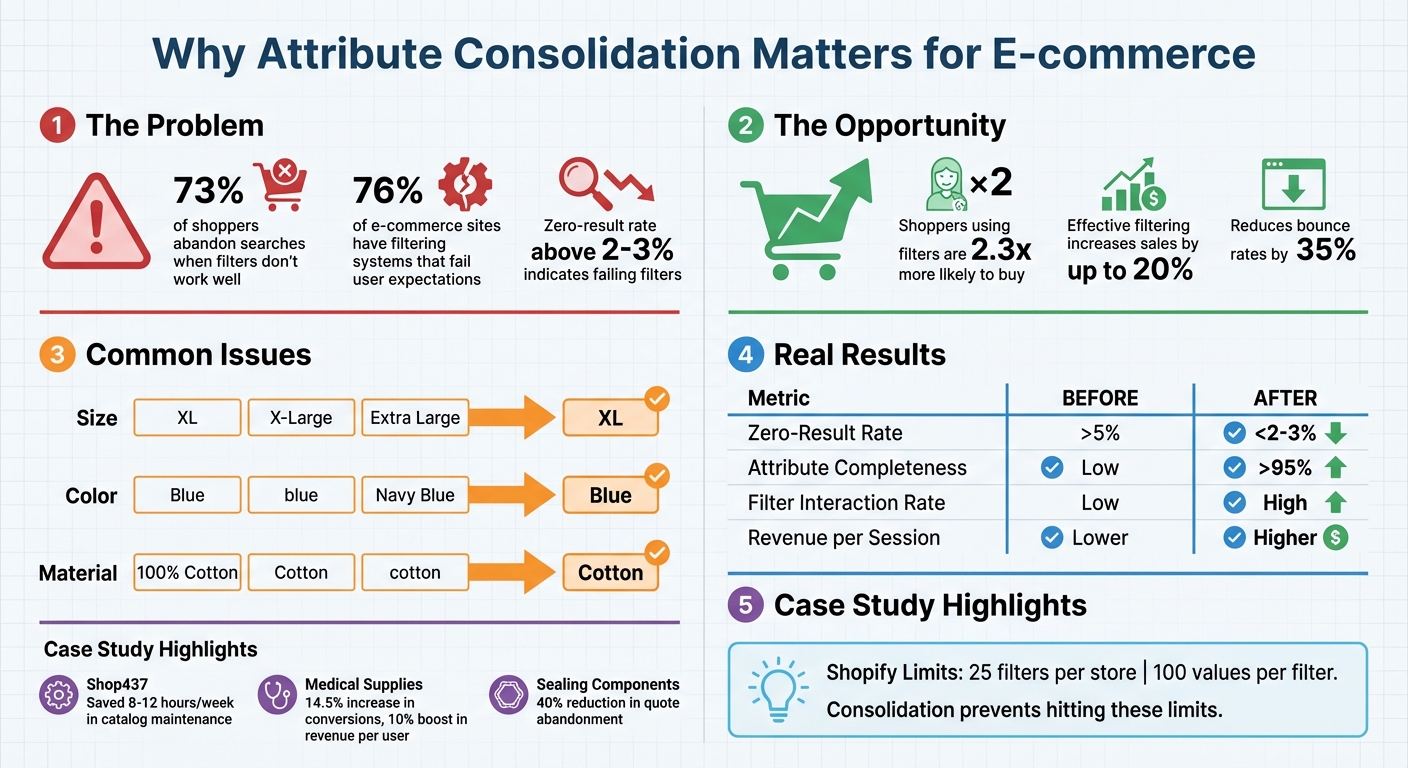
Impact of Product Filter Consolidation on E-commerce Performance
Problems Caused by Too Many Attribute Values
An overabundance of unique attributes in your catalog can seriously impact your store's performance. One of the biggest issues is value fragmentation - when the same attribute shows up in multiple variations. For instance, you might see "100% Cotton", "Cotton", and "cotton" listed as separate filter options. This not only clutters the interface but also creates inefficiencies in your database, as each variation needs separate indexing and query processing. The result? A messy user experience and technical headaches behind the scenes.
How It Affects Store Navigation
Too many filter options can overwhelm customers, leading to "choice paralysis." Imagine a shopper scrolling through a filter menu with 50+ brand names - it’s frustrating and often ends with them abandoning their search altogether. Things get even worse when filters lead to dead ends. Excessive or conflicting attribute values often result in "no results found" pages when filters are combined. If your zero-result rate climbs above 2% to 3%, it’s a clear sign your filters are failing.
For mobile users, the experience can be even more frustrating. Small screens make endless scrolling through disorganized filter options a nightmare. And when products are tagged inconsistently, they become practically "invisible" to shoppers using specific filters - even if those products are exactly what they’re looking for.
Search Accuracy Problems
The impact of excessive attributes goes beyond user experience - it also puts strain on your backend systems. Faceted search relies on database queries for every filter interaction. In catalogs with 100,000+ products, unindexed attribute columns force the system to run complex queries, which can significantly slow down performance.
"Faceted search hits your database for every filter interaction. On high-traffic sites with large catalogs, this can create performance bottlenecks." – Sebastian Correa, Co-Founder of BrokenRubik
These technical slowdowns make navigation even harder for shoppers. And the ripple effects don’t stop there - your SEO performance also takes a hit. Every unique filter combination generates a new URL. For example, a catalog with just 4 facets, each offering 10 options, can produce over 10,000 unique URLs. Search engines waste their limited crawl budget indexing these nearly identical pages instead of focusing on your important product content. This creates "crawl bloat," which dilutes rankings and causes keyword cannibalization. In the end, search engines struggle to figure out which pages are most important, dragging down your overall visibility.
sbb-itb-e8e54fb
Case Studies: Results of Attribute Consolidation
Problems Before Consolidation
Shopify merchants often grapple with disorganized filters, and Shop437, an activewear brand migrating in 2025, is a prime example. Their catalog, spanning 400–500 SKUs, suffered from fragmented metadata. Key attributes like fabric type (e.g., their proprietary 437cloud™ fabric) and support level were tagged inconsistently. This led to some products becoming "invisible" to shoppers using specific filters.
Another example involves a medical supplies and equipment client working with ConversionTeam in March 2022. Their filter layout buried crucial attributes - like product category and certification type - below the fold. Customers had to scroll past less relevant options to find these key filters, which negatively impacted conversions.
A sealing components manufacturer serving industrial buyers faced its own set of issues. Their catalog used inconsistent naming for attributes - mixing terms like "ID" and "Inner Diameter" - and lacked uniformity in measurement units. This forced buyers to manually cross-reference PDF spec sheets to confirm compatibility, leading to over 40% of quote requests being abandoned mid-process.
Results After Consolidation
These challenges highlight the transformative impact of attribute consolidation.
Shop437 teamed up with Aquifer Growth to standardize over 10,000 product attributes. By normalizing metadata and eliminating redundant filter options, they ensured every product was easily discoverable through optimized search paths. This cleanup not only saved the team 8–12 hours per week in catalog maintenance but also boosted organic traffic thanks to an SEO-friendly mega-menu and filter structure.
The medical supplies client saw rapid improvements after ConversionTeam reorganized their filter layout. By placing the most-used attributes above the fold and setting them to open by default, they achieved a 14.5% increase in conversions and a 10% boost in revenue per user. These changes, implemented in March 2022, allowed customers to find products without unnecessary scrolling.
For the sealing components manufacturer, a spec-driven filtering system made all the difference. By consolidating technical attributes like material compound, durometer, and inside diameter, they created a seamless buying experience. Customers no longer had to cross-reference specs manually, resulting in a 40% reduction in quote abandonment.
These examples demonstrate how attribute consolidation can solve complex filtering challenges and improve overall performance, paving the way for more efficient methods.
Methods for Consolidating Attribute Values
Automated Tools for Consolidation
If you're looking for a straightforward way to consolidate attributes, Shopify's Standard Product Taxonomy is a great starting point. This built-in library organizes over 10,000 product categories into more than 1,000 attributes across 26 industries. When activated, Shopify Magic, a free AI assistant, steps in to suggest categories and detect attributes like color, material, and size from product names, descriptions, and images. This helps eliminate discrepancies such as "M", "Med", and "Medium" showing up as separate entries.
For larger catalog migrations or merges, tools like Matrixify can handle bulk operations while keeping product and variant IDs intact. Meanwhile, Google Cloud Vertex AI Search for Commerce uses machine learning to group numerical attributes (like price or dimensions) into meaningful intervals, offering customers more relevant filter options. These tools make it easier to merge records and organize attributes consistently.
For even more advanced needs, Vision LLMs can extract attributes directly from product images, which is especially useful for items with limited text descriptions. If you're looking to generate consistent and SEO-friendly product descriptions, Hypotenuse AI (starting at about $29/month) allows you to upload a CSV file and create descriptions for hundreds of products at once.
While automation can handle large-scale data efficiently, manual intervention is still crucial for resolving more complex attribute conflicts.
Manual Processes for Attribute Normalization
A solid starting point for manual normalization is to create a canonical attribute model. This means defining each attribute's key, units, and data type. Doing so prevents confusion between similar terms like material_type and primary_material.
To address conflicting values, establish a precedence hierarchy. For example, prioritize manufacturer data over distributor data, and keep both raw and normalized values on file for traceability. For attributes tied to safety or high-value products, consider adding a human-in-the-loop QA process to catch errors that automation might miss.
When migrating your catalog, avoid disrupting your live site by populating new metafields alongside existing ones. Update your theme to use the new fields, test thoroughly, and only deprecate the old structure once you're confident everything works as intended. To maintain data integrity, lock critical attributes after enrichment to prevent automated supplier feeds from overwriting clean data with unstandardized updates.
"Your catalog won't scale because you 'extract better.' It scales because you normalize consistently." - AvidiaTech
Regular audits are essential to prevent value fragmentation - cases where duplicates like "Red", "red", and "Crimson" unnecessarily split filters. Use bulk import/export tools to identify and replace inconsistent strings before launching new filter options.
Measuring Consolidation Impact
After consolidating attributes, it’s important to track key metrics to evaluate your success:
| Metric | Before Consolidation | After Consolidation | Target |
|---|---|---|---|
| Zero-Result Rate | >5% (dead-end filter combinations) | <2–3% | <2–3% |
| Attribute Completeness | Low (products invisible to filters) | High (all products discoverable) | >95% for critical facets |
| Unique Attribute Counts | High (e.g., "XL", "X-Large", "Extra Large") | Low (single "XL" option) | Minimal duplication |
| Filter Interaction Rate | Low (confusing options) | High (matches purchase intent) | Increasing trend |
| Revenue per Filtered Session | Lower (shoppers bounce) | Higher (faster product discovery) | Increasing trend |
Source:
Zero-result pages are a major pain point, and any rate above 2–3% should prompt immediate action. Run a dead-end path audit to find the filter combinations that lead to these results. Then, either fix the underlying data or adjust your filter logic. For critical attributes like size and color, aim for at least 95% completeness to ensure products show up in filtered searches.
How FacetGuard Simplifies Attribute Consolidation
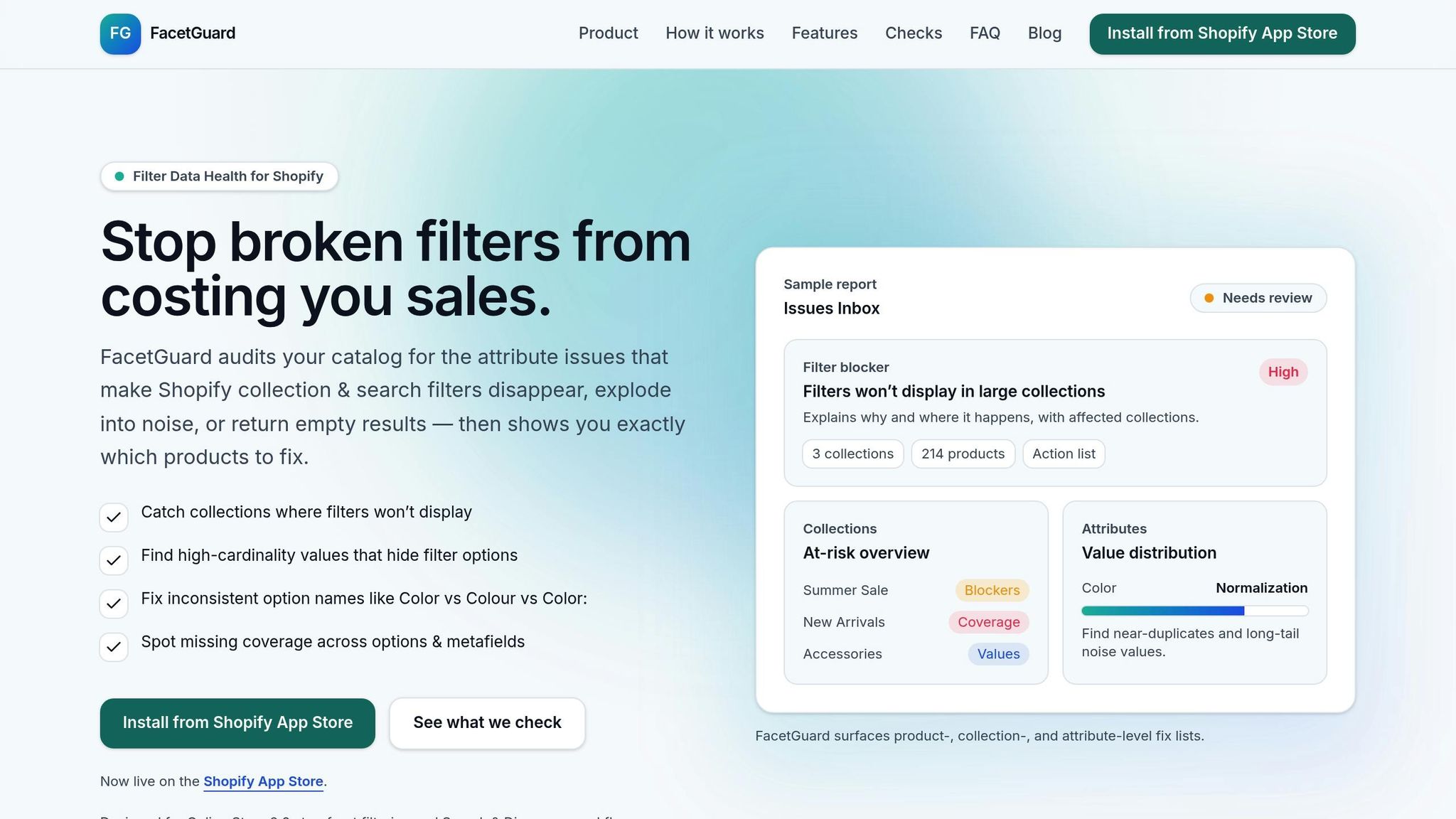
Key Features for Attribute Management
FacetGuard tackles attribute inconsistencies head-on with tools like the Value Limit/Cardinality Audit, which scans your catalog to identify attributes with too many unique values. For example, if your filters are cluttered with duplicate sizing entries, this feature flags them so you can merge them into a single, clean option. The Attribute View tool complements this by showing how attribute values are distributed across your products, making it easy to spot semantically identical variations that could be fragmenting your filters.
The Issues Inbox is a centralized hub for filter-related problems, prioritizing them based on their severity and impact. Meanwhile, the Filter Blockers Scanner identifies collections where filters aren’t displaying at all and explains why - whether it’s due to Shopify’s 25-filter limit or the 5,000-product threshold. This feature helps you pinpoint collections at risk, missing attributes, or areas where fragmented values are causing duplicate filter options.
For larger catalogs, Actionable Exports streamline the correction process by providing downloadable CSVs of affected products. Your team or PIM system can use these exports to make updates efficiently. Plus, you can mark issues as resolved directly in the app, ensuring everyone stays on the same page about what’s been fixed and what still needs attention. These tools are designed to address problems like filter overload and inconsistent attribute values, keeping your catalog organized and shopper-friendly.
Benefits for Shopify Merchants

FacetGuard’s features bring tangible benefits to Shopify merchants, simplifying operations and improving the customer experience.
By reducing cardinality and consolidating fragmented values, the app ensures your filters work seamlessly and display accurate options. For instance, merging duplicate size variations into a single choice spares shoppers from unnecessary decision fatigue. This also helps maintain your zero-result rate below the critical 2% to 3% threshold, a key indicator of functional filters.
The app’s Option Name Consistency & Coverage checks are another game-changer, helping you hit the 95% completeness target for essential attributes like size, color, and fit. Missing attribute values make products "invisible" in filtered searches, even if the details are hidden in descriptions. FacetGuard flags these gaps, letting you address them before launching new filter options. For merchants dealing with metafield sprawl - where different teams create overlapping fields like "material_type" and "product_material" - FacetGuard highlights these inconsistencies, helping you establish a unified, reliable system.
Conclusion
Bringing together inconsistent attribute values like "XL", "X-Large", and "Extra Large" into a single, unified option creates a smoother shopping experience and drives higher sales. Why? Because it removes the confusion that slows down searches and frustrates customers. The stats speak volumes: 73% of online shoppers abandon their search if they can’t quickly find what they need, while effective filtering can increase sales by up to 20% and cut bounce rates by 35%.
Streamlined filtering doesn’t just improve conversions - it also enhances your site’s overall performance. Consolidating attributes eliminates "dead-end" pages with no results, reduces crawl bloat to improve SEO, and ensures products stay visible when filters are applied. This is especially critical for mobile users, who account for over 60% of Shopify traffic. On mobile, streamlined filters mean fewer taps and a quicker path to checkout.
Despite these clear benefits, 76% of e-commerce sites still have filtering systems that fail to meet user expectations. Manual attribute management simply can’t handle the complexity of catalogs with thousands of SKUs. That’s where automated solutions like FacetGuard come in. FacetGuard audits your catalog to identify inconsistent values, missing attributes, and filter blockers before they impact your sales. It delivers actionable exports and prioritized fix lists, making it easier to tackle critical issues without the headache of manual data management.
FAQs
How do I find duplicate attribute values in my catalog?
To spot duplicate attribute values, go through your catalog and look for repeated or inconsistent entries. Using auditing tools can make this process easier by identifying duplicates or similar values. Standardizing your data - such as aligning units or ranges - can also help reveal inconsistencies. Tools like FacetGuard are particularly useful for auditing attributes, detecting duplicates, and ensuring your Shopify storefront's filters remain accurate and dependable.
Which filters should I consolidate first?
When dealing with attributes like color, size, or material, inconsistency or overlap in values can confuse users and make filters less effective. To address this, focus on consolidating these filters. This not only simplifies navigation but also improves the overall filtering experience. Tools such as FacetGuard can help audit your attribute data, pinpointing issues and highlighting areas to improve clarity and usability. By eliminating redundant filters, you can create a smoother, more intuitive experience and avoid frustrating dead-end filter combinations.
How can I measure if consolidation improved my filters?
Tracking progress means keeping an eye on user engagement metrics like bounce rates and conversion rates. These numbers can reveal how well your changes are resonating with your audience.
On the SEO front, focus on indicators such as crawl efficiency, reduced duplicate content, and minimized URL bloat. These are often influenced by how complex your filter URLs are, so simplifying them can lead to better results.