How to Clean Up Product Attributes for Better Search
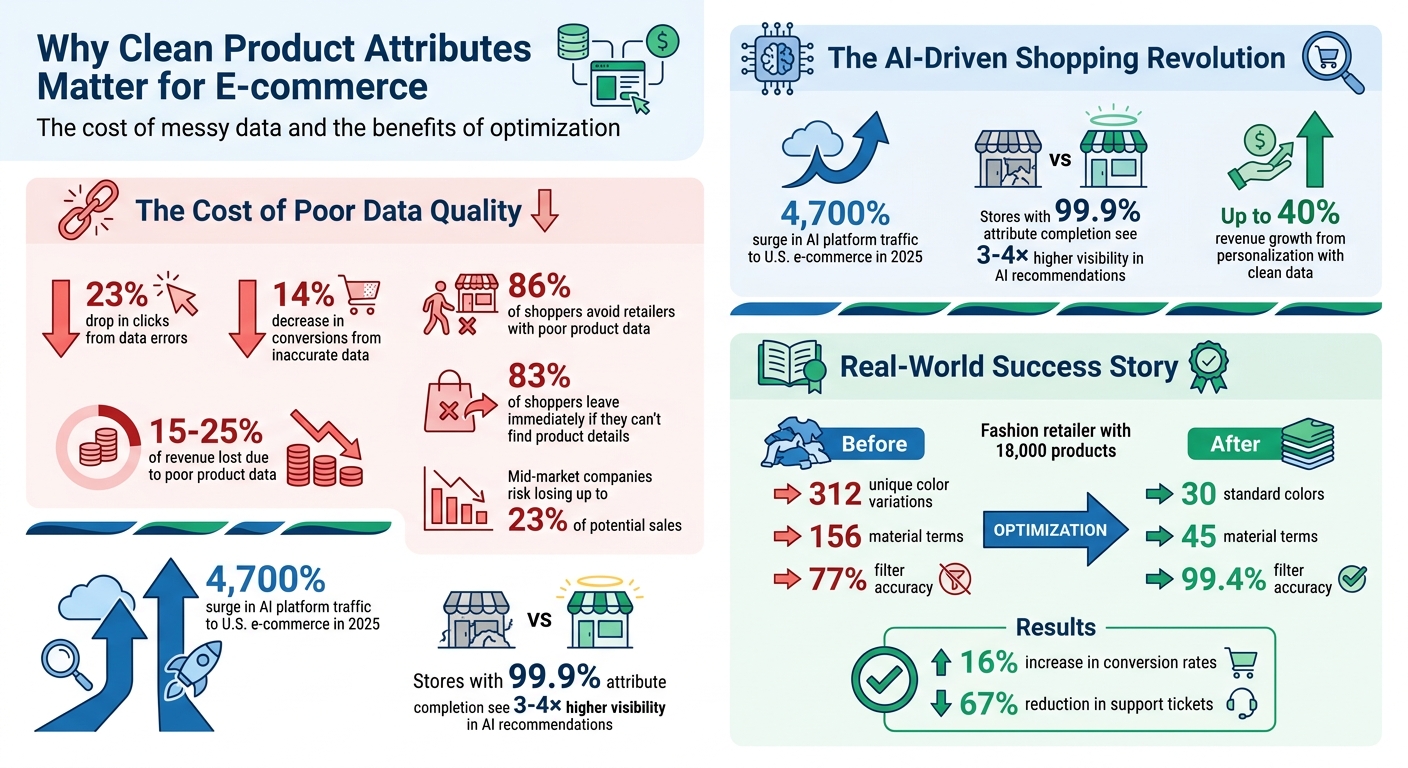
Messy or incomplete product attributes can ruin your Shopify store’s search and filtering experience - for both human shoppers and AI tools. With AI-driven shopping growing rapidly (AI platform traffic to U.S. e-commerce surged 4,700% in 2025), clean and structured data is no longer optional. Stores with 99.9% attribute completion see 3–4× higher visibility in AI recommendations and up to 40% revenue growth from personalization.
Key Takeaways:
- Inconsistent attributes like "Navy" vs. "Dark Blue" confuse filters and AI systems.
- Missing data makes products invisible in filtered searches, costing you sales.
- Tools like FacetGuard help identify and fix attribute issues quickly.
- Standardizing attributes (e.g., creating controlled vocabularies) leads to better search accuracy and higher conversions.
Action Steps:
- Audit your catalog for inconsistent or missing attributes.
- Normalize and standardize attribute values (e.g., unify "Color" names like "Navy Blue").
- Use Shopify tools like metafields and FacetGuard to fix and maintain clean data.
- Regularly review new products and conduct monthly audits to prevent data problems.
Clean attributes improve search, boost conversions, and prepare your store for the AI-driven future.
Impact of Clean Product Attributes on E-commerce Performance
Improve Shopify Product Pages and Increase Conversion Rate With Metafields

sbb-itb-e8e54fb
Step 1: Audit Your Product Catalog for Data Issues
Start by reviewing your product catalog to identify and address data issues that disrupt search and filtering. A detailed audit can reveal problems like inconsistent naming, missing information, or overly complex filters - all of which can negatively impact both shoppers and AI-powered search tools.
The stakes are high. Errors in product data can result in a 23% drop in clicks and a 14% decrease in conversions. Inaccurate or incomplete data can cost businesses anywhere from 15% to 25% of their revenue. On top of that, 86% of shoppers avoid retailers with poor product data. Every error - whether it's a typo, a missing detail, or a misconfigured attribute - is a missed opportunity to engage and convert customers.
Using FacetGuard to Spot Key Issues
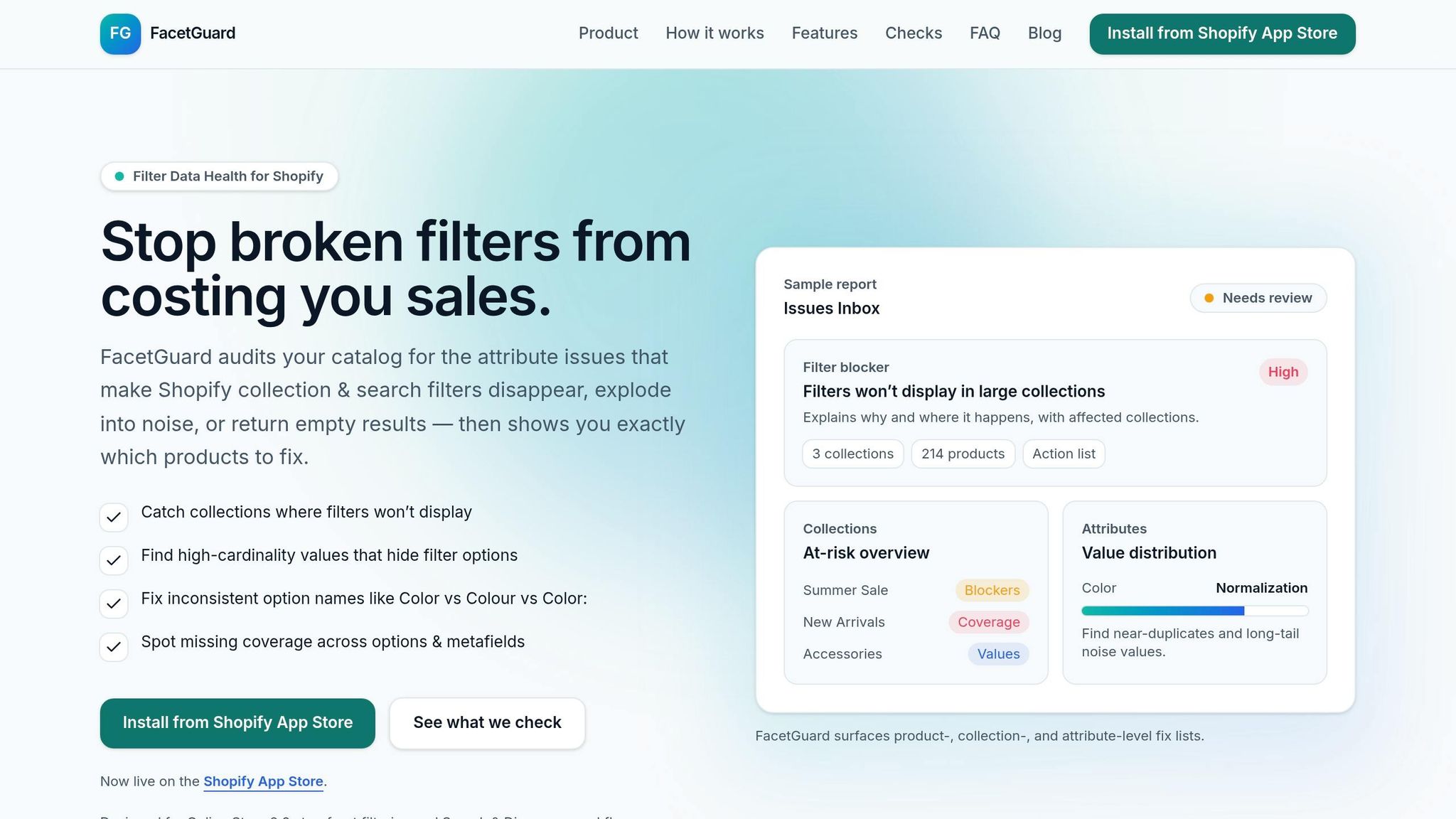
FacetGuard simplifies the process of identifying catalog issues. Its Issues Inbox provides a prioritized list of filter-related problems, ranked by how much they affect your store. Instead of manually combing through thousands of products, you can quickly pinpoint which attributes are causing filters to fail and which collections are most impacted.
The Filter Blockers Scanner is particularly useful for detecting "silent failures" - situations where filters disappear from search results or collections without warning. It identifies the root cause, whether it's due to Shopify's size limits or structural data problems.
The Cardinality Audit highlights attributes with too many unique values. For example, having over 50 "Material" options can overwhelm shoppers with irrelevant choices, making it harder for them to find what they’re looking for. Meanwhile, the Coverage Check ensures that all products have the necessary attributes, so customers don’t run into empty search results.
Beyond these tools, Shopify stores often face recurring attribute challenges.
Common Attribute Problems in Shopify Stores
Inconsistent naming is a frequent issue. Variations like "Color" versus "Colour" or "Small" versus "S" can split a single filter into multiple, redundant options. Even subtle inconsistencies, such as extra spaces or punctuation differences (e.g., "Color:"), can confuse both shoppers and search algorithms. For instance, if some products are labeled "Navy", while others use "Dark Blue" or "Navy Blue", filters become fragmented, and AI systems struggle to match products with search queries.
High cardinality arises when attributes have too many unique values. Instead of grouping similar items, you might end up with separate options like "Cotton", "100% Cotton", "Pure Cotton", and "Cotton Blend". This creates an overwhelming filter list that frustrates customers trying to narrow their search.
Missing attributes can make products invisible when filters are applied. For example, if 40% of your items lack "Size" data, those products won’t appear in filtered results. This directly impacts your store’s searchability and sales.
Metafield sprawl occurs when similar fields are used for the same purpose, such as having both material_type and product_material. This can lead to inconsistent filtering and broken logic within your theme. As Performantcode puts it:
"Complex Shopify catalogs rarely fail because Shopify lacks features. They fail because the data model underneath them becomes unmanageable".
| Issue Type | Common Examples | Impact on Search/Filtering | Priority |
|---|---|---|---|
| Normalization | Color vs Colour; Small vs S | Splits a single filter into multiple redundant options | High |
| Cardinality | 50+ unique "Material" values | Creates noise that buries relevant filter choices | Medium |
| Visibility | Large collection size thresholds | Causes filters to disappear entirely from the storefront | High |
| Coverage | Missing "Size" or "Brand" tags | Products become invisible when those filters are applied | High |
| Structure | Duplicate metafield namespaces | Inconsistent data display and broken filter logic | Medium |
To get started, focus on your top 20 products for quick wins. Export CSV reports to track your progress and tackle issues systematically. Once you've addressed these foundational problems, you’ll be ready for the next step: normalizing and standardizing your attributes to enhance Shopify’s search functionality.
Step 2: Normalize and Standardize Product Attributes
To boost Shopify search accuracy and improve filtering for shoppers, start by normalizing your catalog. This means converting inconsistent attribute values into a consistent format.
Once you've identified data inconsistencies, focus on standardizing your attributes to ensure a smoother shopping experience.
Standardizing Option Names and Values
Begin by creating controlled vocabularies - definitive lists of approved values for each attribute. For example, map variations like "Navy", "Dark Blue", "Navy Blue", and "Midnight" to a single standard value, such as "Navy Blue." A fashion retailer managing 18,000 products from 120 suppliers achieved this by using a robust product information management (PIM) system. They simplified 312 unique color variations into 30 standard colors and reduced 156 material terms to 45 hierarchical terms. The results? Filter accuracy soared from 77% to 99.4%, conversion rates rose by 16%, and search-related support tickets dropped by 67%.
Consistency is key. Apply uniform formatting rules across all attributes. For instance:
- Use Title Case for names (e.g., "Stainless Steel").
- Add a space before units (e.g., "15 lb").
- Separate multi-select attributes with a pipe (e.g., "Cotton | Polyester").
Be cautious of inconsistent terminology. Marketing phrases like "showerproof" and "waterproof" or vague terms like "IPX4-ish" can confuse shoppers and hinder search accuracy. Also, standardize units by choosing one format per attribute. If you're storing weight, decide between pounds or kilograms and convert all incoming data to that unit before it reaches your storefront.
For attributes with range values (e.g., "50–104°F"), split them into separate numeric fields, such as temp_min and temp_max, to ensure filters process them correctly.
Improving Attribute Coverage with Metafields
Metafields allow you to store custom information that Shopify’s standard fields don’t cover, like materials, care instructions, dimensions, or certifications. Start by assigning your products to Shopify’s Standard Product Taxonomy. This unlocks category-specific metafields, which suggest relevant attributes based on product type. For instance, shirts might include attributes like neckline and sleeve length, while toys might have age group and safety certifications.
Whenever possible, use Shopify’s standard metafield definitions (e.g., color, size, rating) instead of custom ones. These predefined options work seamlessly across Shopify themes, apps, and marketplaces, ensuring compatibility. Metafield lists are especially helpful for products with multiple attributes, like blended materials ("Cotton | Polyester | Spandex"), enabling robust multi-select search facets. To avoid data entry errors, set up validation rules within metafield definitions, such as character limits for subtitles (70 characters) or numeric ranges for warranty periods.
For shared information that applies to multiple products, like size charts, brand profiles, or certifications, use metaobjects instead of metafields. Metaobjects act as reusable data structures, so when you update a brand profile, the changes automatically reflect across all linked products. This reduces duplication and keeps your catalog consistent.
Step 3: Clean Up Attributes Using FacetGuard Tools
Once you've standardized your attributes, FacetGuard simplifies the cleanup process with focused views and bulk export features. Introduced on January 13, 2026, this app helps Shopify merchants resolve filter-related data challenges without the hassle of fixing issues one by one.
Using Collection and Attribute Views
FacetGuard's Collection View offers a snapshot of collections prone to broken filters, showing issue counts and spotlighting the products causing trouble. Start by addressing filters missing due to Shopify's size thresholds, then tackle collections with fragmented options to ensure smoother navigation.
The Attribute View dives deeper into specific attributes like Color or Size to pinpoint normalization problems. It highlights value distributions and flags inconsistencies such as differences in casing, punctuation, or spacing (e.g., "Color" vs. "Colour" or "Navy Blue" vs. "navy blue"). Fixing these discrepancies not only strengthens your filters but also eliminates potential confusion for shoppers.
Both views feed into a centralized Issues Inbox, which organizes problems by severity. You can mark issues as "ignored" or "resolved", keeping the focus on the most pressing catalog errors. Once you've identified the issues, you can export a fix list for bulk updates.
Exporting and Fixing Issues in Bulk
FacetGuard takes the insights from its views and translates them into actionable bulk exports. Instead of fixing individual products manually, you can generate a CSV "fix list" that identifies the exact products and variants causing problems. This list is ready for bulk updates using Shopify's native editor or your preferred tools, saving significant time for large catalogs.
After completing the fixes, set up regular scans to catch any new attribute errors right after product imports. FacetGuard's monitoring alerts ensure your filters stay accurate and effective as your catalog expands.
Best Practices for Maintaining Product Attributes
After optimizing your product attributes, keeping them updated is key to ensuring accurate search results and maintaining user engagement over time. Regular catalog maintenance is crucial because outdated or inconsistent product data can significantly impact your bottom line. In fact, businesses can lose between 15% and 25% of their revenue simply due to unmaintained data over time. And as new products are added, the issue only grows. The most successful merchants treat attribute maintenance as an ongoing process, not a one-time task.
Regular Catalog Audits and Monitoring
Set aside 30 minutes each week to review new products. This quick check helps you catch problems like missing descriptions, incomplete metafields, or incorrect attribute values before they snowball. Additionally, conduct a more thorough audit every month, especially after bulk imports or updates from supplier feeds, to ensure that controlled vocabularies are still being followed.
Tools like FacetGuard can simplify this process by running scheduled scans and sending alerts whenever new attribute issues arise after an import. Its Issues Inbox organizes these problems by severity, so you can prioritize high-impact fixes while ignoring less critical ones to avoid unnecessary distractions.
This consistent monitoring creates a streamlined and efficient workflow for managing product attributes.
Creating a Standardized Workflow
To preserve the benefits of your attribute cleanup efforts, it’s essential to implement a standardized workflow. This involves enforcing controlled vocabularies and validation rules at every step of the process.
For example, a Home & Garden retailer with 12,000 SKUs saw major improvements in March 2026 by reducing their attributes from 400 to 140. This change cut feed rejections to just 3% and reduced onboarding time per SKU from 25 minutes to only 8.
Here’s how you can achieve similar results:
- Define controlled vocabularies for key attributes like colors, sizes, and materials. Use dropdown menus or validation rules at the point of entry to enforce consistency.
- Adopt tag prefixes (e.g., "material:cotton" or "season:summer-2026") for easier bulk filtering in Shopify.
- Store measurements as raw numbers with separate unit fields - for instance, "width: 12" and "unit: in" - instead of strings like "12 inches." This allows for more flexible sorting and seamless locale-based conversions.
- Assign data stewards to oversee specific categories and review new attribute entries before they go live.
- Maintain a style guide and changelog for your attribute standards, so your entire team has access to the latest documentation.
Conclusion: Key Takeaways for Cleaning Up Product Attributes
Getting your product attributes in order directly impacts your revenue. Mid-market e-commerce companies risk losing up to 23% of potential sales due to messy data. On top of that, 83% of shoppers will leave a site immediately if they can’t find the product details they need. When filters fail or return empty results on large collections, you’re essentially hiding products from customers who are ready to buy.
As shopping trends lean heavily toward AI-powered tools, clean, structured data becomes even more important. In 2025, traffic from AI platforms to U.S. e-commerce sites surged by a staggering 4,700% year-over-year. Stores with nearly perfect attribute completion - 99.9% - enjoy 3–4× higher visibility in AI-driven recommendations compared to those with incomplete data. AI systems thrive on clean data, and every step you take to improve your product attributes boosts both your visibility and customer engagement.
The good news? You don’t have to fix everything at once. Start small by focusing on the biggest issues. Conduct targeted catalog audits to identify and resolve critical problems. Tools like FacetGuard can help pinpoint filter blockers and other high-priority issues. Begin by standardizing essential attributes like color, size, and material before diving into more technical details in metafields. Simple habits, like 30-minute weekly reviews of new products, can stop problems from piling up, while monthly deep audits ensure your entire catalog stays in shape.
FAQs
Which product attributes should I clean up first?
To optimize searchability and filtering, focus on technical and structured data first. This includes details like product variants, sizes, materials, compatibility, and specifications. Use consistent naming conventions, craft accurate product titles, and ensure all metafields are complete. These steps help search engines and filters better understand your catalog, improving search accuracy and SEO. By prioritizing these foundational elements, you set the stage for addressing other content later.
How do I choose a single standard for colors, sizes, and units?
To create a consistent and user-friendly system, establish a controlled vocabulary with clear, standardized rules for naming colors, sizes, and units. For instance, opt for a single term like "Red" instead of using variations like "Crimson" or "Scarlet." Similarly, stick to one size format, such as "Large" or "L," to avoid confusion.
Before publishing, set up validation rules to maintain data consistency across the board. Additionally, aligning your approach with established industry standards - like Shopify's product categories and metafields - can help enhance both categorization and search accuracy, ensuring a smoother experience for users.
When should I use Shopify metafields vs. metaobjects for attributes?
Shopify metafields are perfect for storing detailed, custom data tied to individual products - think care instructions, dimensions, or any unique attribute that enhances a product page. They’re ideal for adding specific details that make each product stand out.
On the other hand, metaobjects shine when it comes to managing more complex or reusable data. For example, if you need shared attributes across multiple products or want to organize data for a large catalog, metaobjects provide a scalable and structured solution.
In short, use metafields for product-specific details and metaobjects for managing organized, reusable data across your store.