
How to Maintain Consistent Catalog Attributes at Scale
Managing large Shopify catalogs often leads to messy product data - like inconsistent color names ("Navy", "navy", "Dark Blue") - which can break filters, frustrate customers, and even get your Google Shopping feed rejected. Fixing these issues manually takes hours every week and becomes impossible as your catalog grows.
Here’s how to solve it:
- Standardize attributes: Use structured Shopify metafields with clear naming conventions (
namespace.key) and validation rules. - Audit data regularly: Tools like FacetGuard catch errors like typos or duplicate values that disrupt filters.
- Normalize values: Map inconsistent entries (e.g., "Dark Blue" → "Navy") to a single, approved vocabulary using Shopify's "Limit to preset choices."
- Automate fixes: Export flagged errors as CSVs, clean them up, and re-upload for bulk updates.
For example, standardizing a 12,000-SKU catalog reduced Google Shopping rejections from 23% to 3% and cut product onboarding time from 25 to 8 minutes per SKU. Clean data improves filters, boosts conversions, and saves time.
Takeaway: Consistent, validated product data ensures your catalog runs smoothly, filters work correctly, and customers find what they need - no more wasted time fixing avoidable errors.
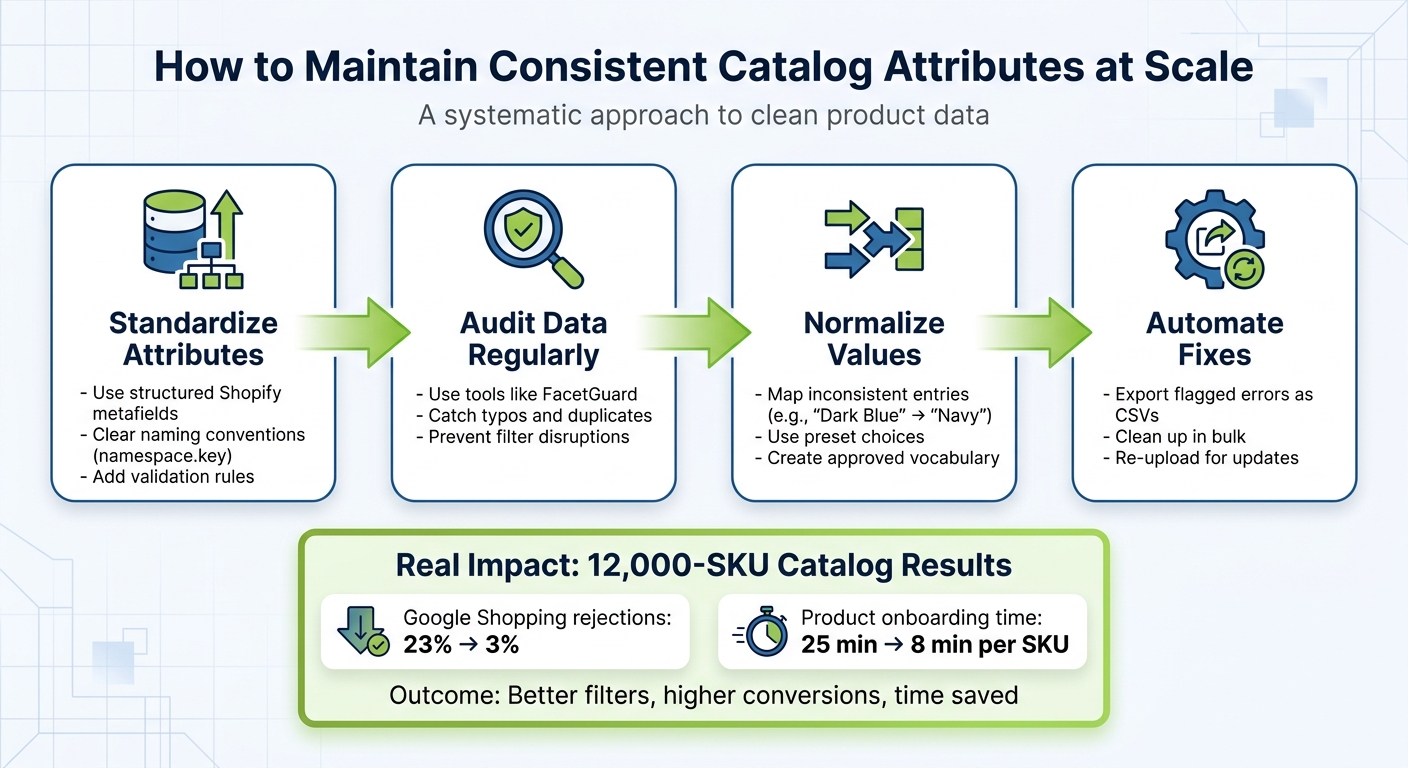
4-Step Process to Maintain Consistent Shopify Catalog Attributes
Complete Shopify Product Data Management Guide | Challenges, Mistakes, Best Practices, How to Scale

sbb-itb-e8e54fb
Setting Attribute Standards for Shopify Metafields
Structured metafields are the foundation of consistent catalog attributes. Without clear guidelines, you risk "metafield sprawl" - a chaotic buildup of overlapping fields like specs_material, material_type, and product_material, all storing the same type of data, such as fabric details. This lack of structure can lead to conflicting data sources and disrupt filtering logic.
"Metafields start as a flexible solution and gradually become a liability when they grow without structure." – Performantcode.io
Each metafield is built on four essential components: a namespace (groups related fields), a key (the specific attribute name), a type (defines data format), and validations (rules for acceptable values). For example, the metafield specifications.material uses "specifications" as the namespace and "material" as the key. This structure avoids naming conflicts and clarifies ownership across teams.
Required vs. Optional Metafields
Shopify simplifies attribute management by automatically linking required metafields to products when you assign them a standard category. For example, categorizing a product as "Shirts" activates fields like size, color, and fabric by default. These fields ensure a consistent baseline across your catalog.
On the other hand, optional metafields are ideal for storing specialized data that falls outside standard definitions - such as warranty information, internal SKUs, or unique care instructions. Whenever possible, leverage Shopify's predefined fields like product rating or color, as these integrate seamlessly with themes and apps. Custom fields, however, require manual configuration. To maintain consistency, each attribute should only exist in one location, as duplicating data across multiple fields creates unnecessary confusion.
Once definitions are clear, strict naming conventions can further enhance data integrity.
Formatting and Naming Conventions
Adopting consistent naming practices prevents operational headaches. Stick to a predictable namespace.key format and maintain one casing style - whether it's spec_sheet or specSheet, avoid mixing the two. Similarly, refrain from toggling between singular and plural forms to keep things straightforward.
"Consistency is not cosmetic. It's structural. Without consistent naming, your Shopify product data structure becomes unpredictable." – Performantcode.io
For US-specific formatting, use measurement types instead of plain text. For example, the "Dimension" type can store values in inches (in), feet (ft), or yards (yd) as structured JSON like {"value": 10.5, "unit": "in"} rather than freeform strings. Weight fields should use ounces (oz) or pounds (lb), while volume fields support US fluid ounces (us_fl_oz) or gallons (us_gal). For fields requiring controlled vocabularies, use "Single line text" with preset options to avoid variations like "Navy" versus "Dark Blue." Include clear formatting instructions in the metafield description, such as "Enter material as a percentage (e.g., 100% Cotton)", to guide data entry.
Auditing Catalog Attributes for Inconsistencies
Even with well-defined standards, catalog inconsistencies can sneak in through product imports, manual updates, or team handoffs. These errors, while subtle, can have a big impact. In fact, product data errors can reduce clicks by 23%, lower conversions by 14%, and shrink revenue by up to 25%. Something as small as inconsistent naming - like a trailing space in "Navy " versus "Navy" - can split filter results, making it harder for shoppers to find products. This kind of fragmentation can significantly harm the user experience. Auditing tools are designed to catch and fix these issues quickly.
"Filter issues often don't look like errors - they look like 'the storefront is weird today.'" – FacetGuard
Using FacetGuard's Issues Inbox
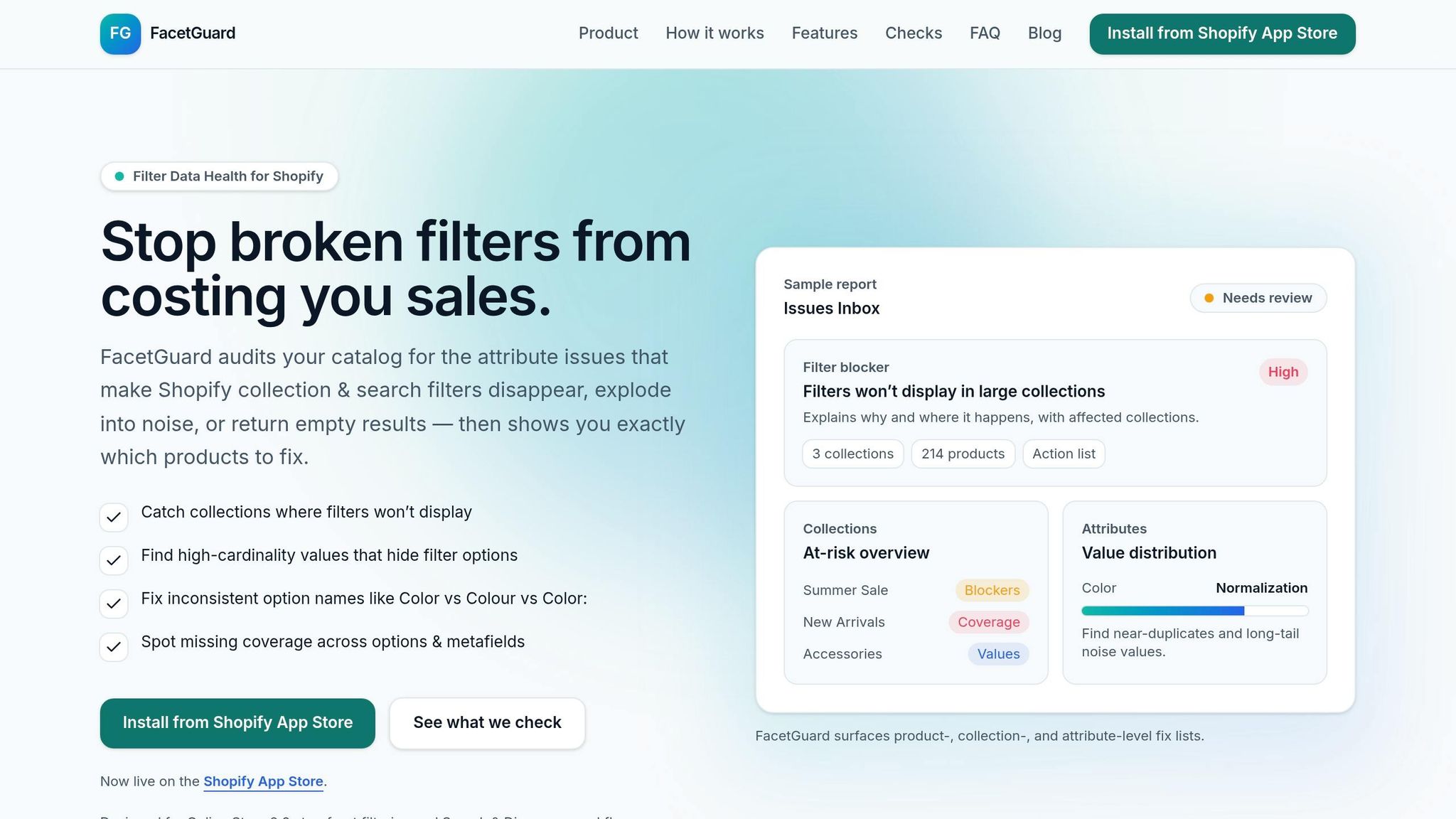
Once standards are in place, auditing becomes a powerful way to identify and address deviations. FacetGuard’s Issues Inbox simplifies this process by gathering all filter-related problems into one dashboard. Instead of sorting issues alphabetically, they’re ranked by severity and business impact. This makes it easy to prioritize fixes that matter most, like filters disappearing from large collections, while smaller issues affecting just a few products are ranked lower.
The tool allows quick navigation from an issue to the specific products causing it. For example, if the inbox flags inconsistencies in the "Color" attribute, you can click through to see exactly which products have "Navy " (with a space) versus "Navy" (without). A CSV export option also lets you handle bulk updates efficiently. This eliminates the need to comb through thousands of SKUs manually. The tool even highlights near-duplicate names that split filter coverage, saving you from these hidden pitfalls.
Identifying Filter Blockers with FacetGuard
Some issues go beyond inconsistencies and can completely disrupt filtering. FacetGuard’s Filter Blockers Scanner focuses on this specific problem: collections where filters disappear entirely due to Shopify’s size limits or excessive attribute noise. For instance, if a collection grows too large or an attribute has hundreds of unique values, Shopify may stop displaying filters, leaving only basic sorting options for shoppers.
The scanner identifies collections at risk and explains why filters are missing. Take the "Material" attribute as an example - if it includes 300 unique values with typos like "100% cotton", "100% Cotton", and "cotton 100%", the scanner will flag this as an issue. It also provides a list of products contributing to the problem, which you can export as a CSV for bulk updates. This makes it easier to clean up messy values and standardize your catalog.
Spotting these issues is a critical first step toward creating a consistent and well-organized catalog, paving the way for systematic fixes and automation.
Mapping and Normalizing Metafield Data
After spotting inconsistencies in your product data, the next step is fixing them at their core. This involves mapping your data to structured metafield schemas and standardizing inconsistent values. Without these steps, filters may malfunction, shoppers might get frustrated, and managing your catalog will only get tougher over time.
Mapping Product Data to Metafield Schemas
Think of each metafield as a structured database entry, not just a random note. Every metafield should have a clear purpose, format, and owner to avoid "metafield sprawl." This happens when similar attributes, like material_type and product_material, are used interchangeably but mean the same thing. To simplify, stick to Shopify's standard metafield definitions whenever possible. These are pre-built to ensure compatibility with apps, themes, and platforms like Google Merchant Center.
When setting up your metafield schemas, keep a consistent namespace and key structure. For example, you might group attributes like material, care_instructions, and weight under the namespace specifications. Be sure to select the correct data type - like Single line text, Number, JSON, or Boolean - so the data displays properly in your theme and can easily be queried later.
Avoid redundancy by mapping each attribute to a single metafield. For instance, don’t store the same information in a tag, product metafield, and variant metafield. This can lead to conflicts and unpredictable theme behavior. For attributes that vary by customer selection, like chest sizes, use a variant metafield. On the other hand, if the information is consistent across all product versions, such as fabric type, a product metafield is the better choice.
Once your data is mapped correctly, the next step is to standardize any variant entries to ensure consistency.
Normalizing Variant Values
Normalization involves cleaning up inconsistent attribute values in your product data. For example, if your catalog lists colors like "Dark Blue" and "Deep Sea", you’d standardize them to a single value, such as "Navy." This process starts with defining a controlled vocabulary - an approved list of values that all variations map to.
Shopify’s "Limit to preset choices" feature can help by creating dropdown menus in your admin. This eliminates the risk of staff entering inconsistent values like "Dark Blue" instead of "Navy". For data already in your system, use bulk editing tools to clean it up. For example, you might convert entries like "80% cotton" or "Algodón" into a unified "Cotton" value, ensuring your filters work as intended.
Keep the original value stored alongside the normalized one. This is useful for debugging or resolving any disputes later on. When updating existing data, take a phased approach: populate new metafields, adjust your theme dependencies, and then gradually phase out the old fields. This minimizes any disruptions to your storefront during the transition.
| Raw Input Value | Canonical Attribute Key | Normalized Value |
|---|---|---|
| Dark Blue | color |
Navy |
| Deep Sea | color |
Navy |
| lbs | weight_lb |
lb |
| 23 1/2 in | width_in |
23.5 |
| Yes / Included | is_waterproof |
true |
| 10–40°C | temp_min_c / temp_max_c |
10 / 40 |
Monitoring and Automation with FacetGuard
Once your metafields are mapped and standardized, the next step is ensuring consistent monitoring to maintain data accuracy. Everyday activities like product imports, staff updates, or vendor feeds can introduce inconsistencies that disrupt storefront filters. That’s where automated monitoring comes in - it helps identify and address issues before they escalate.
Monitoring Attribute Consistency with FacetGuard
FacetGuard builds on your standardized metafields by offering a centralized Issues Inbox. This tool consolidates all filter-related data problems, ranking them by severity and impact - such as the number of collections or products affected. With this prioritized list, you can quickly focus on the most pressing issues.
One standout feature is the Value Limit/Cardinality Audit, which identifies excessive unique values caused by typos or formatting errors. It even breaks down these inconsistencies by collection, allowing you to zero in on areas with the greatest impact. Using the Attribute View, you can examine specific attributes like "Material" or "Size", highlighting near-duplicates caused by minor differences in case, punctuation, or extra spaces.
To stay ahead of potential issues, schedule scans after bulk imports and configure alerts to catch problems as soon as they appear. This eliminates the need for constant manual checks, saving time and effort.
Using CSV Exports for Bulk Fixes
FacetGuard doesn’t just identify problems - it also simplifies the resolution process. When an issue arises, it generates a detailed CSV export listing the products and variants responsible. This means you can skip time-consuming manual searches and go straight to fixing errors using Shopify’s bulk editor or a third-party tool.
For example, if the Cardinality Audit flags multiple inconsistent color entries, you can export the affected list, standardize the values in a spreadsheet, and re-import the corrected data in one go. FacetGuard also lets you tag issues as "ignored" or "resolved", making it easier to track progress and manage your workflow. Together, these monitoring and correction tools ensure your catalog stays in top shape at every stage.
Conclusion
Consistent catalog attributes lay the groundwork for a storefront that runs smoothly and efficiently. When you approach metafields as a structured schema with clear guidelines for ownership and formatting, everything clicks into place: filters function as they should, customers can easily find what they’re looking for, and your team spends less time fixing data-related issues.
Regular audits with tools like FacetGuard's Issues Inbox can help you catch those sneaky, silent failures - like disappearing filters or empty results that don’t throw obvious errors. By addressing these issues based on their severity and impact, you can focus your efforts where they’ll make the biggest difference, such as high-revenue collections or key customer-facing filters.
Normalization and mapping are also game-changers. They eliminate inconsistencies like "Color" versus "Colour", ensuring your filter options stay cohesive. And with the ability to export CSVs, you can tackle bulk fixes quickly, avoiding the tedious task of editing products one by one. These strategies, as outlined earlier, are essential for maintaining efficient storefront filters.
"Consistency is not cosmetic. It's structural." - Performantcode.io
Clean, properly validated attributes don't just improve filtering - they reduce support tickets and make integrations smoother. Regular monitoring with FacetGuard ensures your standards hold up as your catalog grows. When your data is in order, technology stops being a hurdle, allowing your team to focus on what really matters: delivering better experiences for your customers.
"Complex Shopify catalogs rarely fail because Shopify lacks features. They fail because the data model underneath them becomes unmanageable." - Performantcode.io
Successful brands treat catalog management as an ongoing system, not just a task to tackle when problems arise. By adopting these practices, you can turn catalog management into a competitive edge for your business.
FAQs
Which product attributes should I standardize first?
To improve search relevance, filtering, and catalog consistency, start by standardizing key attributes. Focus on essentials like the product name/title, brand, and category - these are critical for better indexing and user navigation. Beyond that, ensure uniformity in physical attributes such as size, color, material, and dimensions. Standardizing these details helps customers filter products accurately and enhances their overall shopping experience. By prioritizing these elements, you can boost search performance and maintain high data quality, even with extensive catalogs.
How do I choose between product vs variant metafields?
Choose product metafields when dealing with attributes that are consistent across the entire product, like material, care instructions, or brand name. On the other hand, opt for variant metafields when attributes vary between individual variants, such as size, color, or custom features.
To put it simply: product metafields cover attributes shared by all variants, while variant metafields handle details unique to each variant. This approach keeps things organized and simplifies large-scale management.
How often should I run attribute audits after imports?
Running regular attribute audits is a smart way to maintain data consistency and prevent problems with filters and search functionality. It's a good idea to audit right after every import and then on a recurring basis - weekly or monthly, depending on how often and how much your data gets updated. By catching inconsistencies, missing data, or filter issues early, you can keep your catalog performing smoothly and efficiently, even as it scales.