
Manual vs Automated Catalog Audits: Which Is Better?
Which is better for managing your Shopify product catalog - manual or automated audits? It depends on your needs. Manual audits excel in tasks requiring human judgment, like ensuring tone consistency, localization, and regulatory compliance. Meanwhile, automated audits are faster, scalable, and ideal for identifying technical issues across large catalogs.
Key Takeaways:
- Manual Audits: Best for nuanced tasks like brand voice, localization, and compliance. Time-consuming and costly but great for complex cases.
- Automated Audits: Handles large-scale catalogs efficiently, detects technical errors quickly, and provides continuous monitoring. Limited in addressing context or subjective issues.
Quick Comparison:
| Factor | Manual Audits | Automated Audits |
|---|---|---|
| Speed | 2–8 weeks for large catalogs | Minutes to hours |
| Cost | $2,000–$10,000 per audit | $100–$500/month |
| Scalability | Limited by team size | Handles 10,000+ SKUs easily |
| Accuracy | Great for 75–80% of UX issues | 99% for technical checks |
| Best Use Cases | Localization, compliance, UX | Large catalogs, technical fixes |
The best approach? Combine both. Use automation for continuous monitoring and manual audits for deeper, human-centered reviews.
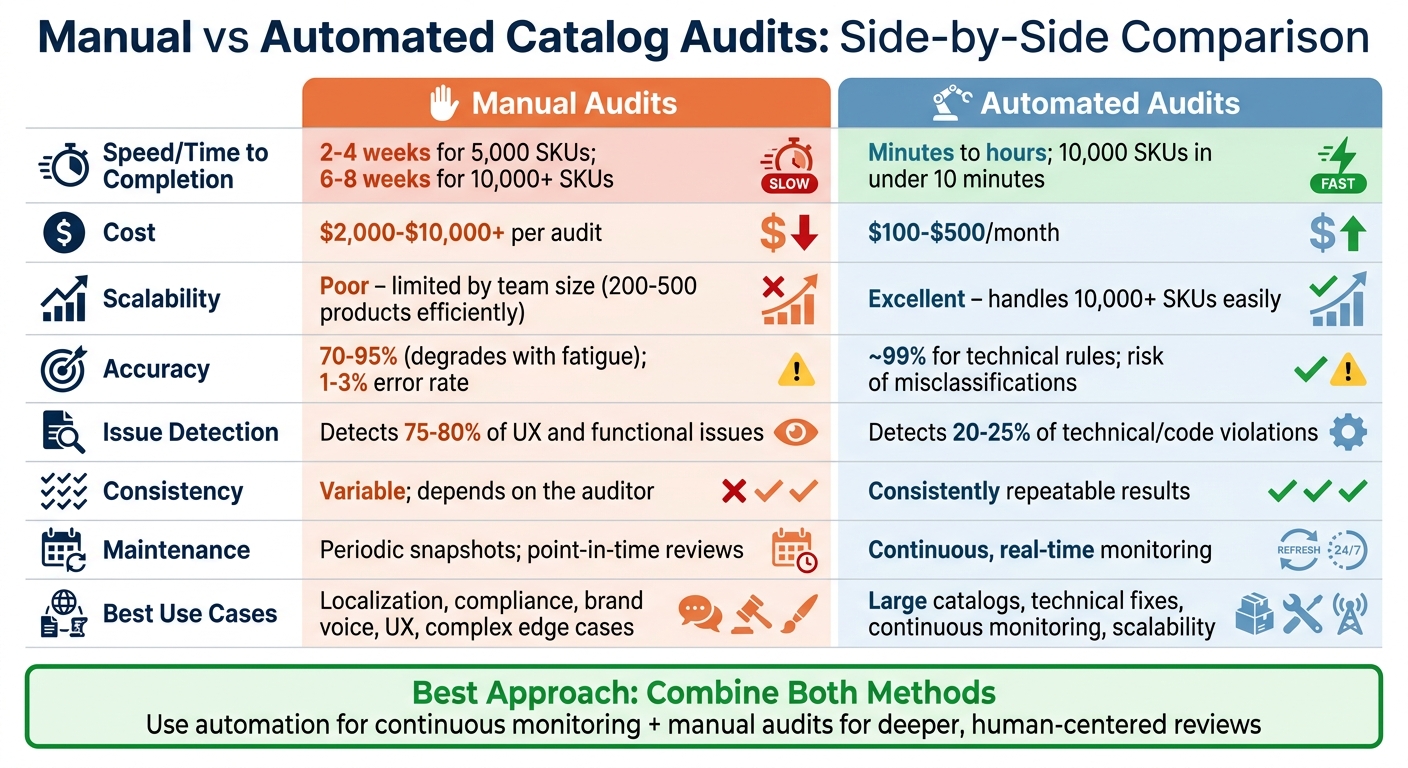
Manual vs Automated Catalog Audits: Speed, Cost, and Scalability Comparison
Optimize Your Shopify Product Catalog with Free Health Audit

sbb-itb-e8e54fb
Manual Catalog Audits: Benefits and Drawbacks
Manual catalog audits involve team members carefully reviewing product data, placing human judgment at the forefront of quality control. This approach has its clear strengths but also comes with notable challenges. Let’s break down the benefits and drawbacks of manual audits.
Benefits of Manual Catalog Audits
One of the standout advantages of manual audits is their attention to detail. Humans can catch subtle inconsistencies that automated tools often overlook. For instance, when standardizing terms like "Gray" and "Grey", manual reviewers can identify regional differences - such as American versus British spelling - and ensure the catalog remains consistent.
Another key benefit is localization. Native speakers can verify translations, SEO keywords, and messaging to ensure they resonate with local audiences. They also check that imagery and messaging align with cultural norms, avoiding potential missteps.
Maintaining a consistent brand voice is another area where manual audits shine. Whether a product description needs to sound playful, technical, or luxurious, human reviewers ensure the tone aligns with brand guidelines while respecting manufacturer-specific requirements.
Manual audits are also crucial for regulatory compliance. Reviewers can confirm that products meet regional standards, like CE marking in Europe or safety warnings required in the U.S. Automated tools may miss these nuanced requirements, making human oversight essential. Additionally, manual audits act as a safeguard against errors in AI-generated content.
"Automated auditing tools can speed up the initial process, but human review is imperative to protecting localization quality and compliance requirements." - Catsy
Finally, manual audits excel in handling complex or edge cases. Products with unique attributes - like a jacket that functions as both outerwear and activewear, or items requiring detailed unit conversions between imperial and metric systems - benefit from the nuanced judgment only humans can provide.
Drawbacks of Manual Catalog Audits
Despite their strengths, manual audits come with some clear limitations. The time commitment is one of the biggest downsides. Reviewing 500–5,000 SKUs can take 2–4 weeks, while larger catalogs of 10,000+ SKUs might require 6–8 weeks.
Scalability is another challenge. As catalogs grow or expand internationally, maintaining manual oversight becomes increasingly difficult. Repetitive tasks, such as unit conversions, size standardization (e.g., U.S. vs. U.K. sizing), or translation checks, can lead to human error over time. What works for a small business can quickly become unmanageable as the product range increases.
Additionally, manual audits require a skilled team. Staff must be familiar with product categories, brand guidelines, and technical requirements. For small businesses, dedicating resources or hiring experts can be a strain, especially when errors in product data can cost companies 15% to 25% of their annual revenue.
Finally, due to their resource-intensive nature, continuous manual auditing is rarely practical. Product data degrades at an estimated rate of 70% annually, but most businesses can only afford to conduct audits quarterly. This gap between audits allows errors to accumulate, potentially affecting the customer experience.
Automated Catalog Audits: Speed and Efficiency
Automated catalog audits transform the way product data is managed, drastically cutting down the time required to scan and review catalogs. For Shopify merchants juggling 500–5,000 SKUs, manual audits can drag on for two to four weeks. In contrast, automated systems can scan a 10,000 SKU catalog in under 10 minutes, and even a massive 50,000 SKU catalog takes less than an hour to process.
These tools also introduce continuous monitoring through scheduled scans, which immediately catch problems as they arise. This is especially critical given how quickly product data can become outdated. Instead of waiting for quarterly audits, automated systems act as an early warning mechanism, detecting "silent failures" - like disappearing filters on large collection pages - before customers notice.
Benefits of Automated Catalog Audits
Speed. Automation processes data at lightning speed, identifying issues across thousands of products in a fraction of the time it would take a human team. This not only saves time but also prevents costly errors. For context, product data errors can result in conversion losses of up to 14% and cost businesses 15–25% of their revenue.
Scalability. Automated systems apply standardized rules and templates consistently across entire catalogs, no matter the size. Whether you're managing hundreds or tens of thousands of SKUs, automation ensures uniformity without adding extra staff. Unlike manual reviews, which are prone to fatigue and inconsistency, automation maintains the same level of precision from the first SKU to the last.
Prioritized Action Lists. These systems don’t just flag issues - they rank them by severity and revenue impact. For example, they might highlight inconsistencies like "Color" versus "Colour", which can disrupt filter functionality, and focus on the top 20% of products that typically recover 80% of potential lost value. This targeted approach helps teams prioritize fixes that matter most.
Reduced Manual Labor. By automating repetitive tasks - like standardizing formats, converting units, and spotting duplicates - teams can redirect their efforts toward strategic initiatives. In fact, automated data cleansing can cut down the time spent on manual fixes by over 80%.
While the advantages are clear, it's important to recognize that automation isn't perfect.
Drawbacks of Automated Catalog Audits
Automation, while powerful, has its limits. The biggest challenge lies in its lack of contextual awareness. For instance, while an automated tool can flag missing alt text, it can't assess whether the existing text is meaningful or relevant. Similarly, while these systems excel at identifying technical issues like color contrast failures or HTML markup errors, they typically catch only 20–25% of complex issues, leaving the majority for human review.
Another limitation is that automated systems rely on predefined rules, which means they might miss unique edge cases. For example, products that span multiple categories or require nuanced regional compliance checks can slip through the cracks. They may also produce false positives or negatives, flagging legitimate variations as errors or overlooking subtle problems. This is why automation works best as a "first pass", directing ambiguous cases to human reviewers for deeper analysis.
"Automation is a tool, not a replacement for judgment." - Priya, Operations Lead
Manual vs Automated Catalog Audits: Side-by-Side Comparison
When it comes to catalog audits, manual and automated approaches each bring distinct strengths to the table. Manual audits shine when human judgment is needed for evaluating complex product details, while automated tools excel at handling large-scale, technical tasks with speed and precision. These differences lead to noticeable variations in cost, time, and overall accuracy.
Manual audits typically cost between $2,000 and $10,000 per cycle and can take weeks to complete. On the other hand, automated systems offer continuous monitoring for a much lower monthly fee - $100 to $500 - and can scan 10,000 SKUs in mere minutes. Beyond the financial aspect, performance metrics further highlight the gap between these methods.
Speed and Accuracy
The major advantage of automated tools is their ability to process catalogs quickly and with high accuracy for technical checks - approximately 99% accuracy. However, they primarily identify 20–25% of technical issues, such as missing alt text or HTML errors. Manual audits, while slower, are better at spotting 75–80% of user experience and accessibility issues, with a lower human error rate of 1–3%. This makes manual audits invaluable for addressing issues that require nuanced understanding, such as usability and accessibility concerns.
Scalability Challenges
Scalability is another area where automated systems outshine manual processes. Manual audits can handle only 200–500 products efficiently before requiring additional staff, making them less practical for large catalogs. Automated systems, however, maintain their efficiency whether you're managing a few hundred SKUs or scaling up to hundreds of thousands. Considering that inaccurate product data can lead to revenue losses of 15–25%, which could average $12.9 million annually, scalability becomes a critical factor for businesses aiming to minimize such risks.
Comparison Table: Manual vs Automated Catalog Audits
| Factor | Manual Catalog Audit | Automated Catalog Audit |
|---|---|---|
| Time to Completion | 2–4 weeks for 5,000 SKUs; 6–8 weeks for 10,000+ SKUs | Minutes to hours; 10,000 SKUs in under 10 minutes |
| Cost | $2,000–$10,000+ per audit | $100–$500 monthly subscription |
| Scalability | Poor; requires more staff as catalog grows | Excellent; scales efficiently without extra headcount |
| Accuracy | 70–95% (degrades with fatigue); 1–3% error rate | ~99% for technical rules; risk of misclassifications |
| Issue Detection | Detects 75–80% of UX and functional issues | Detects 20–25% of technical/code violations |
| Consistency | Variable; depends on the auditor | Consistently repeatable results |
| Maintenance | Periodic snapshots; point-in-time reviews | Continuous, real-time monitoring |
| Best For | User experience and complex interactions | Technical compliance, scalability, and real-time sync |
Each approach has its strengths, and the choice between manual and automated audits ultimately depends on the specific needs of your catalog. Whether it's the human touch for user experience or the efficiency of automated tools for technical compliance, understanding these differences is key to making the right decision for your business.
When to Use Manual Catalog Audits
There are times when human judgment is non-negotiable, especially when your Shopify catalog involves technical specs, regulatory details, or brand-sensitive content. Automation can only take you so far - AI tools might misinterpret reference codes or ignore character limits, leading to costly errors.
Take complex data normalization, for example. Imagine your catalog lists "Burgundy", "Red", and "Crimson" as separate filter options for the same product family. Or perhaps you see "500ml", "0.5 L", and "16.9 oz" used inconsistently. Automated tools can’t make sense of these discrepancies or decide which terms to standardize. A manual audit helps you build a clear, consistent dictionary of terms, ensuring smooth storefront navigation. Without this, broken filters and mismatched values can frustrate shoppers and hurt your sales.
For SEO-focused reviews, manual checks are equally critical. Automation might flag missing keywords, but it can’t tell if your product descriptions feel natural or if they’re crammed awkwardly with search terms. Similarly, while AI can detect missing alt text, only a person can verify if "Blue running shoe with white sole" accurately describes the image for visually impaired users.
Regulatory compliance is another area where manual audits are a must, especially if you’re selling across different regions. Whether it’s ingredient lists for cosmetics, CE markings for European markets, or localized safety warnings, these details require careful human oversight. Mistakes in product data can have serious consequences: they could cost you up to 23% in clicks and 14% in conversions, and 86% of shoppers are unlikely to return after encountering inaccurate information.
To get started, prioritize your efforts. Begin by auditing your top 20 best-selling products to identify recurring issues. For larger catalogs with over 5,000 SKUs, target fields that directly impact filters, search functions, and return rates - these areas are most likely to affect your bottom line. Don’t overlook hidden metafields that feed into specification tables and Google Shopping integrations, as errors here can disrupt navigation and hurt your visibility.
When to Use Automated Catalog Audits
Automation becomes a game-changer once your Shopify catalog surpasses 100 SKUs. At this point, managing audits manually becomes overwhelming, and when you hit 1,000+ SKUs, it can quickly turn into a staffing issue. For smaller teams, automation shifts catalog management from a tedious, manual task to a streamlined, scalable process.
For larger catalogs, the benefits of automation are undeniable. Manual cleanup simply doesn’t scale when you’re handling thousands of products. Automated audits ensure consistency across product titles, descriptions, and attributes by standardizing variations (like "Color" vs. "Colour" vs. "Color:"). They also catch hidden issues, such as disappearing filters or empty search results, that can disrupt your storefront.
These tools perform daily scans to identify problems caused by theme updates, new apps, or bulk CSV imports. This is especially important during high-traffic times - like after major theme changes or before seasonal campaigns - to ensure landing pages and checkout flows run smoothly. For instance, in October 2025, retailer Daniel House used catalog automation to cut onboarding time for 200 SKUs from 40 hours a month to just 30 minutes. This efficiency allowed them to scale to 1,000 SKUs monthly without hiring additional staff.
For businesses with multiple stores or international operations, automation is essential for maintaining consistency across regional stores. Tasks like currency conversion, unit measurement adjustments, and localization become much easier. Automated systems also sync pricing and inventory across all sales channels in real time, avoiding outdated stock levels or inconsistent pricing.
The time and cost savings are substantial. Manual product data entry can take 20–30 minutes per SKU, but AI-powered tools slash that to under 2 minutes. Automated accessibility scans typically cost $100 to $500 per month, compared to $2,000 to $10,000+ for manual audits. By saving over 15 hours a week on catalog tasks, teams can focus their energy on strategic growth. These advantages make it clear when automation becomes essential, allowing businesses to blend manual and automated strategies for optimal catalog management.
Using Manual and Automated Audits Together
Combining manual and automated audits is the key to effective catalog management. Each method has its strengths: automated audits excel at catching technical issues quickly, while manual audits handle the nuanced, human-centered elements that automation can't fully grasp. Together, they create a balanced approach that ensures both technical accuracy and a user-friendly experience.
Automated tools are perfect for daily scans, flagging issues like missing alt text or broken links. On the other hand, manual audits focus on areas that require human judgment, such as assessing the quality of product descriptions or testing how well keyboard navigation works. By blending these approaches, you can achieve both precision and a deeper understanding of user needs.
Daily automated checks catch problems early, but manual audits - conducted monthly or quarterly - dive deeper into user experience, structural details, and high-priority pages. This layered strategy ensures automation isn't just applied to disorganized or inconsistent data. As Shopify partner Ramesh Babu J aptly puts it:
"Deploying structure on top of chaos doesn't fix the chaos - it buries it. And buried problems surface later, at the worst possible time."
Before automating, it's crucial to standardize your data manually. Fix inconsistencies like mismatched tag taxonomies (e.g., "S" versus "Small"), establish clear naming conventions, and clean up variant logic. Automation relies on clean, organized data to work effectively. Once the foundation is solid, automation can maintain consistency while manual audits prioritize fixes that align with your business goals.
For critical areas like checkout flows and product filtering, manual validation is essential. These high-stakes touchpoints require functional testing that automation alone can't handle. This ensures both technical accuracy and a seamless user experience. Meanwhile, automation can manage repetitive tasks such as inventory updates, metadata checks, and technical compliance, freeing up your team to focus on driving growth.
Shopify-Specific Factors to Consider
Shopify's technical setup comes with its own set of challenges. For example, the platform caps smart collections at 128 metafield definitions and 60 selection conditions per collection. Once you get close to these limits, managing collections manually can become tricky and error-prone. Automated audits can help by flagging when you're nearing these thresholds, preventing potential issues like accidental deletions. These constraints make automation an essential tool for handling Shopify's data complexities.
Another major hurdle is metafield sprawl. Isaac Lewin, a Shopify Architect, highlights this issue:
"Standard Shopify search ignores metafields entirely. A customer searching 'GOTS-certified organic cotton' will get zero results even if you have 40 products with that certification stored in a metafield".
This creates a "hidden data layer" that Shopify's admin tools may overlook. For stores relying on external feeds or headless setups, this fragmented data can make centralized management nearly impossible without API-native tools.
Headless architectures add another layer of complexity. When the front-end is separated from Shopify's back-end, inconsistencies in metafield naming - like specs_material versus material_type - can cause filtering issues without any visible errors. As Performantcode.io explains:
"Complex Shopify catalogs rarely fail because Shopify lacks features. They fail because the data model underneath them becomes unmanageable".
Automated audits are invaluable here, as they can systematically verify that your product data - variants, metafields, inventory - is synced across all layers. Manual checks, on the other hand, struggle to validate API outputs effectively.
For stores managing 2,000 variants per product (Shopify's 2026 API limit), manual audits are simply not feasible. Automated tools using cursor-based pagination can handle catalogs exceeding 50,000 SKUs without hitting bottlenecks. However, automation only works well if your data is clean. Before implementing automated audits, it's critical to establish a canonical dictionary to standardize values and fix inconsistencies like "500ml" versus "0.5 L".
To improve data accuracy, define essential fields based on product categories - such as voltage for electronics or material for apparel. You can also implement a Product Quality Score (0–100), weighted by factors like metafield completeness (30%), SEO readiness (30%), and value consistency (20%). This scoring system can help identify when manual reviews are necessary, ensuring that data standards are applied in a way that accounts for category-specific needs.
Conclusion
Manual and automated audits each play a specific role in managing Shopify catalogs. Manual audits are ideal for subjective tasks like assessing localization, user experience, and content relevance. However, they can be time-consuming - taking anywhere from 2 to 8 weeks for most Shopify merchants - and prone to human errors, such as inconsistent unit conversions. On the other hand, automated audits excel in speed and consistency, quickly identifying technical issues like broken links or missing alt text. Yet, they often fall short when it comes to detecting functional or contextual problems. This makes a hybrid audit strategy the most practical solution.
Relying on just one method isn't enough. Errors in product data can lead to significant losses - up to 23% fewer clicks and 14% fewer conversions. The most effective approach combines the strengths of both methods: daily automated scans for ongoing technical monitoring and periodic manual audits (monthly or quarterly) for deeper evaluations of user experience and compliance. Automation ensures efficiency, while manual reviews bring the precision needed for brand-sensitive areas like checkout flows, complex categorization, and high-impact content.
Start by manually cleaning your data. Fix issues like duplicate SKUs and missing attributes to avoid the "garbage in, garbage out" problem. Once your data is clean, use automation to scale ongoing maintenance, flagging ambiguous issues for human review. Prioritize the top 20% of your revenue-driving products to quickly recover lost value.
Ultimately, your audit strategy should reflect your store's size and complexity. For Shopify merchants managing large catalogs with metafield sprawl, headless setups, or nearing the 2,000-variant-per-product limit, automated tools are critical. They help maintain filter accuracy and ensure smooth search performance throughout your store. Refining your audit process not only keeps your catalog in check but also enhances user experience and boosts overall store performance.
FAQs
What should I audit first in my Shopify catalog?
To get ready for scaling internationally, start by reviewing your product attributes. Ensure they are consistent across different markets, languages, and currencies. This step is crucial for maintaining a seamless shopping experience for customers worldwide.
Next, take a closer look at your collection structure and naming conventions. Organizing these effectively can make your products easier to find, improving discoverability for users navigating your site.
If you’re managing a large inventory, tackle data quality issues as a priority. Missing or inconsistent product information can lead to problems with search functionality, filtering options, and - most importantly - customer trust. Addressing these gaps early will save you headaches down the line.
How often should I run automated audits vs manual reviews?
The right frequency for catalog audits largely hinges on how complex your catalog is and what it requires. Automated audits work best on a weekly or monthly schedule. They help spot inconsistencies and keep your SEO in good shape without much manual effort. On the other hand, manual reviews are more suited for quarterly or bi-annual sessions. These allow for a more thorough examination, especially for intricate or high-value products. Combining both - a mix of regular automated checks and occasional manual reviews - offers the perfect balance of efficiency and attention to detail.
How do I know if my catalog data is “clean enough” to automate?
To figure out if your catalog data is ready for automation, start by assessing its quality. Look for standardized and accurate product details, such as titles, descriptions, prices, and metadata. Your data should be complete, consistent, and free of errors.
Perform a thorough audit to spot any gaps or inconsistencies, like outdated or missing information. If your data checks these boxes and is largely standardized and error-free, it’s a good sign that automation could be a viable next step.