
How Metafields Impact Shopify Filter Performance
Metafields in Shopify allow you to store custom data for products, collections, and more - making it possible to create advanced filters for better product discovery. However, poorly structured metafields can lead to slow filters, incorrect results, or even broken functionality. Here's what you need to know:
- Key Problems: Overuse, duplication, and large metafield sizes can cause performance issues.
- Impact on Filters: Slow queries, timeout errors, and limits on unique filter values can frustrate customers.
- Optimization Tips: Use consistent naming, reduce redundancy, and leverage Shopify's API updates to improve speed and reliability.
- Tools to Help: Apps like FacetGuard can audit your metafields and highlight issues like missing data or excessive filter values.
Metafields are powerful but require proper management to avoid performance bottlenecks. Structured data and optimized queries are essential for keeping filters fast and accurate, especially for large catalogs.
Shopify Category Metafields Tutorial - What are the Benefits & How to Use Them
sbb-itb-e8e54fb
Performance Problems Caused by Metafields
Metafields offer a lot of flexibility for customization, but when poorly managed, they can cause serious performance issues - especially with filtering. Mismanagement can lead to anything from slow page loads in smaller collections to complete filter breakdowns in larger catalogs. As Performantcode puts it:
"Metafields start as a flexible solution and gradually become a liability when they grow without structure."
Overuse and Poor Metafield Management
One major issue is metafield sprawl. This happens when multiple metafields are created for the same attribute - like specs_material, product_material, and material_type all being used for fabric details. Such duplication creates inconsistent logic, making filters unreliable and destabilizing themes.
Another common problem is redundant data storage. For example, storing the same information across product metafields, variant metafields, and tags creates multiple "sources of truth." This not only increases the data load but also risks conflicts when filters try to reconcile differing values. Shopify allows up to 256 metafield definitions per resource type, but only 128 can be used for admin filters or smart collections.
Large JSON metafields are another headache. Some stores use JSON metafields to store complex configurations, pricing rules, or full product specifications. This can lead to massive files that are difficult to process efficiently. Shopify Staff member James Lunan highlighted the issue:
"What we're seeing is extremely large JSON files with largely repetitive data that is pulled into storefronts and parsed on the front end... [Metaobject references] would be smaller in size, and improve storefront performance."
To address this, Shopify reduced the maximum metafield size by 93% starting with API version 2026-04. JSON metafields are now capped at 128KB, while other types are limited to 64KB. These changes aim to mitigate the performance drain caused by oversized metafields.
Query Delays and Timeout Risks
Structural issues aside, the complexity of metafield queries can also slow filters down. Shopify’s documentation warns:
"Complex metafield queries can be slower than standard field queries. Consider caching results when appropriate."
This performance gap becomes especially noticeable in large catalogs. Stores with 95,000+ products have reported internal server errors or empty results when querying by metafield, particularly for products listed later in collections. Without proper pagination and caching, these delays can frustrate customers, leading to abandoned searches.
Another challenge lies in filter value display limits. Shopify storefront filters can show a maximum of 100 unique values per metafield, while the Search & Discovery app extends this to 1,000. If a metafield contains more unique values - like 800+ color variations - filters may fail to update dynamically when customers select additional facets, leaving them stuck.
Lastly, excessive theme requests can drag performance down further. When themes or apps request all metafields instead of just the necessary ones, Shopify has to process and transmit unnecessary data. This bloats payload sizes, slows time-to-first-byte, and reduces caching efficiency. The result? A slower storefront experience, especially for mobile users or those on slower internet connections.
How to Optimize Metafields for Faster Filters
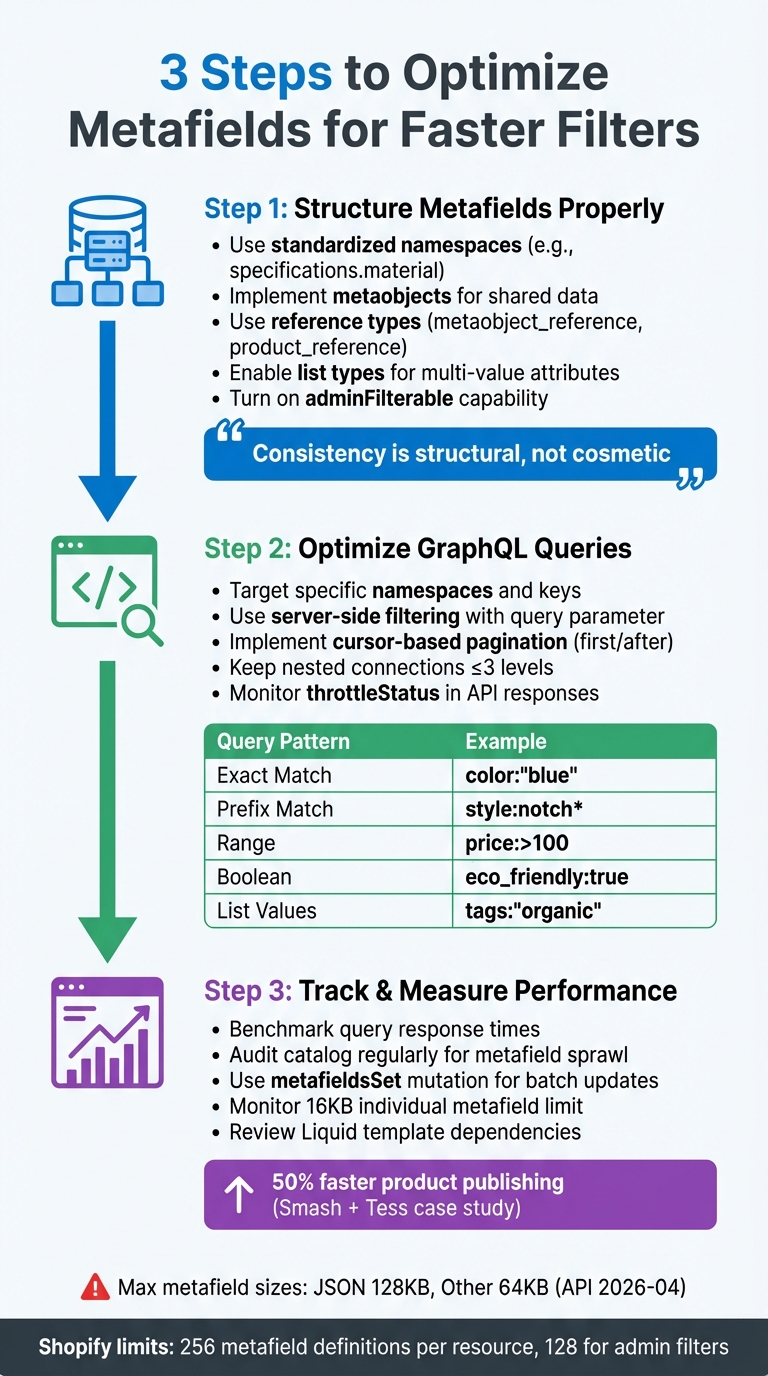
Shopify Metafield Optimization Guide: 3-Step Process for Faster Filters
Metafields themselves aren't inherently slow; the real issue lies in how they are structured and queried. As Performantcode.io explains:
"Metafields are not inherently slow. Problems arise when they're used without structure".
By treating metafields as a structured data schema rather than a collection of random notes, you can significantly improve the speed and reliability of your filters.
Structuring Metafields Properly
Start with standardized namespaces like specifications.material and use metaobjects for shared data. This approach reduces redundancy and improves query efficiency. Performantcode.io emphasizes the importance of consistency:
"Consistency is not cosmetic. It's structural. Without consistent naming, your Shopify product data structure becomes unpredictable".
When linking products to other resources, use reference types such as metaobject_reference or product_reference. These references allow Shopify to resolve relationships more efficiently through the Storefront API.
For attributes with multiple values, like "Sustainable" and "Organic", opt for list.single_line_text_field or list.metaobject_reference. Shopify's query engine will then match any value in the list to a search term, making filters more adaptable. Just make sure the adminFilterable capability is enabled on metafield definitions for better query performance.
GraphQL Query Optimization
Once metafield structures are standardized, focus on refining your GraphQL queries. Target specific namespaces and keys instead of fetching all metafields for a resource. This reduces payload size and speeds up response times. Use server-side filtering with the GraphQL query parameter (e.g., query: "metafields.namespace.key:value") to avoid pulling all resources and filtering them client-side.
For large datasets, implement cursor-based pagination using first and after to prevent timeouts. Pay attention to the throttleStatus object in API responses, as complex metafield queries can consume more points than standard field queries. Shopify recommends keeping nested connections to three levels or fewer to maintain performance.
Shopify’s documentation warns:
"Complex metafield queries can be slower than standard field queries. Consider caching results when appropriate".
Test your queries in GraphiQL and use reusable fragments to ensure consistency.
| Query Pattern | Syntax Example | Supported Types |
|---|---|---|
| Exact Match | color:"blue" |
All types (case-sensitive for text) |
| Prefix Match | style:notch* |
Text types only |
| Range | price:>100 |
Numeric and Date types |
| Boolean | eco_friendly:true |
Boolean (no quotes) |
| List Values | tags:"organic" |
Matches if any value in the list matches |
By optimizing your queries, you can achieve noticeable performance gains. The next step is to measure these improvements to ensure they hold up over time.
Tracking and Measuring Filter Performance
With proper structuring and optimized queries in place, it's essential to track filter performance. Use benchmarking tools to compare query response times for metafield filters against standard queries.
Shopify has introduced a 16KB limit per individual metafield to address performance issues caused by large JSON files on the front end. Darius-Shopify, a Shopify staff member, explained:
"We've been facing significant challenges with large metafields impacting storefront performance, and we need a solution that mitigates these issues. Limiting metafields to 16KB is the simplest safeguard".
Regularly audit your catalog to prevent metafield sprawl, and review how heavily your Liquid templates rely on metafields for layout decisions. When updating metafields, use the metafieldsSet mutation to batch multiple values in a single API request instead of making separate calls.
In February 2023, Smash + Tess adopted Shopify metaobjects to manage complex data. This change increased their speed of publishing products from "draft" to "active" by 50% and cut the time to publish new collection release templates from over an hour to just a few minutes.
Consistent monitoring and auditing ensure the benefits of optimized metafields are maintained, closing the loop on performance improvements.
How FacetGuard Fixes Metafield Filter Problems
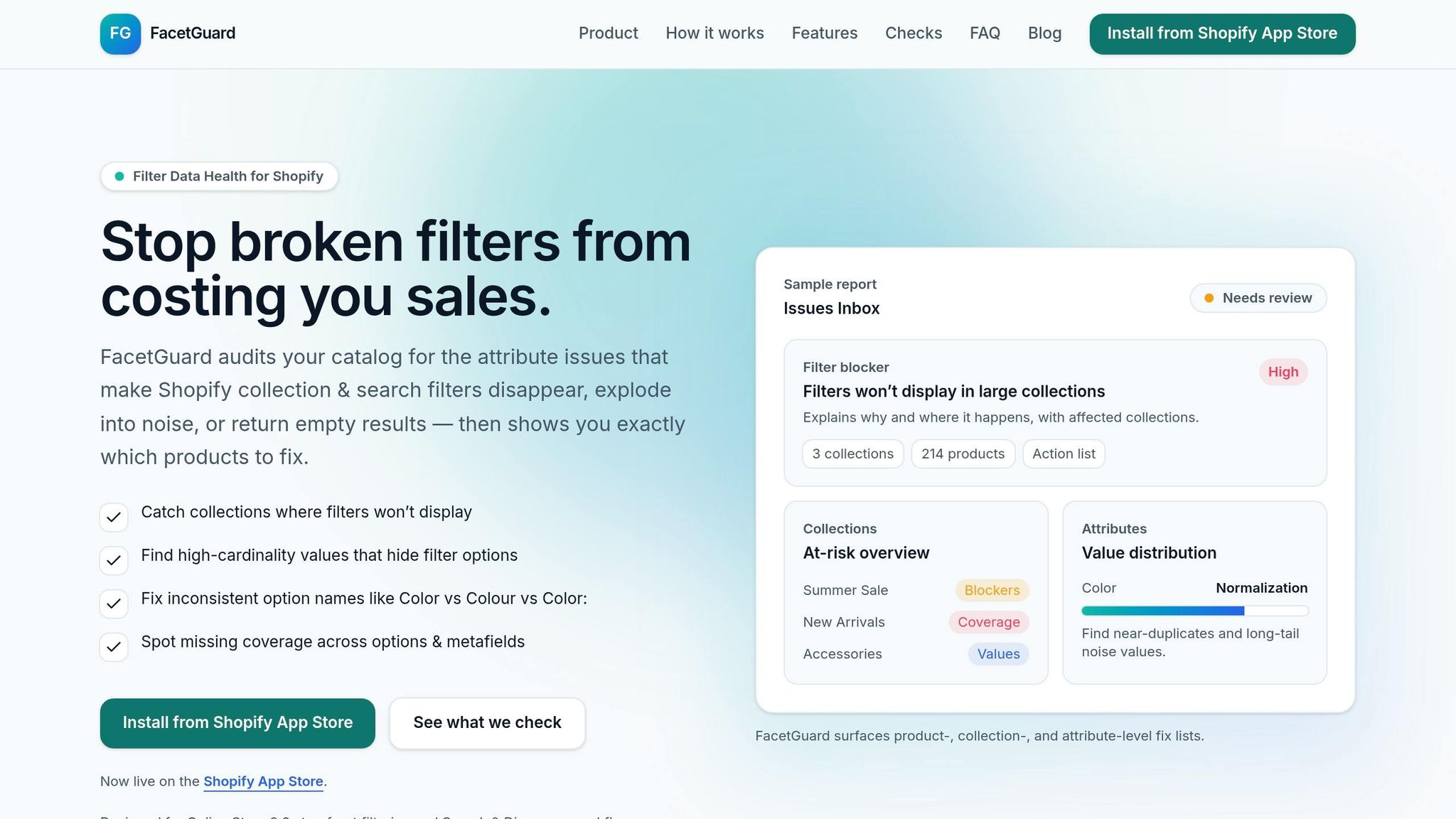
Even with proper structuring and optimized queries, many filter-related issues stem from inconsistent data, such as mismatched naming conventions or missing values. FacetGuard, launched on the Shopify App Store on January 13, 2026, tackles these problems head-on by performing read-only audits of catalog attributes and filter configurations. Its purpose is to deliver actionable insights that directly address these persistent challenges.
The app identifies two major problems that often disrupt filter functionality:
- Visibility Blockers: These occur when collections exceed Shopify's size limits, causing filters to disappear entirely.
- Cardinality Explosion: This happens when attributes contain too many unique values, creating unnecessary noise that clutters or hides filter options from shoppers.
For headless or API-driven storefronts, FacetGuard also evaluates metafield types and schema configurations that can limit filtering capabilities.
Metafield Audit Features
FacetGuard equips merchants with tools to diagnose and prioritize filter issues effectively. Key features include:
- Issues Inbox: A dashboard that organizes filter problems by severity, helping merchants dive into specific products or variants causing issues.
- Filter Blockers Scanner: Explains why filters fail to appear on certain pages, offering clarity on problematic areas.
- Attribute View: Provides detailed breakdowns of individual attributes like "Color" or "Material", highlighting value distributions and identifying messy data sources.
The app also excels at spotting subtle data issues. For example, it detects normalization problems like near-duplicate option names caused by inconsistent casing, punctuation, or extra spaces. It calculates "Coverage Gaps" to show the percentage of products missing critical metafield or option values and flags variant inconsistencies that can lead to confusing filter results.
Practical Guidance for Merchants and Developers
FacetGuard doesn’t just identify problems - it provides practical solutions. Merchants can export CSV action lists for bulk updates and schedule scans to catch new issues as they arise during product imports. The app also features an "Ignore/Resolved" workflow, allowing teams to minimize noise in the Issues Inbox and focus on high-priority fixes.
As FacetGuard explains:
"FacetGuard audits your catalog for the attribute issues that make Shopify collection & search filters disappear, explode into noise, or return empty results - then shows you exactly which products to fix".
Currently available for free on the Shopify App Store, FacetGuard is tailored for Online Store 2.0 filtering and Search & Discovery workflows.
Conclusion
Optimizing metafields is at the heart of creating fast and reliable filtering in Shopify. While metafields can expand Shopify's catalog capabilities, poor management can lead to performance issues. Problems like inconsistent naming, missing values, or an excessive number of unique options can cause filters to fail. As FacetGuard aptly puts it:
"Filter issues often don't look like errors - they look like 'the storefront is weird today'".
To ensure efficient filtering, it's crucial to treat metafields as a structured schema rather than as informal notes. This means adopting clear naming conventions, enabling admin filtering, and addressing cardinality issues to prevent performance bottlenecks. Shopify's tighter metafield size restrictions further emphasize the need for strong data management practices.
These technical adjustments aren't just about backend efficiency - they directly enhance the experience for both merchants and customers. Good data management ensures that filters work seamlessly, allowing shoppers to explore catalogs efficiently. On the other hand, poorly managed filters lead to frustrating experiences, like endless scrolling or incomplete search results. Performantcode.io highlights this point well:
"The biggest performance issue isn't page speed. It's team speed. When metafields are poorly governed... this slows the entire organization".
For merchants handling large, complex catalogs, automated audits can shift the focus from constantly fixing issues to proactively preventing them. By identifying normalization problems, visibility gaps, and other potential blockers, tools like FacetGuard's read-only audits help maintain clean and effective filters - ensuring customers enjoy a smooth shopping experience.
Ultimately, clean and functional filters are essential for turning casual browsers into loyal buyers while keeping operations running smoothly.
FAQs
When should I use a metaobject instead of a JSON metafield?
When dealing with standalone, relational data entities that need to exist independently and connect to multiple resources, consider using a metaobject. For example, this works well for things like designer profiles or size charts that may be shared across various parts of your system.
On the other hand, if you're working with simple key-value pairs tied directly to a single resource, JSON metafields are a better fit. These are ideal for storing straightforward data within one specific resource.
How do I reduce too many unique filter values in a metafield?
To keep the number of unique filter values in a metafield manageable, focus on reducing its variety by grouping similar entries and using consistent naming conventions. For instance, stick to a single term like "Red" rather than mixing variations such as "red" or "RED". Eliminate values that are either unnecessary or rarely used, so the filters emphasize relevant options. Tools like FacetGuard can assist in spotting and addressing these high-variety issues, enhancing filter functionality and creating a smoother user experience.
What’s the fastest way to find which products are breaking my filters?
To quickly spot products that are causing filter problems, consider using a tool like FacetGuard. This tool scans your catalog for attribute issues, such as missing or inconsistent metafields, which often result in filter malfunctions. Plus, FacetGuard generates prioritized fix lists, making it easier to identify and address problematic products, collections, and attributes, ensuring a smoother resolution process.