Why ProductFilters Fail in Storefront API
ProductFilters in Shopify's Storefront API often fail due to setup errors, data inconsistencies, and API limitations. These issues disrupt filtering on headless storefronts, leading to poor user experiences and lost sales. Here’s a quick breakdown of the main problems:
- Manual Setup Errors: Filters like product type, vendor, and metafields require proper configuration in the Search & Discovery app. Missing steps or mismatched data (e.g., case sensitivity) often cause filters to fail silently.
- Collection and Search Limits: Filters vanish or malfunction when collections exceed 5,000 products or search results surpass 100,000 products.
- Pagination Bugs: Cursor errors and API quirks make it hard to retrieve large datasets, especially in paginated views.
- Multi-Variant Issues: Strict matching rules and high-cardinality attributes (e.g., too many unique filter values) lead to unpredictable results or missing filters.
Key Solutions:
- Standardize metafield names (lowercase) and ensure correct filter types (
single_line_text_field,number_integer, etc.). - Use product tags for large collections or switch to
searchqueries for better filtering. - Regularly audit catalog data for consistency, incomplete attributes, and duplicate entries.
These problems stem from how Shopify processes data, but careful configuration and proactive catalog management can prevent most failures.
Why ProductFilters Fail: Main Causes
Each issue not only disrupts data retrieval but also impacts the overall customer experience.
Metafield Collection Misconfigurations
A lot of filter failures stem from setup mistakes in the Search & Discovery app. Metafield filters don’t work by default - they need to be enabled manually under Online Store -> Navigation -> Collection and search filters. One common oversight is forgetting to check the "Available to Storefront" box when defining the metafield in Settings > Custom data. Without this step, the API ignores the filter entirely.
Another issue? Metafields are always converted to lowercase when created. If you use uppercase letters in your GraphQL queries, the filters fail silently. As johncraigcole from Shopify explains:
"Check that for the variant metafield filter the case of the namespace and key in the filter are correct. If these metafields were created with a definition in the admin or API they should be lower case. If the case is wrong it will be as though the filter was not applied".
Developers also often query the wrong data level. For example, they might mistakenly query variantMetafield for data stored at the product level - or the other way around. Additionally, the Storefront API only supports filtering on specific metafield types: single_line_text_field, number_integer, number_decimal, and boolean. Using unsupported types like multi-line text or JSON will result in filtering failures.
But metafield misconfigurations aren’t the only problem - pagination errors can also cause major headaches.
Pagination and Cursor Errors
Pagination often breaks due to malformed cursors. In some cases, the API returns cursors that become invalid when used in subsequent requests. This is especially true for objects like Checkout.lineItems or Metafield.references. Even when hasNextPage: true indicates there’s more data, users might not be able to access it.
There’s also a specific bug where invalid query parameters cause the endCursor to match the input after cursor, creating an endless loop. As Kyle noted:
"Any paging logic that uses hasNextPage and endCursor to get the next page will request the same page over and over again".
When collections grow large, these problems become even more pronounced. In March 2023, AgRachithHegde reported filtering a collection with over 1,000 products by metafields. Instead of returning the expected 91 products, the filter only returned 28. The merchant confirmed:
"When the products in a collection are more than 1000 this issue is there. For the filter we are not able to fetch proper product".
But the challenges don’t stop there - products with multiple variants add another layer of complexity.
Multi-Option Product Challenges
Filtering becomes tricky when dealing with products that have multiple variants. A single product can match several filter values at once, which often leads to what developers call "confusing intersections." This results in filters behaving unpredictably.
The Storefront API also enforces exact, case-sensitive matches between filter inputs and variant option values. For instance, a filter for "red" won’t match a variant option stored as "Red." This strict matching often causes filters to exclude relevant results unintentionally. Shopify’s johncraigcole advises:
"The other thing to check is just make sure your
skin_tonefilter is a case sensitive match to the variant metafield value".
Another issue is high cardinality, which occurs when there are too many unique values for variant options. This can cause filters to behave erratically or even disappear. In catalogs with over 95,000 products, variant filters might only work for items near the beginning of the collection. Products further down the list often return empty results or trigger server errors.
sbb-itb-e8e54fb
Data Patterns That Cause Filter Failures
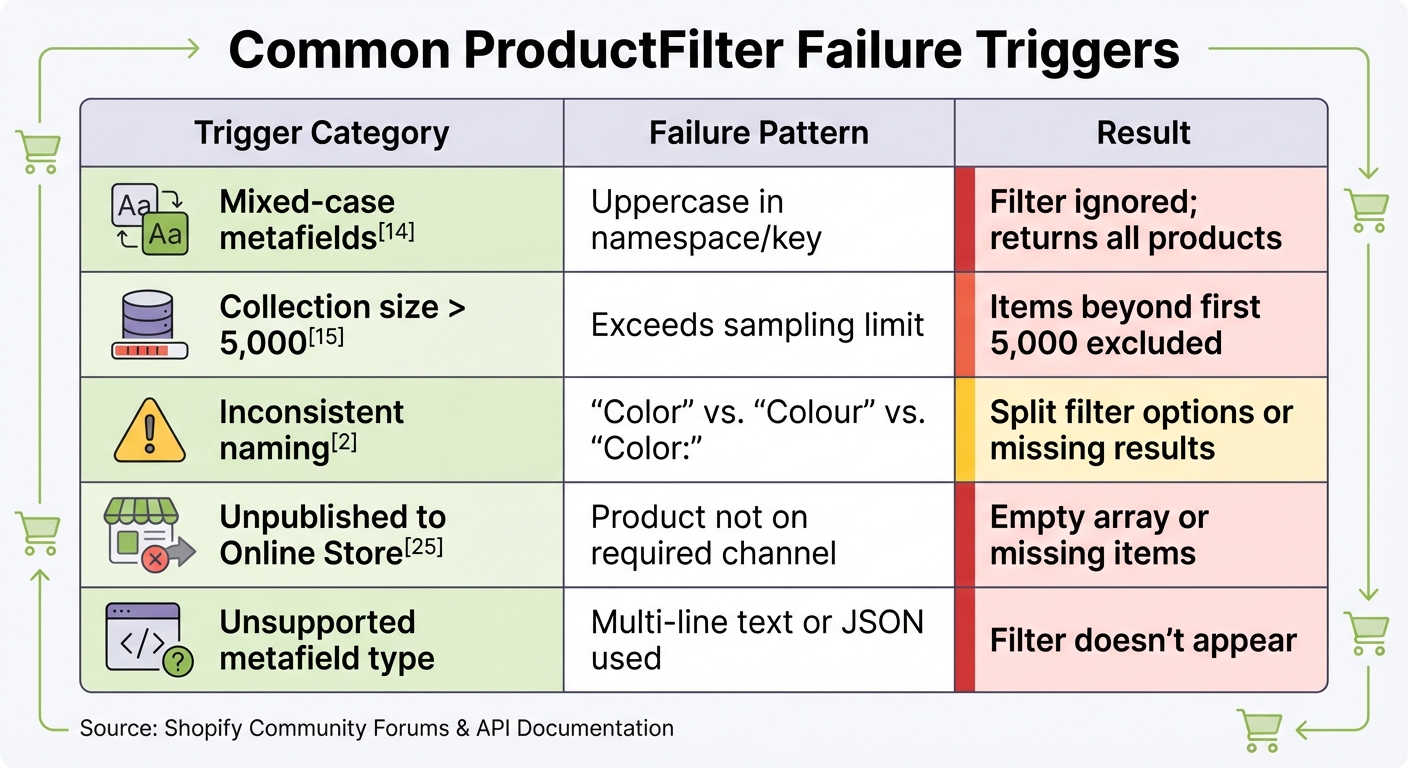
Common Shopify ProductFilter Failure Triggers and Solutions
When it comes to troubleshooting filter failures in Shopify's Storefront API, understanding the underlying data patterns is crucial. These failures often follow predictable patterns tied to how the API processes catalog data, and recognizing them can save a lot of headaches.
Common Triggers and Error Messages
Filter failures can be sneaky. Instead of clear error messages, they often show up as silent failures - where products are returned, but the filters array comes back empty, even when the admin configuration seems correct. One common issue stems from mixed-case metafields. As johncraigcole from Shopify points out:
"Check that for the variant metafield filter the case of the namespace and key in the filter are correct. If the case is wrong it will be as though the filter was not applied".
Another factor is the filtering threshold. Shopify recently increased the limit from 1,000 to 5,000 products per collection, but anything beyond that still won’t appear in filter results. For instance, in a catalog with 95,000 products, the first batch of items may display correctly, but later ones might result in empty filter data.
Publishing status also plays a role. Filters only work if products are published to both the Online Store and custom storefront channels. As _JCC from Shopify explains:
"The faceted filtering is tightly coupled to the Shopify online store channel, and only products published to that channel will be available to use in collection filtering".
Here’s a quick reference table for these triggers:
| Trigger Category | Failure Pattern | Result |
|---|---|---|
| Mixed-case metafields | Uppercase in namespace/key | Filter ignored; returns all products |
| Collection size > 5,000 | Exceeds sampling limit | Items beyond first 5,000 excluded |
| Inconsistent naming | "Color" vs. "Colour" vs. "Color:" | Split filter options or missing results |
| Unpublished to Online Store | Product not on required channel | Empty array or missing items |
| Unsupported metafield type | Multi-line text or JSON used | Filter doesn’t appear |
Impact of Filter Failures on Storefronts
From a shopper’s perspective, filter failures don’t look like bugs - they just make the storefront confusing. When filters disappear or return incomplete results, customers lose the ability to refine their search, leading to what’s called "empty browsing". This forces them to scroll endlessly through products without finding what they need.
High-cardinality attributes are another headache. These occur when a single filter has too many unique values, creating "long-tail noise." For example, instead of a clean list of 5-10 color options, shoppers might see 50 variations like "Red", "red", "RED", and "Red ". Similarly, near-duplicate attribute names can split filter results, making the experience even worse.
In extreme cases, large catalogs can trigger a 500 Internal Server Error when using metafield filtering. From the customer’s viewpoint, this might look like products failing to load or incomplete results that don’t align with their search intent.
Available Workarounds for Common Issues
There are a few proven methods to address these issues:
-
Large collections (over 5,000 products): Use product tags instead of metafields for filtering, as tags handle large datasets more reliably. Alternatively, switch to
searchorpredictiveSearchqueries instead of the standardproductsconnection. These options support product metafield filtering without being tied to collection limits. - Case sensitivity problems: Standardize all metafield namespaces and keys to lowercase during setup. Ensure that your GraphQL queries match these exact lowercase values to prevent silent failures.
-
Empty filter arrays: Double-check that metafield filters are enabled in the Search & Discovery app under "Online Store → Navigation → Collection and Search Filters". If issues persist, try using the
searchAPI (e.g.,search(query: "...", types: [PRODUCT])), which reliably returnsproductFilters. - High-cardinality attributes: Audit your catalog for inconsistent naming and consolidate near-duplicate values. Implement a structured schema to ensure data consistency. Tools that clean up data - like removing trailing spaces, unifying spelling, and standardizing capitalization - can prevent these issues from happening in the first place.
Case Study: Filter Failures in Headless Storefronts
Pagination and API Version Mismatches
Let’s dive into a real-world example of how filter issues can wreak havoc in headless storefronts. In February 2025, developers working on Shopify's Hydrogen demo store stumbled upon a bug that caused filtered searches to return zero results after pagination - even when matching products were available in the catalog.
Here’s what happened: when users selected "Next Page", the URL retained a pagination cursor that the API failed to reset after applying a filter. This meant the filter only worked on the currently visible page of products. As wizardlyhel from Shopify's Hydrogen team explained:
"When the filter is applied, it is only applying to the products in the specific paginated page. Thus, you get no products with [the] filter".
The issue was resolved in March 2025 by Shopify contributor blittle, who introduced a fix to clear pagination cursors whenever a filter was applied. However, this wasn’t the only problem. API version mismatches - like differences between the 2023-01 version and later releases - created additional headaches. For instance, omitting required parameters like first or last could lead to empty filters or even internal errors. In headless setups, these inconsistencies only add to user frustration and degrade overall performance.
Impact on User Experience and Conversion Rates
These technical glitches don’t just stay behind the scenes - they have a direct and noticeable impact on shoppers. One incident highlighted a 69% drop in displayed inventory accuracy when filters failed to show all matching products. Essentially, nearly three-quarters of relevant items were hidden from view.
But the damage doesn’t stop there. When filters malfunction - returning "0 results" for valid searches or disappearing entirely after pagination - shoppers are left with an incomplete browsing experience. This can lead to endless scrolling, frustration, or even site abandonment. In some cases, filter issues in headless storefronts also caused intermittent "ghosting", where filter values vanished without any backend changes. These kinds of disruptions can severely undermine trust and, ultimately, conversion rates.
How FacetGuard Fixes ProductFilter Failures
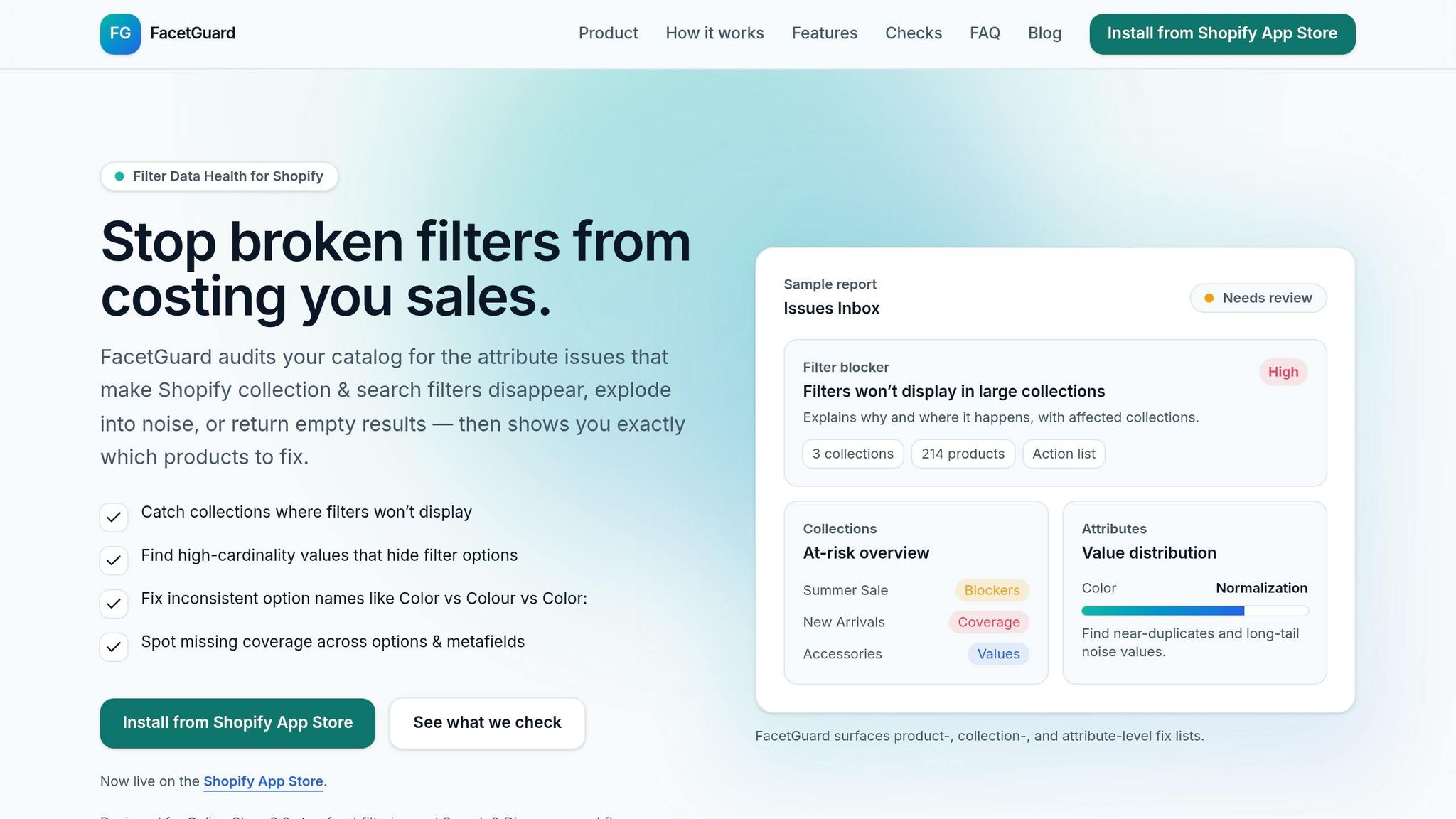
FacetGuard steps in to resolve filter issues before they affect users by auditing your catalog for attributes that could cause problems.
Filter Blockers Scanner
The Filter Blockers Scanner tackles challenges like metafield issues, pagination limits, and multi-option complexities. It works proactively to catch silent failures - a situation where filters disappear without triggering errors. For example, it flags collections that exceed Shopify's internal size limits, such as the 5,000-product cap for collections or the 1,000-product cap for search results. These are flagged as high-severity problems.
For stores using headless implementations, the scanner also checks metafield types and schema configurations to ensure compatibility with the Storefront API. This prevents filters from failing to generate right from the start.
Issues Inbox and Prioritization
After scanning, FacetGuard compiles all detected problems into a centralized Issues Inbox. This dashboard organizes issues by severity - such as "Filter Blocker" for critical failures or "Needs Review" for less severe inconsistencies. It also provides CSV fix lists for bulk updates, making it easy to resolve issues without manual effort. Additionally, FacetGuard schedules automatic scans after product imports to catch and fix dirty data as it enters the system.
These quick fixes are designed to address immediate problems while paving the way for more in-depth audits.
Attribute Audits for Long-Term Solutions
FacetGuard goes beyond immediate fixes with Attribute View audits, which focus on the root causes of filter issues. It identifies problems such as "cardinality explosion" (attributes with too many unique values), near-duplicate options like "Color" vs. "Colour", and inconsistent formatting that disrupts filter functionality. It also measures coverage gaps by reporting the percentage of products missing required metafields or option values.
Conclusion: Best Practices for Avoiding Filter Failures
Filter failures often stem from avoidable data issues. The best way to prevent these problems is to treat your product catalog as a structured system governed by clear rules, alongside performing regular audits.
Start by enforcing strict naming conventions. This helps eliminate problems like near-duplicates or trailing spaces, which can disrupt filter functionality. As Performantcode.io puts it:
"Consistency is not cosmetic. It's structural. Without consistent naming, your Shopify product data structure becomes unpredictable".
Standardize attribute names before launching filters, and maintain this discipline as your catalog grows. These foundational steps can help reduce common filter-related issues.
Next, keep an eye on collection sizes and attribute cardinality. Filters can malfunction when collections grow too large or when attributes amass too many unique values. Shopify supports a maximum of 25 filters, but filters might disappear if internal size limits are exceeded or if attributes become overly complex. Regular audits can help you identify these issues early. Additionally, ensure that your metafield types align with Shopify’s supported formats - such as single_line_text_field, number_integer, number_decimal, boolean, and their list variants. This is especially important for headless storefronts, where schema mismatches can cause immediate failures.
Address any coverage gaps in your catalog. Missing critical attributes, like "Size", can make products invisible in filtered results, undermining customer trust. By generating product-level fix lists, merchandising teams can resolve these gaps efficiently and prevent disruptions on the storefront.
For headless implementations, use API version 2022-04 or higher to enable metafield filters and thoroughly test across different search contexts, as intermittent issues have been reported. Defensive data modeling is also essential - it ensures that missing fields don’t break the user interface, keeping the storefront functional even when individual products are misconfigured. As your catalog grows more complex, keep this advice from Performantcode.io in mind:
"Complex Shopify catalogs rarely fail because Shopify lacks features. They fail because the data model underneath them becomes unmanageable".
FAQs
How can I tell if a ProductFilter failed silently?
If your ProductFilter seems to malfunction - like filters disappearing or displaying all products instead of narrowing down the results - it could indicate a problem with the filter configuration or the API setup. These silent failures can cause the storefront to act unpredictably without triggering any visible errors.
When should I use tags or search instead of collection filters?
When filtering by specific product tags or if filters aren't working as expected, consider using tags or search instead. This approach is particularly helpful in situations like handling search queries or custom metafields, where filters might not function properly or could fail without notice. Tags and search often deliver more consistent results, ensuring smoother functionality for your storefront.
What data cleanup fixes the most filter bugs fast?
Fixing inconsistent attribute names, eliminating high-cardinality values, and standardizing options are effective ways to address most filter problems in Shopify's storefront. These issues often lead to filters malfunctioning, disappearing, or acting unpredictably.