Why Option Name Consistency Matters in Shopify
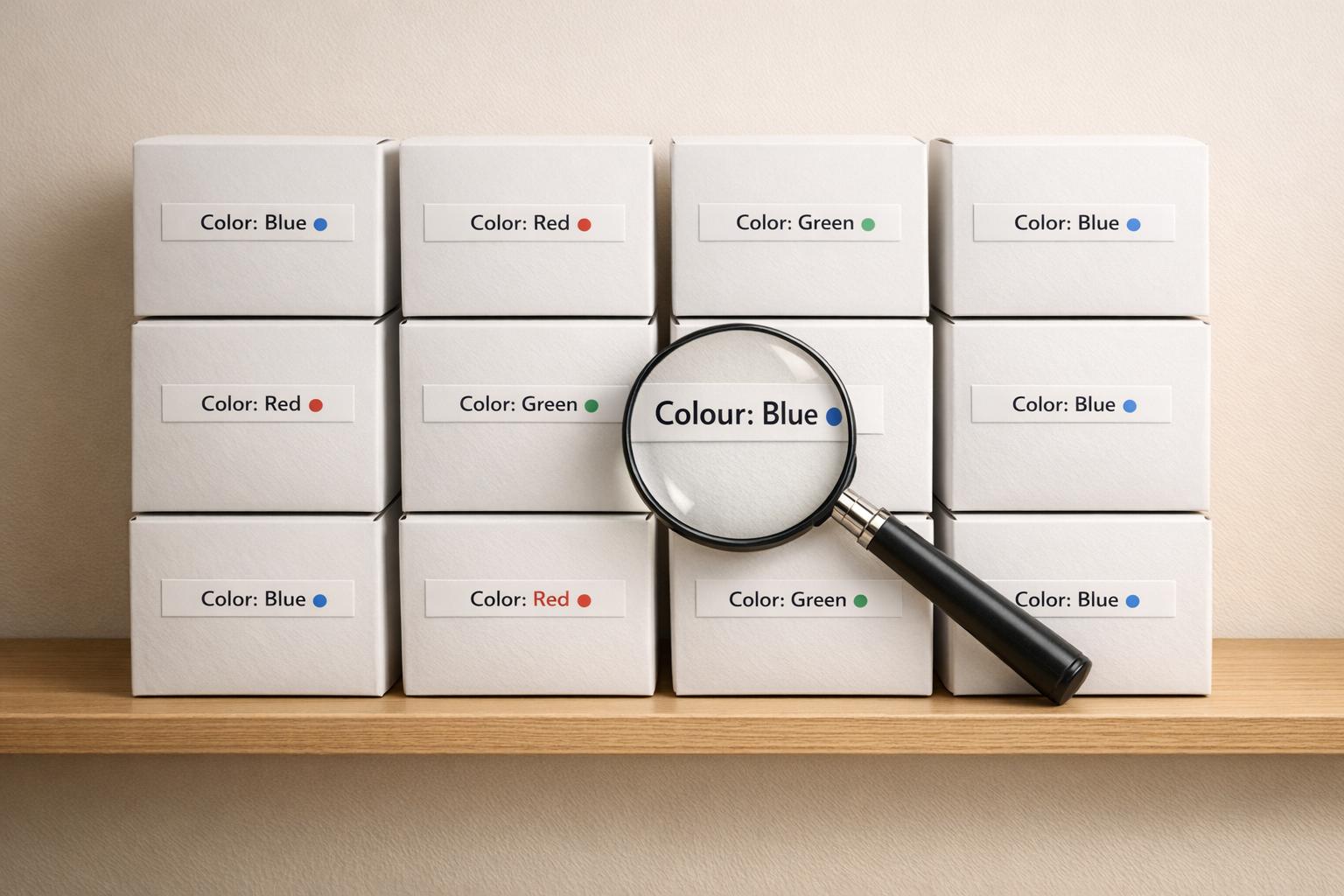
Inconsistent option names can break your Shopify store's functionality. When product attributes like "Size", "Color", or "Material" are labeled inconsistently across your catalog, filters fail, search results fragment, and customers get frustrated. This leads to lost sales, poor user experience, and even a drop in SEO rankings.
Key Takeaways:
- Broken filters: Variations like "M", "Medium", and "Med" split products into separate categories, confusing shoppers.
- Customer frustration: 61% of users leave if they can’t find products quickly.
- Lost revenue: Poor data quality costs businesses an average of $15 million annually.
- SEO issues: Duplicate or fragmented product data can hurt search engine performance.
- Operational inefficiencies: Mismanaged product attributes disrupt inventory tracking and bulk edits.
Solution:
Tools like FacetGuard automate catalog audits to fix inconsistencies, merge fragmented attributes, and ensure consistent naming. This improves filter usability, search accuracy, and overall sales performance.
Fixing these issues isn’t just about cleaning up your catalog - it’s about creating a better shopping experience and boosting your bottom line.
The Business Impact of Inconsistent Product Data in E-commerce
Research: How Inconsistent Option Names Affect Shopify Stores

How Common Are Inconsistent Option Names?
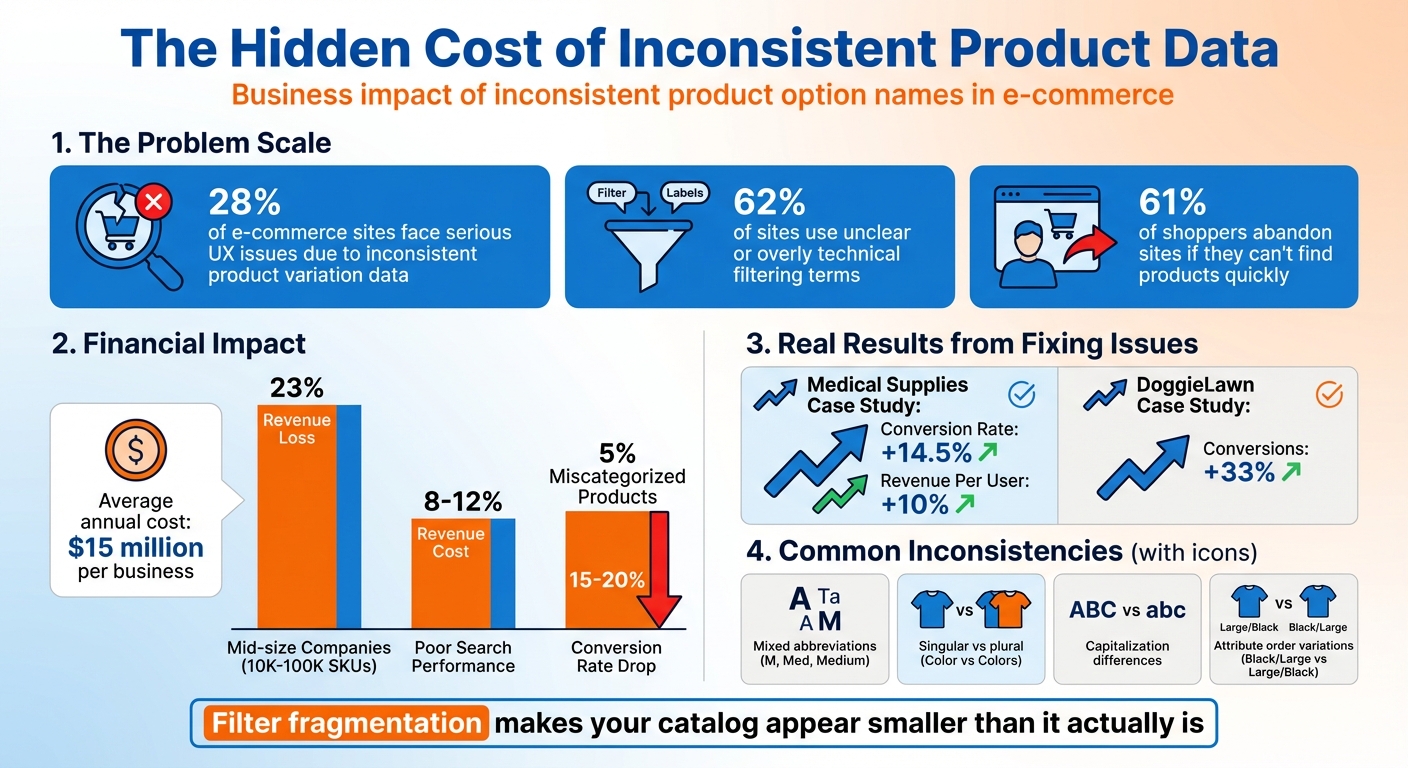
Did you know that 28% of e-commerce sites face serious user experience issues due to inconsistent product variation data? This problem often flies under the radar, but it significantly impacts how customers interact with online stores. Even more striking, 62% of sites use unclear or overly technical filtering terms, making it harder for shoppers to find what they’re looking for. These inconsistencies aren’t just minor annoyances - they can completely undermine the structure of a catalog.
Some of the most common errors include mixing abbreviations with full terms (e.g., "XS", "Extra Small", or "X-Small"), switching between singular and plural forms (like "Color" versus "Colors"), or changing the order of attributes (e.g., "Black / Large" versus "Large / Black"). Even small differences, like capitalization or punctuation, can create duplicate filter options.
"If you were to import catalog data that had three values for the same attribute, such as 'M,' 'Med,' and 'Medium,' then most Shopify search and discovery apps will display three filters when they should only display one."
– James Stanley, Nimstrata
These inconsistencies don’t just confuse customers - they disrupt the entire filtering and search experience, as explained below.
What Happens to Filters and Search
Shopify’s filtering system struggles when product options are labeled inconsistently. Variations like "Medium", "M", and "Med" are treated as entirely separate attributes. This means that a customer searching for "Medium" won’t see products tagged as "M" or "Med", even though they’re identical in size. This issue, known as filter fragmentation, splits your inventory into multiple, disconnected categories. The result? Your catalog appears smaller than it actually is, and in extreme cases, filters may fail to load altogether due to the overwhelming inconsistencies.
The impact on customer experience is immediate and damaging. 61% of shoppers will abandon a site within seconds if they can’t find what they need quickly. Inconsistent filters make navigation more difficult, especially on mobile devices where screen space is limited. Search functions also take a hit - products tagged "Color_Blue" won’t show up alongside those labeled simply "blue", leading to incomplete search results that frustrate users. Behind the scenes, these issues create disorganized sales and inventory reports, making it nearly impossible to forecast demand accurately, even when SKUs are the same.
sbb-itb-e8e54fb
Case Studies: Business Impact of Inconsistent Option Names
Case Study 1: 14.5% Conversion Increase from Fixing Broken Filters
In March 2022, a prominent medical supplies e-commerce site faced a major issue with filter fragmentation caused by inconsistent option names. This problem made it harder for customers to find products, which negatively impacted their shopping experience. To address this, the company teamed up with ConversionTeam to analyze their facet data and prioritize the most-used filters. By standardizing product attributes and ensuring consistency, they resolved the issue.
The results were immediate and impressive: conversion rates jumped by 14.5%, and revenue per user rose by 10%. Here's a snapshot of the improvements:
| Metric | Before Fix | After Fix | Improvement |
|---|---|---|---|
| Conversion Rate | Baseline | +14.5% | 14.5% increase |
| Revenue Per User | Baseline | +10% | 10% increase |
| Filter Usability | Poor (key filters hard to access) | Excellent (popular filters prioritized) | Significant improvement |
This case highlights how inconsistent option names can disrupt the customer journey, while fixing them can directly boost conversions and revenue.
Case Study 2: SEO and Inventory Challenges
An industrial supplier managing 9,000 SKUs encountered another challenge tied to inconsistent filter parameters. These inconsistencies led to the creation of duplicate URLs, causing the number of indexed pages to skyrocket to 120,000. This not only overwhelmed Google’s crawl budget with low-priority pages but also resulted in a decline in organic traffic. Additionally, mismatched product specifications led to an increase in "not as described" returns, damaging customer trust.
The company tackled these issues during a platform migration by standardizing option names and improving variant management. A similar success story comes from DoggieLawn, which saw a 33% boost in conversions in November 2024 after optimizing product variant handling during their switch to Shopify Plus.
The takeaway? Poor data quality doesn’t just hurt SEO and customer trust - it’s expensive. On average, businesses lose $15 million annually due to missed opportunities, reduced ROI, and higher operational risks.
These examples make it clear: clean, consistent catalog data isn’t just about organization - it’s about driving conversions, protecting SEO performance, and ensuring operational stability.
Data Analysis: Measuring the Impact on Filtering and Sales
Severity Levels and Their Effects
Not all product data issues carry the same weight. High-severity problems, like missing attribute values, can have a devastating impact. Imagine searching for blue shirts, but the "color" tag is missing - this makes the products invisible in filtered searches. These scenarios lead to "dead-end" filters where users are met with zero results, often causing them to abandon the site entirely.
Medium-severity issues are less catastrophic but still frustrating. For example, when filter options like "XL", "X-Large", and "Extra Large" are treated as separate categories, shoppers have to click through multiple filters to see all available products. This creates unnecessary friction and confusion. Meanwhile, low-severity inconsistencies, such as spelling differences between "Color" and "Colour", are more of a headache for internal teams than for customers, as they rarely impact the shopping experience directly.
The financial toll of poor product data is staggering. Mid-size companies managing 10,000–100,000 SKUs lose an average of 23% of potential revenue due to data quality issues. Poor search performance alone can shave off 8–12% of revenue, while just 5% of miscategorized or inconsistent products on category pages can cause conversion rates to drop by 15–20%. Overall, these issues can cost organizations an average of $15 million annually when factoring in lost sales and operational inefficiencies.
Charts and Tables Showing the Impact
To understand how inconsistencies in product data affect customer behavior, certain metrics are especially revealing. The zero-result rate is one of the most critical indicators - if it exceeds 2–3%, it signals that filtering systems are failing and need immediate attention. Other helpful metrics include filter interaction rates, which show whether users find filters useful, and post-filter conversion rates, which measure how effectively filters drive sales.
| Metric | What It Reveals | Target Benchmark |
|---|---|---|
| Zero-Result Rate | Frequency of filters leading to dead ends | < 2–3% |
| Filter Interaction Rate | Relevance of filters to users | Varies by category |
| Post-Filter Conversion | Filtering's impact on sales | Higher than site average |
| Inventory Accuracy Rate | Health of overall product data | > 95% |
Monitoring bounce rates on category pages is another key diagnostic. If 61% of visitors leave almost immediately, it’s a red flag that they’re struggling to find relevant products. Another useful metric is the time to first product click, which indicates how quickly shoppers can locate items they’re interested in. These insights emphasize the importance of regular catalog audits to fix inconsistencies and improve the shopping experience.
How FacetGuard Fixes Option Name Inconsistencies
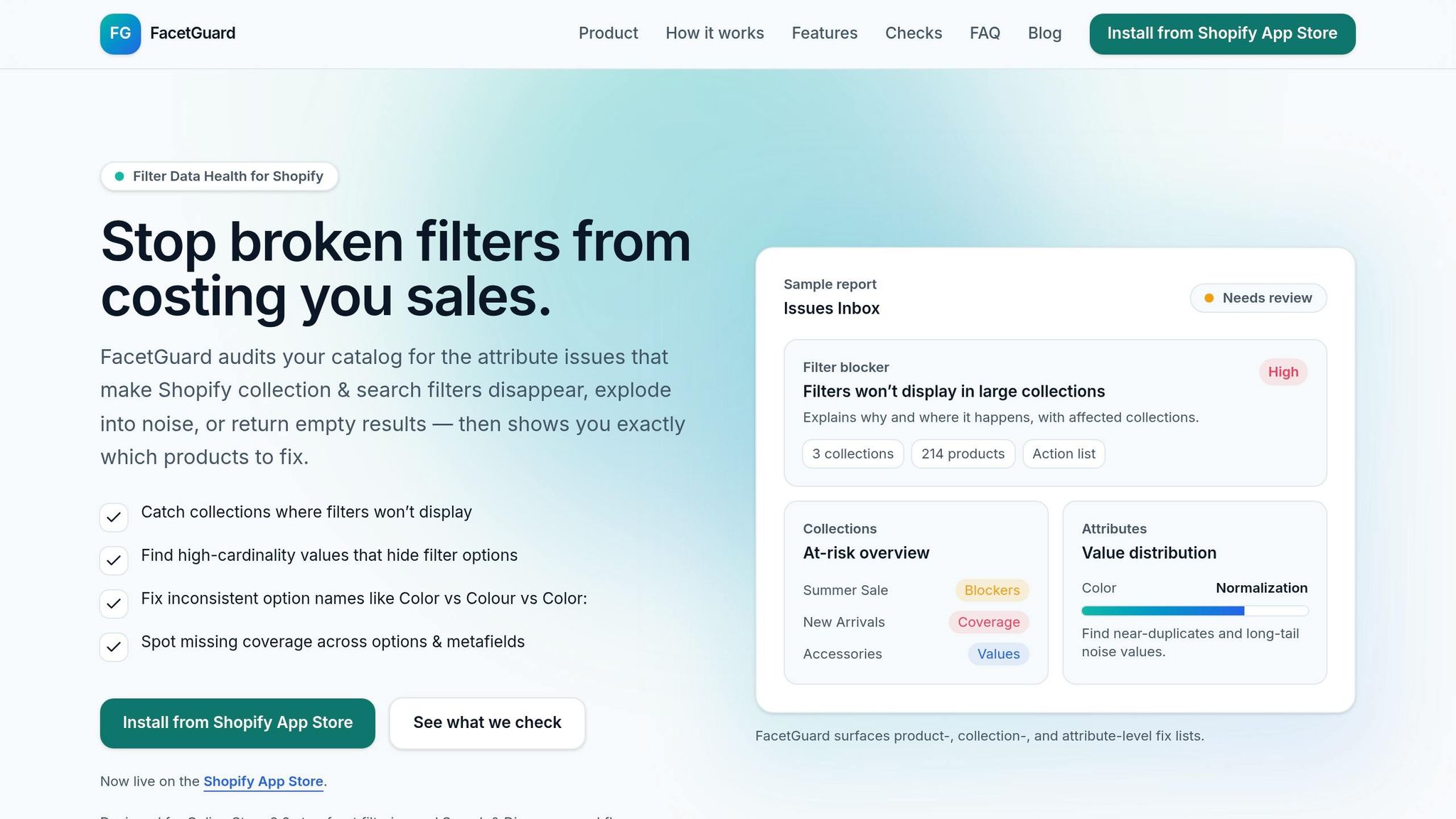
FacetGuard tackles the costly disruptions caused by inconsistent option naming in your Shopify catalog. By automating the audit process, it scans your catalog to identify naming inconsistencies that interfere with filters and search functionality. For example, it spots redundant attribute values like "M", "Med", and "Medium" being used interchangeably for the same size. Additionally, it detects mismatches in option slot assignments, where attributes are placed in different positions across various products.
Option Name Consistency Audit Feature
FacetGuard's audit feature is designed to address naming inconsistencies head-on. The tool systematically reviews every product in your catalog, identifying fragmented values and inconsistent naming patterns that can cause issues like duplicate options or broken filters. For instance, discrepancies such as "XL" versus "Extra Large" or "Color" versus "Shade" are flagged, and a prioritized fix list is generated to help you focus on the most pressing problems.
Another key capability is detecting option slot inconsistencies. This occurs when variant attributes, like size and color, are assigned to different positions (Option 1, Option 2, Option 3) across products. For example, one product might list "Black / 4XL", while another uses "4XL / Black." This lack of standardization can disrupt inventory tracking and demand forecasting. FacetGuard identifies these structural issues, enabling you to maintain a consistent variant option order throughout your catalog.
Getting Fixes Done Faster
Once inconsistencies are flagged, FacetGuard simplifies the cleanup process. The tool generates detailed exports and actionable recommendations, making it easier to address these issues efficiently. For large catalogs with thousands of SKUs, FacetGuard provides CSV files that highlight specific products and the necessary changes, saving significant time and effort on manual data corrections.
FacetGuard also helps unify fragmented attribute values, like merging "100% Cotton", "Cotton", and "cotton" into a single, consistent filter option. This standardization improves the customer experience by making product discovery easier and ensures search engines view your store as reliable and relevant, potentially boosting organic search rankings. Clean, consistent data not only enhances filters but also drives better conversions and smoother navigation for shoppers.
Conclusion: Consistent Names Lead to Better Results
Using consistent option names can have a direct and measurable impact on your business. For instance, standardizing terms like "Color" instead of mixing variations like "Color", "Colour", or "Shade" prevents filter confusion and dead-end searches. This matters because poor data quality costs businesses an average of $15 million annually, with inconsistent product information being a key factor in that loss.
The benefits of standardization go beyond just improving the shopping experience. Your SEO efforts get a boost because search engines detect consistent signals instead of wasting resources on duplicate content. Warehouse operations also become more efficient, as staff can easily locate the right items for picking and shipping. Customers, in turn, enjoy a smoother experience, finding what they need faster, which leads to higher conversion rates and fewer returns.
The good news? You don’t need to manually sift through thousands of product listings to fix these issues. FacetGuard automates the auditing process, identifying fragmented values like "M", "Med", and "Medium" that should be unified. It provides prioritized fix lists and actionable CSV exports, so you can address critical problems first while maintaining a clean, scalable catalog.
Consistent naming also positions your business for future advancements. As AI-driven search and conversational commerce grow, structured product data will be key to appearing in tools like Google’s AI Overviews and similar platforms. By addressing these issues now, you’re not just solving current challenges - you’re setting your store up for long-term success.
Take action by auditing your catalog and enforcing consistent naming standards. With the right tools and processes, you’ll create a seamless shopping experience that fosters trust, boosts conversions, and scales effortlessly as your business grows.
FAQs
How do I find inconsistent option names in my Shopify catalog?
If you're managing a Shopify store, keeping your product options like "Size" or "Color" consistent across your catalog is crucial. Why? It ensures clear filtering for shoppers and accurate reporting for you.
To tackle this, you can manually review your product options, though it can be time-consuming. Alternatively, tools like FacetGuard simplify the process. They identify inconsistencies in catalog attributes, helping you fix them efficiently. This not only makes your storefront filters work seamlessly but also enhances the overall shopping experience for your customers.
What option-name rules should I standardize across products?
Use clear, consistent, and descriptive terms for product options, such as "Size" and "Color". This ensures uniformity across your catalog, making it easier for customers to navigate and for filters and search functions to work effectively. Consistency not only enhances the shopping experience but also minimizes confusion for both buyers and store managers.
Which metrics prove inconsistent options are hurting sales?
Metrics such as sales, orders, and sessions reveal that inconsistent product option names can hurt both visibility and customer engagement. When names are unclear or inconsistent, customers may struggle to find what they’re looking for, which often results in fewer sales and lower conversion rates. By standardizing option names, you make it easier for shoppers to navigate and discover products, creating a smoother shopping experience that ultimately boosts results.