
Scalable Metafield Schema for Large Shopify Catalogs
If you run a large Shopify catalog, bad metafield structure will break filters, split values, and make data cleanup cost more over time. I’d fix that by setting rules before data entry: choose the right resource level, use typed definitions, turn on filterability early, and use metaobjects for shared structured content.
Here’s the short version:
-
Put data where it changes
- Product for shared product info
- Variant for SKU-level info
- Metaobject for shared structured content used across many items
-
Use strict field types
- Use
single_line_text_field,number_integer,number_decimal, andbooleanfor filter-driven fields - Use list types for multi-select values
- Use JSON for grouped specs, not for core filter logic
- Use
-
Normalize values
- Don’t let one field turn into
Oak,oak, andsolid oak - One attribute should map to one approved value set
- Don’t let one field turn into
-
Plan access and filtering upfront
- Turn on
capabilities.admin_filterableduring setup - Set storefront access for headless builds that need the data
- Turn on
-
Use governance, not guesswork
- Give each field a purpose, type, and owner
- Audit for duplicate fields, half-filled data, and old app namespaces
A few numbers stand out. Shopify metafields have a 100 KB per-field limit, and GraphQL work can run into a ~2,000-point ceiling. On large catalogs, that matters. Also, bulk updates can handle 10,000 products in about 30–60 seconds, while one-by-one updates fall apart once you get into very large SKU counts.
Shopify Metafields Explained (2026 Tutorial)

sbb-itb-e8e54fb
Quick comparison
| Option | Best for | Main risk if used wrong |
|---|---|---|
| Product metafield | Data shared by all variants | Wrong values on SKU-level data |
| Variant metafield | Data that changes by SKU | Product-level filters become inaccurate |
| Metaobject reference | Reused structured content | More setup if schema is loose |
| JSON metafield | Grouped technical specs | Harder admin editing and weak filter use |
My takeaway: keep the schema simple, typed, and strict. That’s how I’d keep filters clean, storefront data stable, and catalog work under control as SKU counts grow.
Shopify Metafields, Definitions, and Metaobjects at Scale
Shopify gives you three core building blocks: metafields, metafield definitions, and metaobjects. If you know what each one does - and where each one should live - you can set up a schema that keeps filters clean and cuts down on maintenance as your catalog grows.
Metafields and Definitions: Where Custom Data Should Live
A metafield is custom data attached to a Shopify resource, such as a product, variant, collection, customer, order, company, or company location. On its own, it's just raw custom data. A metafield definition turns that data into managed schema by setting the type, validation, access, and filterability. A metaobject definition works as a reusable content model.
Where you attach a metafield matters just as much as the value inside it:
- Product metafields store shared attributes like "Fabric" or "Warranty Information" - details that apply to the whole product.
- Variant metafields store option-level data like internal SKUs or dimensions that change by size or color.
- Collection metafields support merchandising logic or custom header content tied to a given collection.
- Company and company-location metafields handle B2B segmentation, regional tax rules, or product availability by location.
If data changes by variant, it belongs on the variant. If you place it at the product level, some SKUs will end up with the wrong value. That mismatch causes filters and product data to drift apart. Put each field where the data actually changes, and filtering stays much more dependable later.
Content Types and Validation Rules That Support Clean Filters
The data type you pick for a metafield definition has a direct effect on how well your filters hold up. For fields you plan to use in filters, stick with typed scalar fields and their list versions: single_line_text_field, number_integer, number_decimal, and boolean. These give you consistent, queryable values that storefront filters can use with less trouble. For non-filterable or structural jobs - like rich content blocks or nested data - json or file_reference make more sense, but they shouldn't be the base of your filter logic.
Definitions can also enforce rules like required fields, minimum and maximum numeric values, character limits for text, and regex patterns. That stops bad data before it gets into the catalog, which is a lot cheaper than cleaning up a mess later.
One setting is easy to miss: capabilities.admin_filterable. Set capabilities.admin_filterable on the definition to make the field filterable. Turn it on during planning, not after the catalog is already full. Typed values plus validation rules help prevent filter drift as the catalog gets larger.
Metaobjects for Reusable Structured Content
Metaobjects solve a very specific issue: repeated structured data across a large number of products. Instead of copying the same size guide or material spec into every product record, you create it once as a metaobject entry and reference it wherever needed. That cuts duplication in large catalogs and helps keep structured content in sync across products, collections, and channels.
It also helps to keep reusable content structured instead of stuffing everything into one big field. Use metaobject_reference, not plain-text IDs, so Shopify can resolve the relationship well in Liquid or through the Storefront API. It's basically the Shopify version of a proper foreign key, and it makes large-scale data maintenance much less painful. These building blocks set up the naming, validation, and ownership rules in the next section.
Core Principles for a Scalable Metafield Schema
Schema-First Planning and Stable Naming Conventions
Before anyone starts entering data, lock down your naming rules and value rules. Put every custom attribute into a schema document before you create metafield definitions. If you skip that step, production changes get messy later, especially when you have to rename fields or move data from one structure to another.
Use a naming pattern that stays clear over time, like specs.material, instead of vague keys such as custom.field_1. Those names tend to stick around through migrations and app connections, so it pays to be strict from day one. Use snake_case for keys, singular names for single values like material, and plural names for lists like materials. Keep custom.* for merchant-owned data and $app:your-app.* for private app data.
Normalize Values and Use the Most Specific Data Type
Once the schema is named, standardize the values moving through it. One attribute should map to one filter value. That means using a controlled vocabulary, with each attribute tied to one approved set of values, and applying that at the definition level so inconsistencies get blocked before they land in the catalog.
The same idea applies to data types. Use the most specific type available. If Shopify gives you a native measurement type, use it. Keep units consistent within each attribute family too - use inches for dimensions and pounds for weight within that family. Add validation rules at the definition level, including required fields, min/max values, character limits, and regex patterns, so bad data gets stopped at entry.
Design for Filterability, Access, and Maintenance
After your values are standardized, enable filterability and access only where they’re needed. If a field is supposed to power a storefront filter, turn on capabilities.admin_filterable for that definition during planning, not after the catalog is already full.
Be just as explicit with access. Set access.admin when merchants need to edit a field, and set access.storefront when a headless build or the Storefront API needs to read it, so internal-only data stays private. Liquid themes can read theme-available metafields, but headless storefronts need direct storefront access. So if you're using Hydrogen or a custom frontend, set access.storefront to public_read for any field that needs to surface there.
Weak schema choices snowball fast. Fixing them early costs a lot less than untangling them once the catalog has grown.
Modeling Patterns for Filterable and Headless Catalog Data
Once the schema rules are in place, the next move is simple: put each attribute at the right level and store it in the right shape.
Product Metafield vs. Variant Metafield vs. Metaobject Reference
A good rule here is to place data where it actually changes. If a value stays the same across every variant, keep it on the product. If it changes by SKU, put it on the variant. If it’s structured content you’ll reuse across many items, store it in a metaobject and reference it where needed.
| Data Level | Best Use Case | Example |
|---|---|---|
| Product Metafield | Attributes shared by all variants | Brand, material composition, warranty length |
| Variant Metafield | Attributes that change per SKU | Size-specific dimensions, color hex code, finish |
| Metaobject | Reusable entities shared across the catalog | Designer bio, size guides, certifications, care guide libraries |
So, brand belongs at the product level. A color hex code belongs at the variant level. And something like a size guide library is better as a shared metaobject than copied into product after product.
For dense technical specs, one JSON metafield can group related attributes and cut API overhead.
Patterns for Categorical, Multi-Select, and Numeric Filters
Different filter types need different field types. That part matters more than it may seem at first glance.
Use metaobject_reference for categorical values that need a fixed approved set. Use list.single_line_text_field or list.metaobject_reference for multi-select fields. For range filters, use typed numeric fields.
For categories like material or brand, metaobject_reference keeps values normalized. That helps stop duplicates like "Solid Oak" and "solid oak" from sneaking into the catalog. It sounds minor, but those small differences can make filters messy fast.
For multi-select fields like compatible models or product features, list types are much cleaner for themes and APIs than comma-separated text. And for values such as wattage, capacity, or dimensions, typed fields are the right fit, including number_integer, number_decimal, dimension, weight, volume, or rating.
FacetGuard's Value Limit/Cardinality Audit and Option Name Consistency & Coverage checks can surface duplicate values, inconsistent naming, and other fragmentation caused by free-text categorical fields before they spread across a large catalog.
These choices also shape how cleanly headless storefronts and B2B rules can read the catalog.
Headless and B2B Schema Requirements
For headless storefronts, including Hydrogen or a custom front end, any field that needs filtering must have capabilities.admin_filterable set to true. In GraphQL, request only the namespace-key pairs you need. Broad nested metafield queries add cost and latency.
For B2B catalogs, don’t store pricing logic or tier rules directly on customer records. A cleaner pattern is to define pricing tiers as metaobjects - Bronze, Silver, Gold - and then reference them through customer metafields. That makes tier-wide updates easier, and it keeps buyer-specific data like VAT Exempt or Wholesale Tier in customer metafields, where it can drive personalized catalog views or pricing in your headless middleware layer.
Structured metafields also help recommendation systems work better in headless and AI-driven storefronts.
Performance, Governance, and Catalog Auditing
Shopify Metafield Schema: Choosing the Right Data Level
Prevent Performance and Maintenance Issues Before They Spread
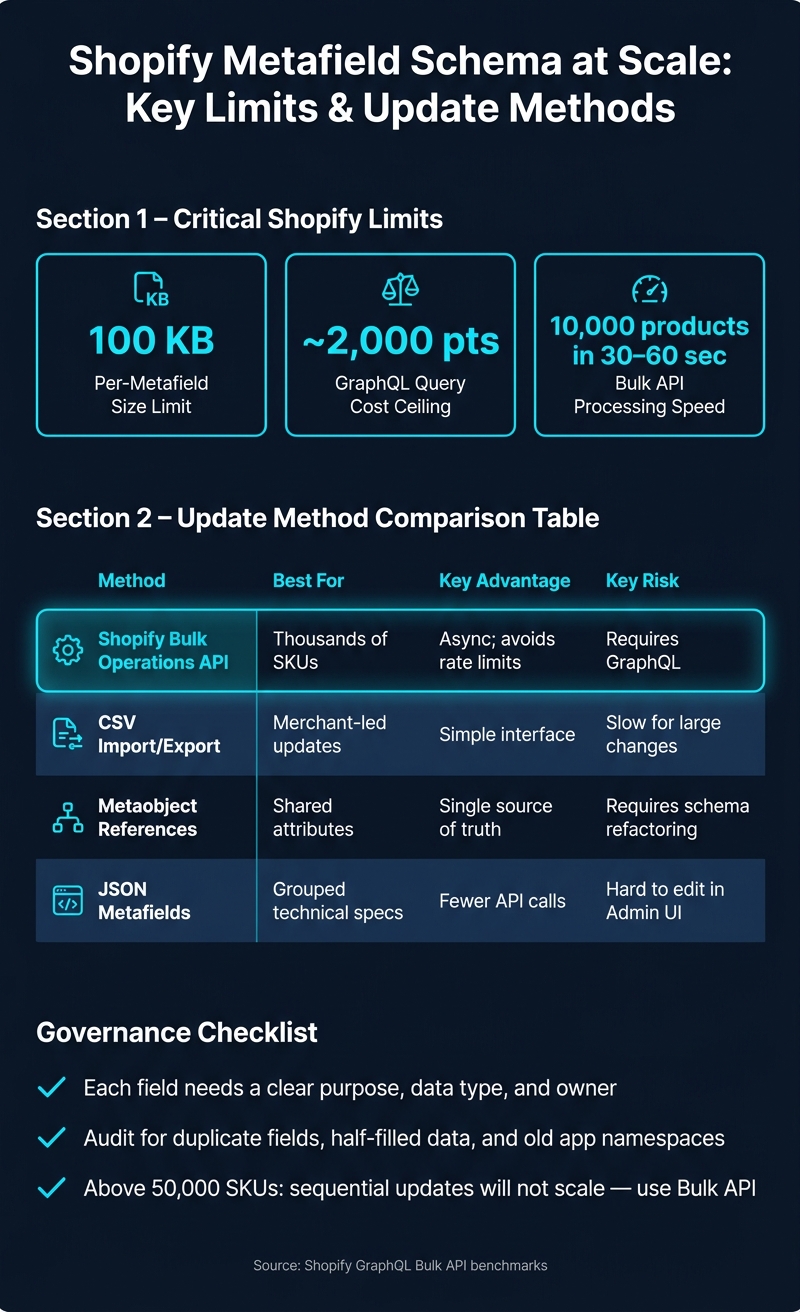
Once the schema is clean, governance and query discipline are what keep it usable as the catalog grows. Two limits matter most: 100 KB per metafield and a ~2,000-point GraphQL ceiling. That means inefficient nested metafield queries can get close to that ceiling fast and trigger throttling during high-traffic periods.
The biggest troublemakers are free-text fields with too many one-off values and duplicated specs. If a field like material allows open text input, you'll end up with a mess of near-identical entries that split filters apart. One team writes "Cotton", another writes "cotton blend", and now the catalog starts pulling in different directions.
A cleaner setup is to group related technical specs into a single JSON metafield. That cuts namespace clutter and lowers the number of API calls needed to retrieve product data.
Bulk Updates, Taxonomy Governance, and Audit Workflows
At scale, schema drift is almost guaranteed. The issue isn't whether it happens. It's how fast you spot it.
Teams add fields without checking what's already there. Naming starts to drift. Before long, you get metafield sprawl: two or more fields doing the same job, such as specs_material and material_type, sitting side by side.
Treat your metafield schema the way you'd treat a database schema. Each field should have:
- a clear purpose
- a defined data type
- an owner who approves changes
Regular audits should catch half-filled fields, duplicate sources of truth, and old namespaces left behind by uninstalled apps before they turn into filter problems or extra maintenance work.
Update method matters just as much as field design once catalogs get large:
| Method | Best For | Pros | Cons |
|---|---|---|---|
| Shopify Bulk Operations API | Thousands of SKUs | Async; avoids rate limits | Requires GraphQL |
| CSV import/export | Merchant-led updates | Simple interface | Slow for large changes |
| Metaobject References | Shared attributes | Single source of truth | Requires schema refactoring |
| JSON Metafields | Grouped technical specs | Fewer API calls | Hard to edit in Admin UI |
Bulk updates are much faster than sequential requests. The GraphQL Bulk API can process 10,000 products in 30–60 seconds. Once you're dealing with catalogs above 50,000 SKUs, sequential updates just don't work.
When fixing inconsistent keys, move carefully. Write values to the new key first, verify the data, and only then remove the old key. Deleting first is the kind of mistake that turns a cleanup project into a data-loss problem.
Conclusion: Build for Clean Filters Now and Easier Catalog Growth Later
At scale, schema quality only holds up when updates and audits stay disciplined. The core idea comes down to three habits: define the schema early, keep values normalized, and audit on a steady basis.
FacetGuard audits catalog attributes to identify issues causing broken, missing, or misleading filters in Shopify collections and search, with prioritized fix lists so teams can act on the highest-impact problems first.
FAQs
When should I use a metaobject instead of a product or variant metafield?
Use a metaobject for reusable, standalone entities that show up across many products, like a brand profile or size chart.
Use product or variant metafields for details tied to one item, such as a specific fabric or voltage.
Metaobjects are also a good fit for relationships that need extra metadata. That helps you avoid repeating the same data across your catalog.
How do I fix inconsistent metafield values without breaking filters?
Move each attribute into one clear, canonical metafield. Then standardize duplicate values like "Navy" and "navy blue." On big catalogs, that cleanup can get messy fast. FacetGuard can help spot bad attributes and show you where to start.
A phased migration works best. Fill the new standardized metafield first. Then update your theme or search settings to use it. After that, remove the old data.
Do the same for numeric measurements and units. If one product says 10 in and another says 10 inches, clean that up too. Add validation rules so new entries stay consistent instead of drifting over time.
Which metafields should be filterable in a large Shopify catalog?
Prioritize metafields that help customers narrow results without cluttering the storefront. Good examples include material, color, dimensions, and certifications. Stick to supported filter types only: single-line text, integers, decimals, booleans, and metaobject references.
Each attribute should live under one canonical name in one storage location. That helps you avoid duplicate filters, broken filters, and messy data that confuses shoppers.
If an attribute has more than 1,000 values, don’t dump everything into one giant facet. Group values into a hierarchy or use search-within-facet so people can find what they need without scrolling forever.
FacetGuard can help audit broken or misleading filter attributes.