
Scaling Shopify Catalogs: Data Schema Insights
Managing a Shopify store with thousands of products is tough. The challenge isn’t Shopify’s features - it’s how your product data is structured. A messy data model leads to broken filters, conflicting product details, and slower merchandising. Here’s how to fix it:
- Why it matters: Inconsistent data causes filters to fail, bulk edits to break, and pages to show errors as catalogs grow past 10,000 products or 100,000 variants.
- Key problems: Duplicate attributes, poor metafield governance, and unaligned variant data create chaos in large catalogs.
- Solutions: Use Shopify Metaobjects and Metafields strategically, normalize attributes, separate technical and merchandising data, and audit your catalog regularly.
Bottom line: Clean, well-structured data ensures smooth scaling, accurate filters, and faster workflows. Let’s dive into how to make it work.
How Large Shopify Catalogs Structure Product Data

Core Shopify Data Primitives at Scale
Shopify offers a set of built-in fields like Title, Description, Vendor, Product Type, Variants, and Images. These fields work well for smaller catalogs, but when scaling up, they often fall short.
To manage larger catalogs, merchants turn to metafields and metaobjects. Metafields allow for product-specific details, such as material or voltage, while metaobjects act as custom relational tables. For example, metaobjects can store reusable data like "Brand" or "Size Charts", which can then be linked to multiple products without duplicating information.
Shopify's data structure aligns with relational database concepts, making it easier to understand how these elements function at scale:
| Relational Database Concept | Shopify Equivalent | Practical Application |
|---|---|---|
| Table (built-in) | Resource | Standard objects like Product or Order |
| Table (custom) | Metaobject Definition | Custom entities like Manufacturer or SizeChart |
| Column | Metafield Definition | Fields like "Fabric" or "Voltage" added to a Product |
| Foreign Key | Reference Type | Fields such as metaobject_reference or product_reference |
A real-world example of this approach comes from Bekateq, where Technical Architect Claudio Gerlich designed a Shopify data model with over 4,400 lines of code and 24 collection templates. This model combined metaobjects and metafields to manage details like technical specifications, available colors, warranty periods, and even a "Documentation Metaobject" for PDFs and a "Brand Metaobject" for certifications.
"Data modeling is the foundation. Good models = simple features. Bad models = chaos." - Claudio Gerlich, Technical Architect, smplx
This kind of structured approach is essential when dealing with the complexities of large-scale catalogs.
What Drives Schema Complexity
As catalogs grow, several factors contribute to schema complexity, often stemming from poor governance and evolving product needs.
One major issue is ungoverned metafield creation. When multiple teams create metafields without coordination, it leads to duplicate attributes and broken filters. Without clear ownership or naming conventions, this problem can escalate quickly.
Another challenge comes from multi-vertical product ranges. Shopify's product taxonomy supports over 25 verticals, with large-scale taxonomies covering more than 10,000 categories and 2,000 attributes. Managing attributes across different product types becomes tricky, as category-specific details often don't translate well between verticals.
Frequent product updates add another layer of complexity. For instance, when technical specifications change regularly, merchants might store them in a single JSON metafield to avoid constant schema changes. While this workaround offers flexibility, it can lead to inconsistencies if not carefully managed.
"Consistency is not cosmetic. It's structural. Without consistent naming, your Shopify product data structure becomes unpredictable." - Performantcode.io
Ultimately, schema complexity often reflects governance issues rather than technical limitations. Shopify's data primitives can handle large-scale catalogs, but success depends on treating them with the same discipline as a formal database schema.
sbb-itb-e8e54fb
Shopify Metafields Explained (2026 Tutorial)
Filter-Related Schema Failures in Large Shopify Catalogs
Filter issues in Shopify catalogs often reveal deeper problems with schema complexity, directly affecting the storefront experience. These issues can manifest as broken filters, duplicate options, or facets that yield no results. According to a UX benchmarking study by the Baymard Institute, 42% of major e-commerce sites rate poorly in faceted navigation. The main culprit? Inconsistent attribute groupings and unclear filter values. For Shopify merchants with large catalogs, the root cause is almost always a schema-related problem.
Attribute Inconsistency and Fragmentation
When multiple teams independently add products, the same attribute can be stored in inconsistent ways. For example, "Color" might appear as "Colour" on some products, "Primary Color" on others, or even as a free-text tag like "red-dress." Shopify's Search & Discovery app builds filters from various sources - options, metafields, tags, and standard fields. When the same concept is scattered across these sources, it results in duplicate or empty filter options.
The solution? Stick to one canonical name, one storage location, and one value format for each filterable attribute. Research from Baymard shows that well-structured filters aligned with user expectations make shoppers 4× more likely to find a suitable product. However, that advantage vanishes when inconsistent naming creates confusion - like having "Navy", "navy blue", and "midnight blue" listed as separate filter options.
In addition to naming inconsistencies, some attributes contribute to unnecessary filter clutter.
High-Cardinality Attributes and Filter Noise
Not every attribute should be included as a filter. Fields like SKU numbers, exact model names, or free-text internal tags can generate hundreds - or even thousands - of unique values. Displaying these as checkbox filters creates filter noise, overwhelming users with options that are more frustrating than helpful. The Nielsen Norman Group highlights that high-cardinality filters increase cognitive load and can lead to choice paralysis. Their recommendation? Only expose high-impact, well-organized values directly to users.
For Shopify merchants, attributes with over 1,000 distinct values should be handled differently. Options like search-within-facet, autocomplete, or hierarchical grouping are better suited for managing such data. Merchants should regularly audit metafields and tags driving filters to ensure each one genuinely helps shoppers refine their search.
Equally problematic is the misalignment at the variant level, which leads to another common issue: filter drift.
Variant Explosion and Attribute Drift
Products with multiple size-and-color combinations often introduce a unique challenge: variant-level attributes that don’t align cleanly with collection or search filters. For example, a color available only in certain sizes or a discontinued size still lingering in the schema can create "ghost" filter options. These options either return no results or lead to out-of-stock pages, frustrating shoppers.
This issue is particularly common in apparel and home goods catalogs, where products can have dozens of variants. The fix lies in enforcing a clear schema rule: decide whether each attribute belongs at the product level, variant level, or both, and apply that decision consistently. When this governance breaks down - often during bulk imports or product line expansions - misaligned attributes cause filters to display irrelevant or outdated options.
Case studies from search vendors suggest that cleaning and consolidating attributes used for facets can improve filter usability by 20–50% and significantly reduce bounce rates from faceted navigation pages. Tools like FacetGuard are specifically designed for this purpose, auditing catalog attributes to identify and prioritize fixes for broken, missing, or misleading filters across products, collections, and attributes.
Schema Design Patterns for Scalable Shopify Catalogs
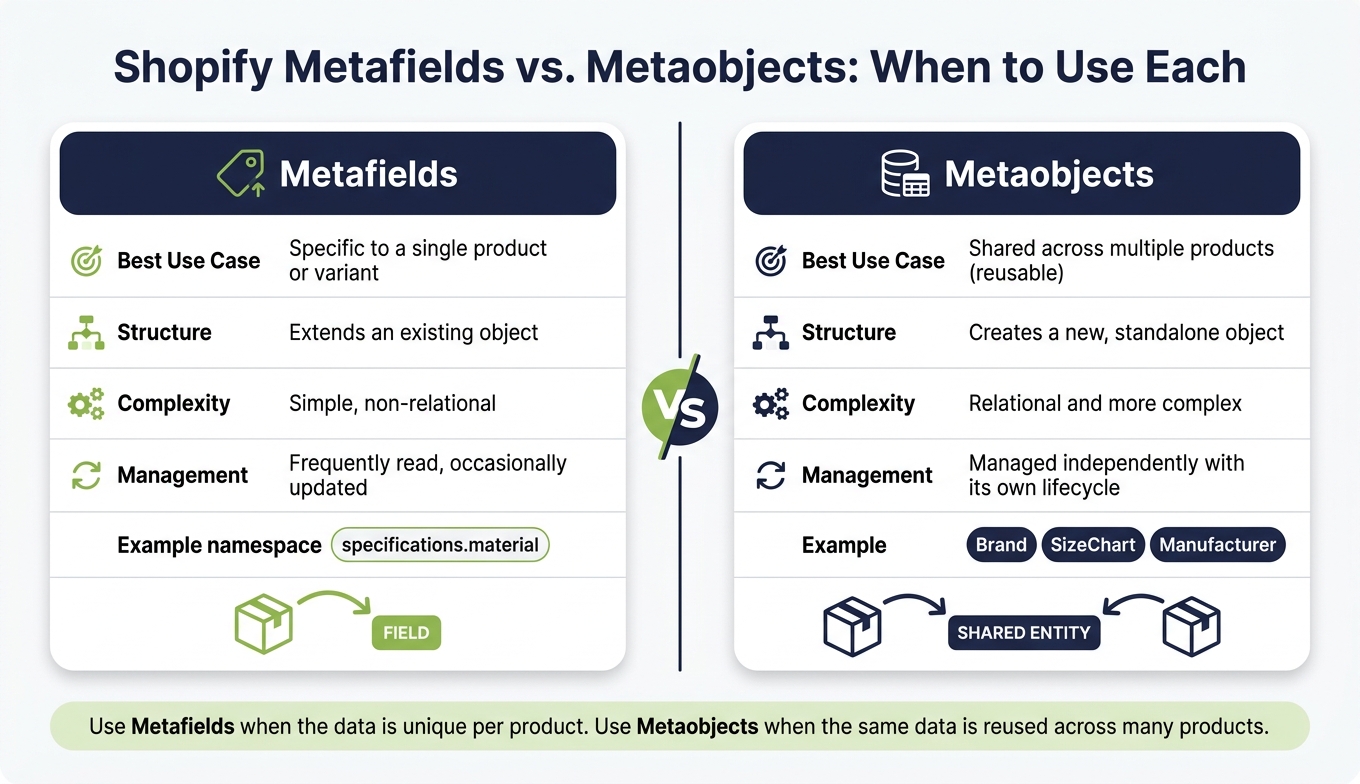
Shopify Metafields vs. Metaobjects: When to Use Each
The challenges discussed earlier - like attribute fragmentation, filter noise, and variant drift - often arise from data schemas that aren’t designed to handle growth. Luckily, there are proven design patterns that can help prevent these problems from becoming a reality.
Normalized Attribute Models for Cleaner Filters
One of the biggest hurdles in managing large Shopify catalogs is dealing with the same concept stored in multiple locations. For example, you might have a "Material" tag, a product_material metafield, and a specs_material metafield, all contributing conflicting values to filters. This kind of duplication creates chaos. By normalizing your data and sticking to a single source of truth - one name, one location, one format - you can eliminate these inconsistencies.
Using a namespace:key structure, like specifications.material, across all products makes your schema easier to understand and provides developers with a consistent reference point for building filters. Large catalogs are particularly prone to metafield sprawl, where redundant fields pile up without clear accountability. Assigning ownership for each metafield - defining who is responsible for creating, updating, and approving changes - can significantly reduce this issue.
For attributes that apply to hundreds of products, Shopify Metaobjects offer a more efficient solution than standard metafields. Metaobjects allow you to create reusable, standalone entities with their own lifecycle, rather than simply extending individual products. Here’s a quick comparison:
| Shopify Metafields | Shopify Metaobjects | |
|---|---|---|
| Best Use Case | Specific to a single product/variant | Shared across multiple products (reusable) |
| Structure | Extends an existing object | Creates a new, standalone object |
| Complexity | Simple, non-relational | Relational and more complex |
| Management | Frequently read, occasionally updated | Managed independently with its own lifecycle |
This normalization process lays the foundation for distinguishing attributes based on their purpose.
Separating Merchandising and Technical Attributes
Once attributes are normalized, further refinement comes from separating their purposes. Not all attributes are created equal. Technical attributes - such as regulatory data, compatibility details, or material composition - require precision and consistency. On the other hand, merchandising attributes, like promotional labels or content blocks, are more dynamic and often updated by different teams.
Mixing these two categories in the same namespace can lead to problems. For instance, a marketing update could unintentionally disrupt a filter. To avoid this, use distinct namespaces that clearly indicate the purpose and ownership of each attribute. For example, technical.material could be reserved for filter-driving specifications, while merchandising.material_story might handle product page copy. This separation makes it easier to manage bulk updates and troubleshoot issues.
Automated Catalog Auditing for Schema Upkeep
Even with a well-designed schema, things can go off track over time. Bulk imports, seasonal updates, or team turnover can introduce inconsistencies that are hard to catch manually. That’s where automated auditing becomes a game-changer.
FacetGuard is a tool specifically designed for this purpose. It audits Shopify catalog attributes and identifies issues like broken, missing, or misleading filters across products, collections, and attributes. For example, its Value Limit/Cardinality Audit flags attributes generating too many unique values, which can lead to filter noise. Similarly, its Option Name Consistency check highlights discrepancies like "Navy" and "navy blue" being treated as separate filter options. The tool provides a prioritized list of fixes, saving merchants from manually reviewing thousands of products.
"Complex Shopify catalogs rarely fail because Shopify lacks features. They fail because the data model underneath them becomes unmanageable." - Performantcode.io
Conclusion: Key Takeaways for Scaling Shopify Catalogs
Main Findings on Data Schema Scalability
Looking back at the analysis, it’s clear that Shopify catalogs struggle when data becomes too complex to manage. Once a catalog surpasses 10,000 products or 100,000+ variants, problems like uncontrolled metafield growth, duplicate attribute storage, and inconsistent formatting emerge. These issues wreak havoc on filters and overall usability. As Performantcode.io aptly states:
"Consistency is not cosmetic. It's structural."
When data structures lack organization, it doesn’t just frustrate customers - it also introduces operational risks. To grow successfully, merchants need to prioritize improvements in schema management:
"At scale, clean data models support sustained growth without constant technical friction or costly refactors."
Next Steps for Shopify Merchants
With these schema challenges in mind, proactive measures are crucial for merchants managing expanding catalogs. To avoid disruptions in filters or workflows, start by creating a single source of truth for every attribute. Consolidate attribute definitions and implement a clear namespace:key structure, such as specifications.material. Assign ownership to each metafield to prevent unchecked growth.
For shared attributes, consider migrating them to Shopify Metaobjects. Update outdated schema structures incrementally, ensuring compatibility with your theme before retiring older formats.
Manual reviews alone aren’t enough to catch data inconsistencies. Tools like FacetGuard can help by continuously auditing your catalog. This free Shopify app flags fragmented values, missing filters, and high-cardinality issues, providing exportable CSV fix lists to help you tackle problems efficiently and at scale.
FAQs
When should I use metaobjects instead of metafields?
Metafields let you attach a single custom field to an existing Shopify resource, like a product or an order. On the flip side, metaobjects are perfect for building entirely new, reusable data structures. Think of things like size charts, author profiles, or ingredient lists - these can be created once and used across your store wherever needed.
How do I decide if an attribute belongs on the product or the variant?
To figure out whether an attribute should be assigned to the product or variant level, ask yourself this: Does this attribute change when a different variant is selected? If the answer is yes, it should be at the variant level.
Product-level attributes are consistent across all variants. For example, the category or material of a product remains the same regardless of the variant. On the other hand, variant-level attributes are those that vary, such as size or color.
Using tools like FacetGuard can make this process easier by identifying and correcting misapplied attributes. This ensures your storefront filters work as they should and provide a better shopping experience.
What’s the fastest way to find and fix broken Shopify filters at scale?
To quickly spot and resolve broken Shopify filters, a diagnostic tool like FacetGuard can be a game-changer. This tool audits your product catalog and flags filter issues based on their severity. For instance, it can identify problems like collections that surpass Shopify's 5,000-product limit, attributes with too many unique values, or inconsistent naming conventions (like "Color" versus "Colour"). Plus, it allows you to export specific product lists in a CSV format, making bulk updates easier and helping you maintain a smooth, functional storefront.