
Why Filters Break in Multi-Storefront Catalogs
Filters breaking in multi-storefront catalogs can lead to lost sales, frustrated customers, and operational headaches. Here’s why it happens and how to fix it:
- Inconsistent Data: Attributes like "Red" vs. "red" or "Small" vs. "S" confuse filters, leading to mismatched results or missing products.
- Too Many Values: Redundant options (e.g., "Bright Red", "RED") overwhelm systems and shoppers, causing filters to disappear or fail.
- Indexing Issues: Large catalogs (100,000+ SKUs) strain systems, leading to delays, outdated filter data, or zero-result pages.
- Silent Failures: Problems like slow load times, irrelevant filters, or missing attributes often go unnoticed but hurt user experience.
Quick Fixes:
- Standardize Attributes: Use consistent names and dropdowns in your Product Information Management (PIM) system.
- Automate Audits: Tools like FacetGuard detect and fix filter issues before they affect users.
- Monitor Zero-Result Rates: Keep them below 2–3% to avoid losing conversions.
- Optimize Indexing: Use partial updates and event-driven syncs to keep filters accurate.
Takeaway: Clean, consistent data and proactive monitoring are key to keeping filters functional across multiple storefronts.
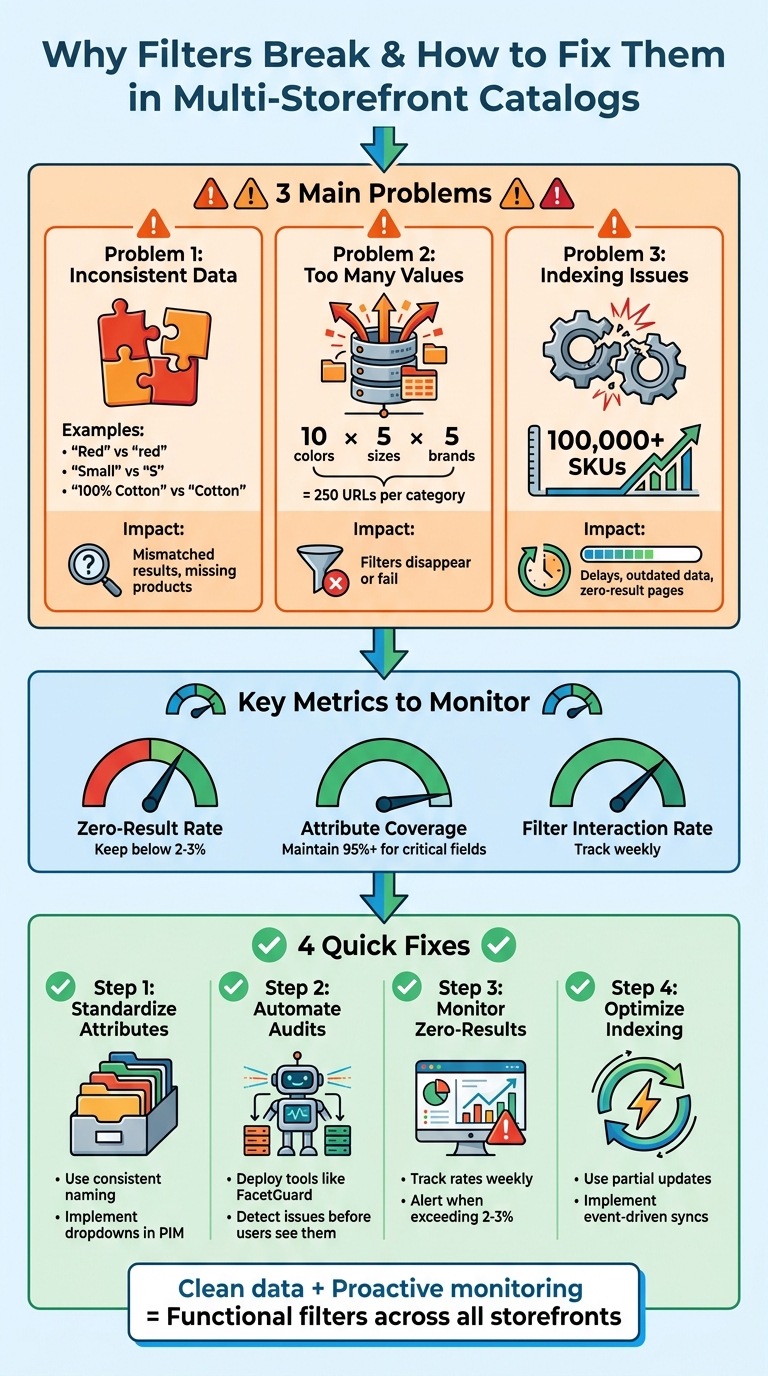
4-Step Process to Fix Broken Filters in Multi-Storefront Catalogs
Problem 1: Inconsistent Attribute Mapping
When storefronts label product attributes differently, things can get messy. For example, your US store might use "Small", "Medium", and "Large" for sizes, while your UK store opts for "S", "M", and "L." Similarly, one storefront might say "100% Cotton", while another simplifies it to just "Cotton." These inconsistencies confuse filters, treating identical attributes as if they were completely different.
This issue stems from schema drift - a situation where attribute definitions change independently across systems. Artemii Karkusha, an Integration Architect at Integration Maestro, explains:
"Schema drift... is the number one reason PIM integrations degrade over time".
For instance, your Product Information Management (PIM) system might introduce new attributes like color_hex or color_family, but if your storefront's mapping logic isn’t updated to recognize them, you end up with silent data gaps. These gaps can make entire product lines invisible. Below are some common examples of mismatched attributes.
Examples of Mismatched Attributes
The most frequent inconsistencies appear in naming conventions. A product labeled "Red" in one storefront might not match "red" (lowercase) in another, leading to duplicate filter options that confuse shoppers. Units are another trouble spot - "10 inch" and "10in" might seem identical, but they disrupt filters that rely on consistent measurements.
Type mismatches create even bigger problems. For example, if your PIM records a color as plain text ("Red") but the storefront expects a dropdown ID like color_option_42, the filter can’t connect the front-end interface to the back-end data. Missing metadata only makes things worse. If a product doesn’t include a value for "Material", it won’t show up in filter results - even if it matches all other criteria.
How Inconsistencies Break Filters
These mismatches wreak havoc on filters, breaking the shopping experience across storefronts. For instance, when attributes like "Color", "Colour", and "Color:" are treated as separate categories, your system ends up with redundant filters instead of grouping products logically. Shoppers are left switching between overlapping options, which is both frustrating and inefficient.
In large catalogs, unmapped attributes can lead to silent filter failures. Without a unified approach to product data, conflicting values cause filters to work in some markets but fail in others. As Karkusha aptly notes:
"If everyone owns the product data, no one does".
The result? Filters that fragment the customer experience, making shopping more complicated and less intuitive.
sbb-itb-e8e54fb
Problem 2: Too Many Attribute Values and Data Noise
Even when attributes are consistently named, filters can still malfunction if they’re overloaded with redundant or slightly varied values. Imagine a catalog where "Red", "red", "Bright Red", and "RED" are treated as separate options. This issue, known as cardinality explosion, overwhelms systems and frustrates shoppers.
Andrew Simpson, Founder & Director at Pea Soup Digital, emphasizes the importance of filters:
"Filters are not a feature. They are a revenue lever. Every click a shopper saves getting to the right product is friction removed from the path to purchase".
When filters are cluttered with redundant data, shoppers face a maze of repetitive options, making it harder to find what they need. Platforms like Shopify sometimes stop displaying filters altogether for large collections that exceed certain thresholds. This problem becomes even more pressing when unique attribute values multiply beyond system limits.
When Attribute Values Overwhelm Systems
Cardinality explosion happens when a single attribute accumulates too many unique values. For example, if 50 suppliers each add their own "Style" names, you could end up with 50+ unique values for what should be a few standardized options. In such cases, Shopify might hide the filter entirely.
The scale of the problem is staggering. A single category with 10 colors, 5 sizes, and 5 brands generates 250 unique URLs. Multiply that across 1,000 categories, and you’re left with 250,000 low-quality pages that can drain search engine crawl budgets. As Serhii Dovzhenko, Technical SEO Architect at North SEO, points out:
"Faceted navigation is the silent killer of enterprise eCommerce SEO. It is absolutely essential for user experience... but without strict technical boundaries, it will weaponize your own catalog against you".
For large B2B catalogs with over 100,000 SKUs, traditional SQL-based filtering systems can buckle under the load. Shoppers encountering zero-result combinations - like filtering for a specific brand and size only to find nothing - are likely to abandon the search entirely. To prevent this, experts suggest keeping zero-result rates below 2% to 3% to minimize conversion losses.
Outdated or unmanaged data only adds to the complexity.
How Legacy Data Adds to the Chaos
Legacy data often contributes to what’s known as value noise. Over time, catalogs accumulate obsolete SKUs, unused metafields, and outdated information that no longer fits current schemas. Merging data from various suppliers - each with their own naming conventions, measurement units, and category structures - further compounds the problem.
This leads to value fragmentation. For instance, the same material might appear as "100% Cotton", "Cotton", "cotton", and "Pure Cotton", creating multiple filter options instead of one standardized choice. Freeform text inputs make matters worse, allowing inconsistencies like "10 inch", "10in", and "10"" that can break numeric range sliders.
Metafield sprawl is another issue. Without clear guidelines, teams often create redundant fields for the same attribute - like specs_material, material_type, and product_material - leading to further inconsistencies.
As Performantcode.io explains:
"Complex Shopify catalogs rarely fail because Shopify lacks features. They fail because the data model underneath them becomes unmanageable".
The solution lies in structured data management. Controlled vocabularies - using dropdowns and predefined lists in Product Information Management (PIM) systems - can help eliminate freeform text errors. Automated normalization scripts can standardize units and merge synonyms before data reaches the storefront. For critical facets like size and color, ensuring 95% or higher attribute coverage can prevent products from disappearing when filters are applied.
Problem 3: Catalog Indexing Fails at Scale
Managing a large catalog across multiple storefronts can become a serious challenge when it comes to keeping filters accurate. Even with well-organized data, the indexing system may buckle under the growing size and complexity of the catalog.
For instance, traditional SQL-based filtering systems often falter when the number of SKUs surpasses 100,000. These systems, which may work seamlessly for smaller catalogs, can struggle to deliver timely or accurate results as the dataset expands across multiple sites.
Indexing Delays and Conflicting Rules
As catalogs grow, the performance of indexing becomes a critical factor. Routine administrative actions - like saving product attributes, tweaking store configurations, or updating website settings - can trigger full reindexing. This process locks database tables and slows down the system significantly. Instead of updating only the modified data, the system rebuilds the entire index, causing unnecessary delays.
Adobe Commerce highlights this issue in its documentation:
"A general recommendation and best practice is to allow the partial reindexation mechanism to take care of data reindexation with no manual action required from a merchant".
Database contention adds another layer of complexity. Frequent updates to product catalogs can create bottlenecks in database indexes, forcing the search engine or query layer to wait for index locks or complete read/write operations.
On top of this, conflicting configurations across storefronts can disrupt indexing. For example, if a key attribute like SKU isn't set as "searchable" in a storefront's backend, it can corrupt the entire index. In Adobe Commerce version 2.4.6-p5, this type of misconfiguration led to stock statuses incorrectly showing "out of stock", regardless of actual inventory levels.
These indexing inefficiencies often lead to broader synchronization issues between storefronts.
Sync Failures Between Storefronts
Keeping filters synchronized across multiple storefronts requires precise coordination. Over time, even small inconsistencies between a product information management system and an eCommerce platform can lead to products vanishing from filtered results.
The sync method used plays a crucial role in maintaining filter reliability:
- Delta sync updates only modified data every 5–15 minutes but can accumulate errors over time.
- Full sync corrects discrepancies but may take 30 to 120 minutes for a catalog with 50,000 SKUs.
- Event-driven sync updates data almost instantly but introduces additional technical challenges.
When indexing lags, filter data becomes outdated, leading to poor user experiences. Shoppers may see filters in the interface that return no results because the data no longer matches the database state. This misalignment leaves customers with broken filters and an overall frustrating experience.
How to Prevent Filter Failures
Preventing filter failures in multi-storefront catalogs boils down to staying proactive with monitoring, enforcing consistent data rules, and keeping everything well-maintained. Problems like inconsistent attributes, cardinality explosions, and indexing failures can be avoided with the right strategies.
Use FacetGuard for Automated Audits and Fixes
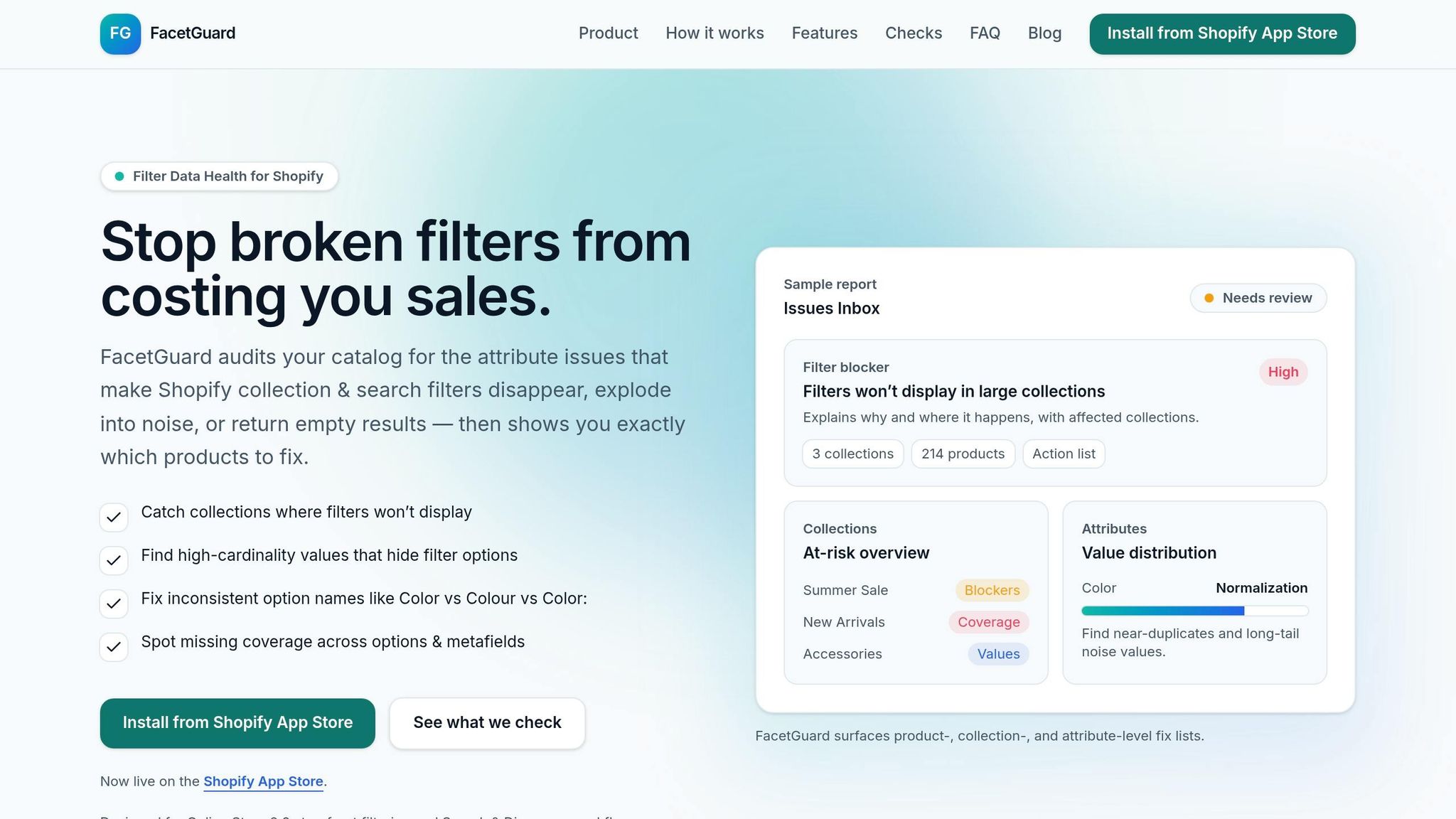
Manually auditing filters across multiple storefronts is tedious and prone to errors. That’s where FacetGuard steps in to make life easier. It automates the detection of filter issues before they affect customers. Its Filter Blockers Scanner identifies collections where filters might fail due to Shopify's size limits or high-risk scenarios, preventing those sneaky malfunctions that could otherwise go unnoticed.
FacetGuard also offers an Issues Inbox, which organizes filter-related problems by severity. It provides clear action lists for product-level fixes and even CSV exports for bulk updates. With tools like the Value Limit Audit, it spots cardinality explosions early by flagging attributes with too many unique values that clutter filter menus. Meanwhile, the Option Name Consistency tool detects near-duplicate attribute names - like "Color", "Colour", or "Color:" - and flags them for cleanup. FacetGuard sums it up well:
"Filter issues often don't look like errors - they look like 'the storefront is weird today.'"
Standardize Attribute Names and Values
Automation works best when paired with consistent naming practices. Inconsistent attribute names split filters and confuse shoppers, so it’s critical to establish a controlled vocabulary. For example, standardizing terms like "Material" or "Size" ensures everyone - team members and suppliers alike - uses the same language.
Using predefined dropdowns in your product information management system (instead of freeform text entry) helps maintain uniformity. Additionally, treat metafields as part of a formal schema. Use predictable, human-readable structures like specifications.material and assign clear data ownership to avoid metafield sprawl. This prevents the same attribute from being scattered across tags, product metafields, or variant metafields, which could lead to conflicting data.
Monitor and Enrich Data Regularly
Adding new products or syncing catalogs can sometimes mess up filter integrity. To stay ahead, track weekly metrics like the Filter Interaction Rate and the Zero-Result Rate. If your zero-result rate climbs above 2–3%, it’s a red flag that needs immediate attention.
Monthly audits are another must. Aim for at least 95% completeness for critical attributes such as size and color. FacetGuard’s scheduled scans are especially useful for catching issues right after catalog imports or syncs. It also helps with ongoing enrichment by merging near-duplicate values - like "Grey" and "Gray" or "XL" and "Extra Large" - into single, consistent options. By keeping your data clean and organized, filters will work smoothly and deliver a better shopping experience.
Conclusion: Maintaining Filter Integrity in Multi-Storefront Catalogs
Throughout this article, we’ve explored why filters often break in multi-storefront catalogs. The main culprits? Inconsistent attribute mapping, too many unique values creating noise, and indexing failures at scale. Each of these issues disrupts the shopping experience - whether it’s confusing options, overwhelming lists of selections, or filters that simply vanish.
The good news is that these challenges are avoidable. By standardizing attributes, actively monitoring data, and fine-tuning indexing processes, you can prevent filter breakdowns and ensure smooth functionality, even in sprawling catalogs.
FacetGuard makes this process easier by identifying "silent" failures - those subtle issues that don’t trigger error messages but make your storefront feel off. Its tools, like the Filter Blockers Scanner, Value Limit Audit, and Issues Inbox, help you prioritize fixes for the most impactful problems first. As the FacetGuard team explains:
"Filter issues often don't look like errors - they look like 'the storefront is weird today.'"
FAQs
How do I find which attributes are breaking my filters?
If your filters are acting up, the first step is to audit your catalog. Look for common problems like missing values, inconsistent naming, or incorrect setup. These issues can disrupt how filters work, especially in complex multi-storefront catalogs.
Tools like FacetGuard can make this process easier. They help detect problems such as incomplete attribute coverage or values with high cardinality (too many unique options). Even better, they provide a prioritized list of fixes, so you know exactly what to tackle first.
Keeping your attribute data consistent and complete isn’t just a one-time task - it’s something you need to review regularly. This ongoing maintenance ensures your filters work smoothly and deliver the best experience for your users.
What’s a safe limit for unique filter values per attribute?
When it comes to unique filter values per attribute, a good rule of thumb is to keep the number around 1,000. Going beyond this can create performance challenges and make filters unnecessarily complicated, particularly in multi-storefront catalogs. By keeping filter values within this range, you can maintain a more seamless user experience and ensure the filters remain functional and easy to navigate.
How can I keep filters accurate while my catalog updates daily?
To keep filters accurate during daily catalog updates, it's important to tackle common problems like inconsistent data, missing attributes, and incorrect configurations. Regular audits of your catalog data can help resolve these issues. For example, standardize terms like "Color" and "Colour", ensure every SKU has complete metadata, and double-check that your faceted search is set up correctly. Tools such as FacetGuard can automate these fixes, making it easier to maintain clean and dependable filters as your catalog grows.